
- trackaffadmin
- 0 Comments
- 26 Views
Delayed attribution means Meta credits a conversion to the day someone clicked or viewed your ad, not the day they actually bought. That backdating is why Ads Manager numbers keep climbing days after a campaign runs. The fix isn’t patience alone: lock a trailing decision window (T+3 or T+4), and pair the Pixel with the Conversions API and event deduplication so you’re optimizing against real signal, not a partial count.
TL;DR:
- Waiting until T+3 or T+4 days after campaign launch generally captures most backfilled conversions, especially for longer sales cycles.
- Using both Pixel and Conversions API together with shared event IDs reduces signal loss from ad blockers and tracking restrictions, improving attribution accuracy.
- For iOS-heavy audiences, attribution delays are longer due to modeling and reporting delays in Aggregated Event Measurement, often extending past a week.
- Reacting to early data before T+3 or T+4 can cause misjudgments, as early numbers are typically incomplete and subject to revision.
- Implementing server-side fixes like TrackAff can improve signal recovery and reduce the modeled conversion gap, boosting ROAS by up to 70%.
Table of Contents
- Understanding Delayed Attribution on Facebook
- Why Conversions Show Up Late
- How Long to Wait Before Judging a Campaign
- The Operational Playbook for Managing Delayed Attribution
- Reconciling Ads Manager With Your Backend Numbers
- TrackAff and the Server-Side Fix for Delayed Attribution
- Traffic Campaigns vs. Conversion Campaigns: Attribution Handles Them Differently
- Automated Bidding Doesn’t Wait for Your Backfilled Data
- What iOS 14+ Privacy Changes Did to Attribution Timing
- What Media Buyers Get Wrong About Attribution Timing
- Get Server-Side Attribution Right
- Sources
Understanding Delayed Attribution on Facebook
Meta’s reporting system timestamps every conversion by the interaction date, not the transaction date. A customer who clicks your ad on Monday and purchases on Thursday shows up in Ads Manager as a Monday conversion, even though your Shopify or CRM logs it Thursday. This single mechanic explains most of the confusion media buyers run into when comparing platform numbers to backend sales.
Meta’s own documentation on attribution windows confirms that lookback periods determine whether an action counts toward an ad at all, and that processing can lag behind the actual event. That lag isn’t a bug. It’s how the system was built to work.
Three mechanics drive what you see in the interface:
- Click-date stamping. Conversions attach to the day of the ad interaction, so early reporting is always incomplete and gets revised as more data settles.
- View-through credit. The default 1-day view window can attribute a purchase to someone who saw your ad but never clicked it, which means some “conversions” never show up in a browser-side backend log at all.
- Modeled conversions. When Meta can’t observe an event directly, it fills the gap using Aggregated Event Measurement, and those modeled numbers get revised as confidence improves.
If you’re pulling a report at 9 a.m. the day after launch, you’re looking at a rough draft. The final version arrives later, sometimes a full week later.
Why Conversions Show Up Late
Four forces combine to create the delay, and they rarely act alone.
The first is simply human behavior. Plenty of buyers don’t convert same-day. Someone clicks a mortgage broker’s ad on a Tuesday and doesn’t submit an application until the following Monday, after they’ve compared rates elsewhere. That gap alone explains a meaningful chunk of what looks like “missing” conversions in early reports.
The second is Meta’s own processing pipeline. Events get ingested, deduplicated, and matched against modeled predictions before they’re finalized. That pipeline takes time, and it runs continuously in the background regardless of how fresh your dashboard looks.
The third is privacy-driven modeling. Apple’s App Tracking Transparency framework restricts what Meta can observe directly on iOS, pushing more conversions into modeled territory through Aggregated Event Measurement. For iOS-heavy audiences, this alone can stretch settlement times well past a week.
The fourth is signal loss from ad blockers and browser Intelligent Tracking Prevention, which quietly drop pixel-only events before they ever reach Meta.
Statistic Callout: Practitioner guidance built around real ad account behavior recommends waiting until T+3 or T+4 before drawing conclusions on most web campaigns, since that’s when the bulk of backfilled conversions have typically landed.
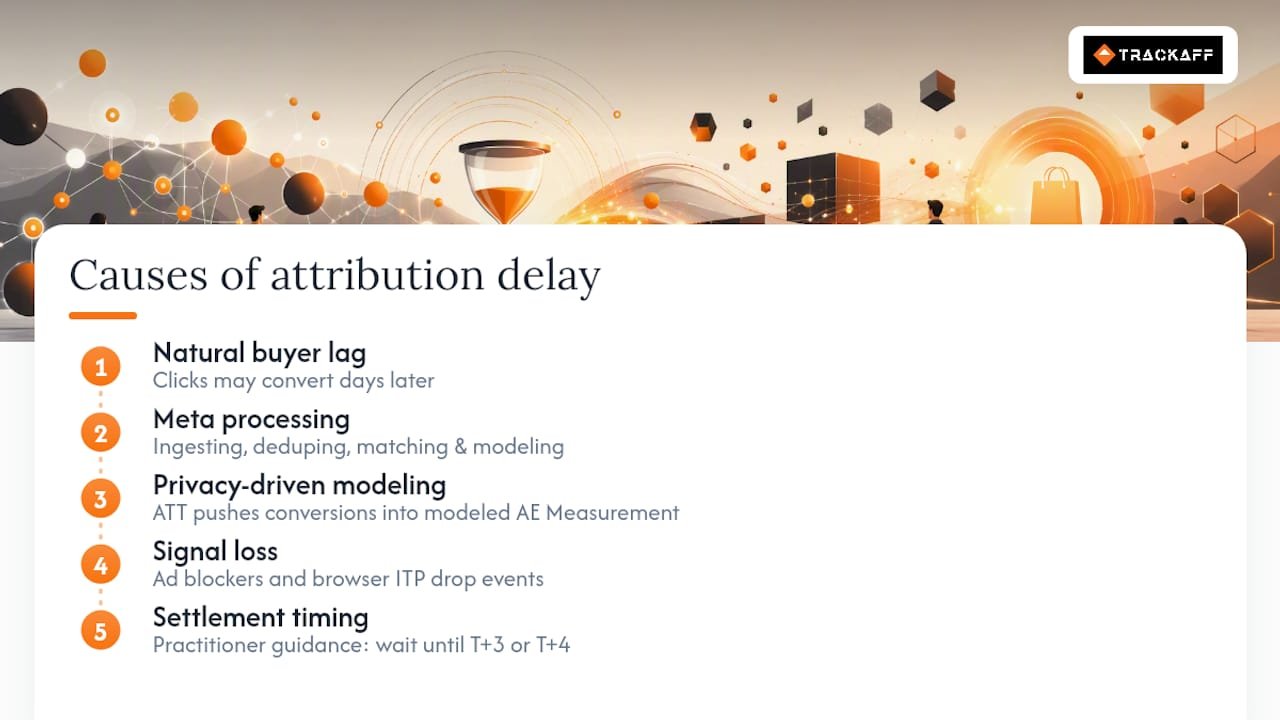
Diagnosing which of these four forces dominates your account tells you which fix to prioritize. A long natural conversion cycle calls for patience. Heavy iOS traffic calls for Conversions API.
How Long to Wait Before Judging a Campaign
Treat campaign evaluation as a schedule, not a gut check. Different days call for different decisions.
- Day of launch (T and T+1): Watch delivery health only. Click-through rate, cost per click, and reach tell you whether the algorithm is finding an audience. Conversion counts are not reliable yet.
- T+3 to T+4: This is your decisioning window for most web campaigns. Enough backfill has arrived that cost per result and ROAS are close to their settled values, and this is when practitioners recommend making budget or creative calls.
- T+7: Treat this as your final reporting number for weekly recaps and client updates. A full week captures nearly all standard click-window conversions.
- T+14: For longer sales cycles, higher-ticket funnels, or heavy iOS traffic, extend reporting to two weeks before locking numbers into a monthly report.
Your attribution window setting changes this math directly. A 7-day click window settles more slowly than a 1-day click window because Meta allows for crediting conversions that occur later within the longer period. If you’re on the default 7-day click plus 1-day view, budget for a longer decision lag than a team running click-only attribution.
The Operational Playbook for Managing Delayed Attribution
Fixing delayed attribution is less about waiting and more about tightening the pipes that feed Ads Manager in the first place.
Start with Pixel and Conversions API running together. Browser-based pixel tracking alone misses events lost to ad blockers, cookie restrictions, and Safari’s Intelligent Tracking Prevention. Server-side tracking through the Conversions API recovers those lost signals without changing Meta’s underlying attribution logic. Both should fire on the same event using an identical event_id, which lets Meta deduplicate and count each conversion once instead of double-counting it.
Lock your attribution window per campaign tier and write it down. Switching between 7-day click and 1-day click mid-campaign invalidates your historical comparisons and creates the illusion of a performance swing that never actually happened, a mistake Portent’s attribution guide flags as one of the most common self-inflicted reporting errors. Pick the window that matches your buying cycle, put it in a shared doc, and don’t touch it without a documented reason.
Improve server-side event freshness. Set up retries for failed sends, alert on queue times that spike above normal, and normalize offline conversion schemas so uploads process faster instead of trickling in over days. Operational guidance on post-iOS14 reporting delays points to this kind of housekeeping as a direct lever on how fast Meta’s pipeline finalizes your numbers.
Compare attribution windows inside Ads Manager to spot view-through inflation. Run a click-only report next to your default blended report. If the gap is wide, your bottom-funnel campaigns are likely getting credit for view-throughs that never actually converted, and you should switch those campaigns to click-only measurement.
Track a weekly lag factor next to ROAS. Calculate the uplift between your T+1 read and your T+4 read every week, and put that number on the same dashboard as your headline ROAS. Once your team sees the typical settlement pattern, they stop panicking over early numbers.
- Event counts match between Pixel and CAPI logs
- Deduplication keys (
event_id) are present on every server and browser event - Timestamps align across your ad platform, CRM, and analytics tool
- UTM parameters are consistent across every funnel entry point
Pro Tip: Run your QA checklist every Monday morning against the prior week’s data, not just when something looks broken. Catching a broken dedup key on day three costs you a week of clean data; catching it on day one costs you nothing.
Reconciling Ads Manager With Your Backend Numbers
Meta and your backend system are measuring two different things, and expecting them to match exactly is where most reconciliation headaches start.
Meta’s attribution model credits influence: any interaction inside your chosen window gets partial or full credit for a resulting sale. Your Shopify or CRM system credits the actual completed transaction, on the date it closed, full stop. Neither number is wrong. They’re answering different questions.
The most practical fix is a weekly ratio method. Divide your Meta-reported conversions by your backend-confirmed orders over a rolling 7 to 30 day window. That ratio becomes your working adjustment factor. If Meta consistently reports 1.3 conversions for every 1 confirmed backend order, you can discount platform ROAS by that ratio when deciding real profitability.
For spot checks, match individual events using event_id on the Meta side against your CRM’s order ID. This catches deduplication failures before they distort a full week of reporting.
Statistic Callout: Reconciliation walkthroughs comparing Meta and Shopify data show the same order landing on entirely different calendar days across the two systems, which is exactly why backend order counts, not platform-reported conversions, should anchor your actual profit calculations. Factor in payment processing fees and fulfillment costs before calling any number a true ROAS.
TrackAff and the Server-Side Fix for Delayed Attribution
The playbook above works better when the events feeding it are complete and fast. That’s the gap TrackAff was built to close.
A solution sits inside your funnel as a branded, white-label form that captures post-click events, purchases, deposits, registrations, and other sales actions, then reports them back to Meta through the Conversions API. It runs deduplication against your Pixel events using shared identifiers, and it connects to your CRM through webhooks so sales data flows back automatically instead of getting reconciled by hand.
The direct payoff is Event Match Quality. Server-side signal recovery means fewer conversions fall into the “modeled” bucket described earlier, which narrows the confidence gap Meta has to guess-fill. Businesses using this approach have reported improved lead quality, less wasted spend, and ROAS improvements of up to 70%, largely because campaigns get optimized around confirmed buyers instead of raw form-fills.
A practical rollout looks like this:
- Connect your active funnels to TrackAff’s tracking layer
- Configure deduplication using consistent event IDs across Pixel and server events
- Run a sanity check comparing TrackAff’s reported events against your CRM’s actual order count
- Monitor the delta over a 7 to 30 day window until the two numbers stabilize
Traffic Campaigns vs. Conversion Campaigns: Attribution Handles Them Differently
Meta doesn’t apply delayed attribution the same way across every campaign objective, and treating a traffic campaign like a conversion campaign is a common misread.
Traffic campaigns optimize toward link clicks or landing page views, events that register almost instantly. There’s little to no lag to manage because the optimization event itself doesn’t depend on a delayed backend action. What you see in Ads Manager for a traffic campaign is close to what actually happened.
Conversion campaigns are a different story entirely. They optimize toward events like purchases or leads, which by definition happen downstream of the click, sometimes minutes later, sometimes days later. Every mechanic covered earlier, click-date stamping, modeled fill-in, view-through credit, applies with full force here because the entire campaign structure depends on Meta correctly identifying and crediting that later event.
This matters for how you allocate testing time. If you’re running a traffic campaign as a top-of-funnel play, you can judge delivery and engagement almost immediately. If you’re running a conversion campaign against the same audience, give it the full T+3 to T+4 window before touching budgets, even if the early numbers look identical in structure. The optimization event’s proximity to the click is what determines how much lag you should expect, not the campaign’s spend level or audience size.
Automated Bidding Doesn’t Wait for Your Backfilled Data
Meta’s automated bidding systems, including Highest Volume and cost-cap strategies, learn from whatever conversion data is available at the moment they’re making a decision. That data is incomplete by definition during the early days of a campaign.
This creates a timing mismatch. The algorithm might shift budget away from an ad set that’s actually performing well, simply because its conversions haven’t finished backfilling yet, while an ad set with a shorter natural conversion cycle looks artificially stronger in the same window. Budget reallocation decisions made by automated systems on day two or three can be working from a distorted picture.
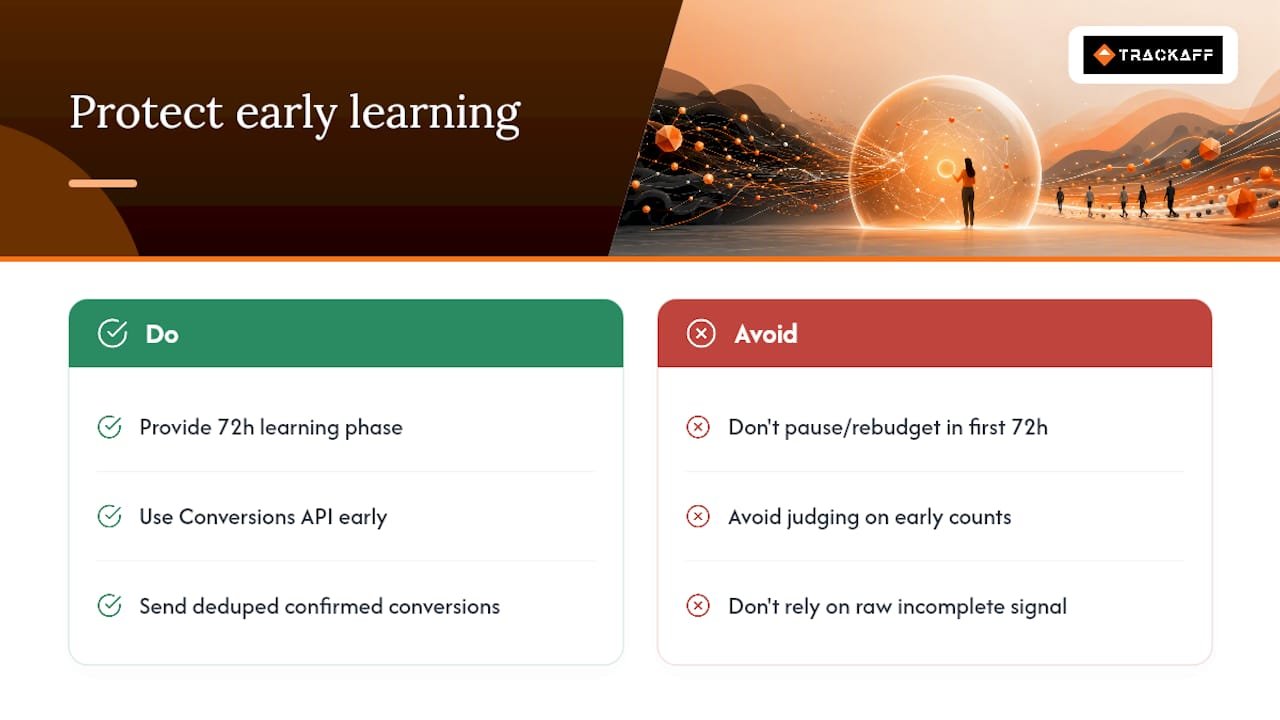
The practical defense is giving campaigns a stable learning phase before layering in aggressive budget shifts. Avoid pausing or dramatically rebudgeting ad sets inside your first 72 hours purely because early conversion counts look weak. If your account structure allows it, feed the system as much confirmed, deduplicated conversion data as possible through the Conversions API, since better-quality signal earlier in the pipeline gives automated bidding a more accurate picture to optimize against, even before full backfill completes.
Campaign Budget Optimization compounds this effect at the campaign level, shifting spend between ad sets based on the same incomplete early signal. If one ad set has a naturally longer conversion cycle than another inside the same campaign, CBO can systematically starve it of budget before its true performance has had time to show up in the data.
What iOS 14+ Privacy Changes Did to Attribution Timing
Apple’s App Tracking Transparency framework changed what Meta can observe on iOS devices, and that shift rippled directly into how long attribution takes to settle. Users who decline tracking permission become invisible to Meta’s direct pixel-based measurement, forcing the platform to lean on Aggregated Event Measurement to fill the gap.
AEM works by aggregating conversion events into a limited set of prioritized actions per domain and reporting them with a built-in processing delay, often up to three days, rather than in near real time. That’s a structural delay layered on top of the ordinary click-date backfill already happening for every campaign, iOS or not.
The practical consequence for iOS-heavy audiences is a wider gap between your T+1 read and your final settled number than you’d see on an Android-dominant campaign. Confidence intervals on modeled conversions also tend to be wider, meaning the number you see even at T+7 carries more uncertainty than the equivalent Android number would.
Conversions API implementation matters more here than anywhere else in the account. Server-side events aren’t subject to the same on-device tracking permission, so a well-configured CAPI setup captures signal that would otherwise never reach Meta at all for opted-out iOS users. It doesn’t eliminate AEM’s built-in reporting delay, but it does reduce how much of your total conversion volume depends on modeling in the first place.
What Media Buyers Get Wrong About Attribution Timing
Most of the damage I see in Meta accounts isn’t caused by delayed attribution itself. It’s caused by reacting to it. Teams change attribution windows mid-test because a number looks disappointing on day two, then wonder why their week-over-week comparisons stop making sense. Others kill an ad set at T or T+1 based on a conversion count that hadn’t finished backfilling, which is a decision made on incomplete information dressed up as a data-driven call.
Three rules hold up in almost every account I’ve reviewed: lock your window before launch and leave it alone, never make a budget decision before T+3, and treat every early number as a draft, not a verdict. Discipline beats speed here, every time.
— Terry
Get Server-Side Attribution Right
Every fix in this playbook, Conversions API, deduplication, event freshness, server-side signal recovery, is exactly what this kind of solution was built to handle without requiring your team to build custom infrastructure from scratch.
A platform connects to Meta funnels through a branded, white-label form that captures purchases, deposits, and registrations the moment they happen, then reports them back through the Conversions API with deduplication already built in. Instead of waiting on browser-side pixel data that ad blockers and Safari’s tracking restrictions quietly strip away, you’re feeding Meta confirmed, server-verified events, the same kind of signal recovery that shrinks the modeled-conversion gap covered earlier in this guide. Sales teams, agencies, and performance marketers running Meta campaigns use it specifically to close the distance between what Ads Manager reports and what actually closed in their CRM.
If your reconciliation math has been running wider than a normal lag factor should explain, that’s usually a signal worth checking. Start a free 14-day trial and connect your first funnel today to see how much of your delayed attribution gap is really signal loss.
Sources
Meta’s own attribution system documentation is the definitive reference for how windows and lookback periods are defined. For hands-on timing guidance, LeadEnforce’s attribution lag breakdown covers the T+3 to T+4 decisioning logic in more depth. Apple’s App Tracking Transparency developer documentation explains the permission framework driving iOS-side modeling. Media buyers working with automotive or local-service funnels may also find Ecosteer’s lead follow-up framework useful for mapping conversion cycles to window selection.
- About Facebook’s attribution system | Meta Business Help
- Attribution lag in Facebook Ads: Why results look better (or worse) days later | LeadEnforce
- AppTrackingTransparency | Apple Developer
Recommended
Your deals close off the pixel. Meta never finds out.
TrackAff reports your real conversions back to Meta the moment they happen, tied to the exact ad that produced them. 10-minute setup, no code.
Start free 14-day trial → Card required · No charge until day 14 · Cancel in one click