
- trackaffadmin
- 0 Comments
- 25 Views
FBC and FBP are not competing methods; they are two different signals that answer two different questions. FBC identifies which Meta ad click brought a user to your site, generated only when an fbclid is present. FBP identifies the browser itself, generated the moment the Meta Pixel first loads, with or without an ad click. Send both in user_data to the Conversions API whenever they exist, paired with event_id for deduplication.
TL;DR:
- Sending both fbc and fbp values enhances attribution accuracy, but only include them if they were legitimately captured to avoid data quality issues.
- The fbc parameter depends on the presence of an fbclid in the URL, which can be lost during redirects, URL shortening, or in-app browser stripping.
- The fbp cookie is generated on the first page load regardless of ad clicks, serving as a browser identifier for cross-session tracking.
- Proper capture, server-side persistence, and deduplication of the identifiers are crucial for maintaining high-quality event matching over long sales cycles.
- Many implementation issues stem from delayed capture or poor persistence, not format compliance, making reliable first-server request logging the top priority.
Table of Contents
- FBC vs FBP: What Each Parameter Actually Tracks
- How FBC and FBP Are Generated, and What They Look Like
- Sending FBC and FBP to Conversions API Without Duplicating Events
- Why Cookies Disappear and What to Do About It
- Implementation Checklist: Capturing and Sending FBC and FBP Correctly
- What Server-Side Post-Click Capture Solves in Practice
- Most Guides Get the Priority Backward
- A Turnkey Path to Server-Side FBC and FBP Persistence
- Where to Verify These Details Yourself
- Sources
- FAQ
FBC vs FBP: What Each Parameter Actually Tracks
fbclid is the query string parameter Meta appends to a URL after someone clicks an ad. It shows up in the address bar, and it disappears fast if nothing captures it before a redirect or a browser strips it.
_fbc is the cookie value your Pixel writes when it sees that fbclid. It preserves click context: which campaign, which ad, which moment. Meta’s own documentation confirms that fbc is generated only when a valid fbclid is present in the URL, which is why a purchase with no ad click behind it will never carry one.
_fbp works differently. It’s a browser identifier the Pixel creates on first page load, independent of any ad interaction. A returning visitor who typed your domain directly still gets an _fbp value.
Here’s the practical split:
- fbc answers “which Meta click brought this user here?”
- fbp answers “which browser generated this event?”
- fbc requires an ad click; fbp does not
- Both map to fields inside
user_datafor Conversions API (CAPI) events
Confusing the two in your CRM or your QA notes is how attribution debugging turns into guesswork. Keep the distinction explicit in your field names, not just in your head.
How FBC and FBP Are Generated, and What They Look Like
_fbc only exists because an fbclid existed first. No click parameter, no _fbc cookie. That’s a hard dependency, not a fallback rule. _fbp, by contrast, fires on the Pixel’s first execution on a page, ad or no ad.
Both values share a recognizable shape. They typically start with an fb.1 prefix, followed by a 13-digit Unix timestamp in milliseconds, then a trailing token derived from the click ID or a randomly generated identifier. Meta’s parameter documentation confirms this fb.1 plus timestamp structure for both fields, and it explicitly warns against hashing either value before sending it to CAPI.
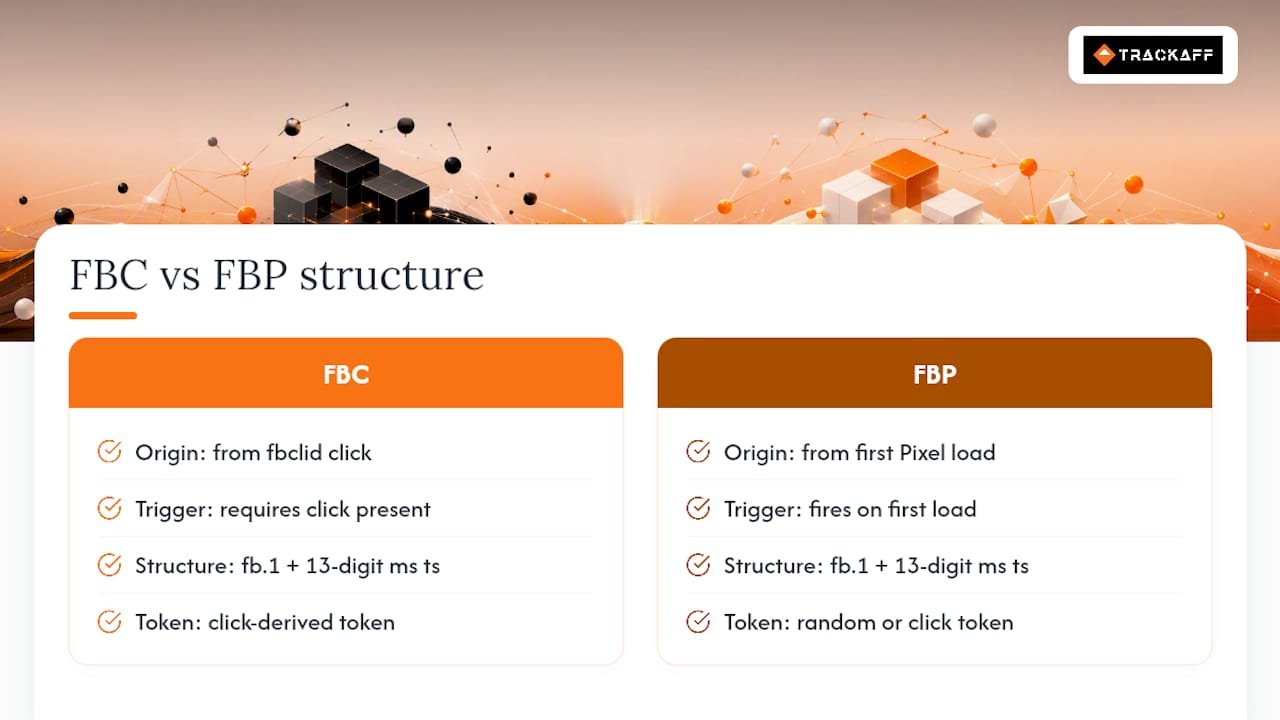
That last point trips up more integrations than you’d expect. Engineers used to hashing emails and phone numbers for user_data sometimes apply the same treatment to fbc and fbp out of habit. Don’t. These are structured identifiers Meta needs to parse, not personal data Meta needs obscured. Hash them and you’ve made a technically valid string that means nothing on Meta’s end. Edge cases exist, too: some in-app browsers alter or truncate the format before your Pixel ever sees it, which is a separate problem covered further down.
Sending FBC and FBP to Conversions API Without Duplicating Events
Getting fbc and fbp into your server-side payload correctly is where most implementations either gain or lose Event Match Quality (EMQ). The mechanics are straightforward once you follow the order Meta expects.
- Place both values inside
user_data, never as top-level fields or custom data. If your CRM stores them elsewhere, map them intouser_dataat send time. - Only send fbc and fbp when they were legitimately captured. A missing value should stay missing, not get backfilled with a placeholder or a guessed string.
- Attach
event_idandevent_timeto every event. Theevent_idhas to match the one your browser-side Pixel fires for the same conversion, or Meta will count it twice. - Deduplicate on the Meta side by design, not by hope. If your Pixel fires a
Purchaseevent client-side and your server also sends aPurchasevia CAPI, identicalevent_idvalues tell Meta these are one event, not two. - Test before you trust it. Use
test_event_codein Events Manager to confirm the payload lands the way you expect, then monitor EMQ over the following days to see whether matching actually improved.
Missing fbc and fbp doesn’t break your pipeline. It quietly lowers EMQ, because Meta falls back to weaker matching signals like IP and user agent. You’ll still get data. You just won’t get the attribution quality that justifies the effort of running CAPI in the first place.
For a deeper technical walkthrough of payload structure and endpoint behavior, this guide to Conversions API implementation covers the developer-facing mechanics in more depth than Meta’s reference docs alone.
Why Cookies Disappear and What to Do About It
Cookie behavior on Meta’s side assumes an ideal browser: first-party storage, no interference, full retention windows. Real traffic rarely cooperates.
Safari’s Intelligent Tracking Prevention (ITP) caps script-writable cookie lifetimes, which shortens how long _fbp and _fbc stay valid client-side. In-app browsers inside Instagram, Facebook, and TikTok frequently strip fbclid before your landing page’s JavaScript ever runs. Redirects through URL shorteners, link-in-bio tools, or third-party checkout pages can drop the parameter entirely between the click and the page that actually holds your Pixel.
- ITP shortens or blocks client-side cookie retention on Safari and other WebKit browsers
- In-app browsers strip or mangle
fbclidbefore your Pixel loads - Redirect chains and external checkout flows are common places to lose the parameter silently
- Server-side HttpOnly cookie persistence recovers many of these lost attributions when tracking prevention blocks client-side storage
When fbclid never survives to the landing page, _fbp becomes your fallback identity anchor. It’s weaker than a genuine click ID, but it’s still a real, consented signal, which beats sending nothing.
Pro Tip: Log the raw fbclid on your very first server request, before any client-side redirect, JavaScript execution, or app-to-browser handoff has a chance to eat it.
Implementation Checklist: Capturing and Sending FBC and FBP Correctly
Building this correctly is less about clever code and more about doing the steps in the right order, every time, with no shortcuts on validation.
- Capture
fbclidon the first server request, before any redirect. Write_fbconly iffbclidis actually present in that request. - Set
_fbpon the Pixel’s first fire, whether or not an ad click preceded it. - Persist both values server-side, keyed to a session or user identifier, behind a consent check. HttpOnly cookies or a database row both work; what matters is that the value survives client-side volatility.
- Replay stored values into later CAPI events. A purchase that happens three days after the click should still carry the original
fbc, pulled from your server store, not regenerated. - Never fabricate a value. If
fbcdoesn’t exist for a given user, leave the field empty. Manufacturing a plausible-looking string to fill the field does not improve matching and can actively hurt it. - Preserve exact case and format. Don’t lowercase, trim, or reformat the string Meta gave you.
- Deduplicate with
event_id, matching browser-side and server-side events for the same conversion. - Validate with
test_event_code, then track EMQ in Events Manager over real traffic, not just test events.
Pro Tip: Run a side-by-side comparison of EMQ before and after you add server-side persistence. If the score doesn’t move within a week of real volume, the bug is almost always in how consent gating or session mapping is wired, not in Meta’s matching algorithm.
What Server-Side Post-Click Capture Solves in Practice
Some tools build post-click conversion tracking around exactly this pattern: capture fbclid and browser identifiers at the first touch, persist them server-side behind consent, then replay legitimate fbc and fbp values into CAPI when a purchase, deposit, or registration actually closes.
The engineering detail worth watching during rollout is timing drift between when a value is captured and when it’s replayed. Long sales cycles make stale sessions or expired persistence windows the most common source of quietly dropped attribution. Gate every step of this on documented consent, not just a passive cookie banner.
Most Guides Get the Priority Backward
Most implementation guides treat fbc and fbp as a formatting problem: get the fb.1 prefix right, don’t hash the string, place it correctly in user_data. That’s necessary, but it’s not where most attribution actually gets lost.
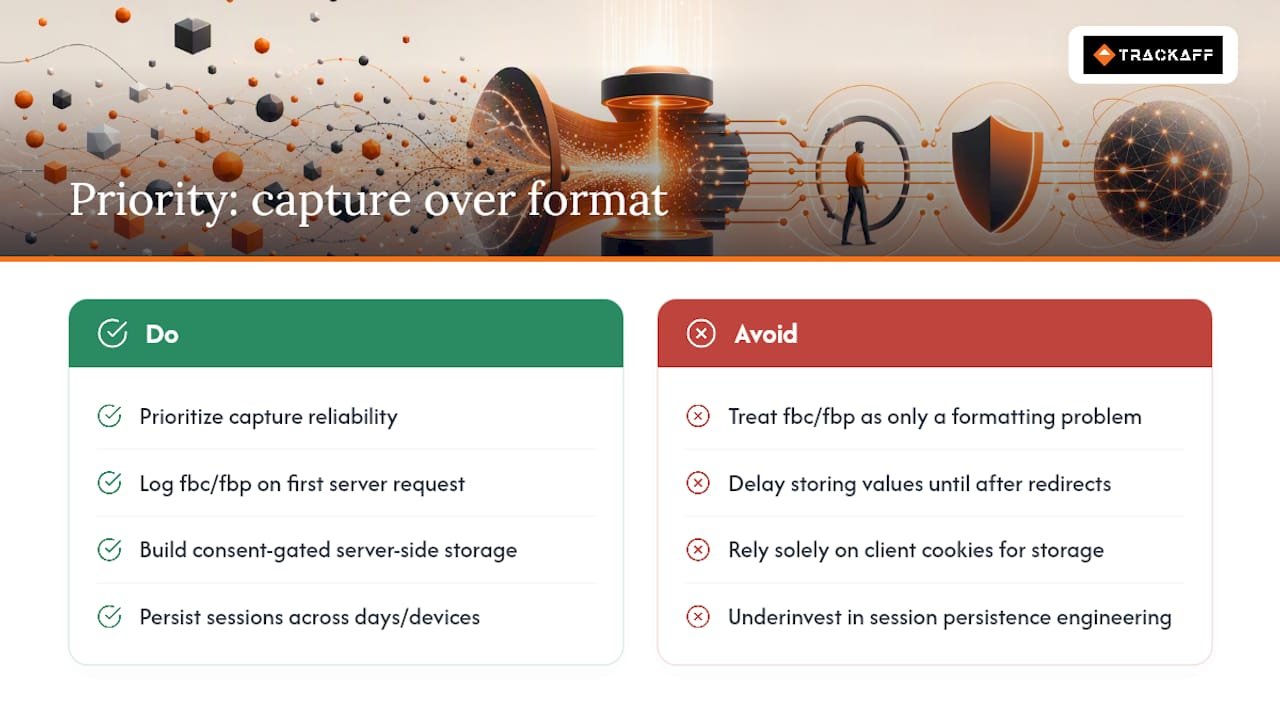
The real failure point sits earlier, at capture and persistence. A perfectly formatted _fbc value is worthless if your server never stored it before the session expired, or if a redirect ate the fbclid before your first-party cookie had a chance to write it. Format compliance is a five-minute fix. Session persistence across a multi-day, multi-device conversion path is the actual engineering problem, and it’s the one most teams underinvest in.
If you’re prioritizing, start with capture reliability, not format polish. Get fbclid logged on the very first server request, before any redirect touches it. Build consent-gated server-side storage before you worry about edge cases in ITP behavior. A slightly imperfect format on a value you actually captured will always outperform a perfectly formatted value you never had.
— Terry
A Turnkey Path to Server-Side FBC and FBP Persistence
Everything above is buildable in-house: capture logic, consent-gated storage, CAPI replay, deduplication, EMQ monitoring. It’s also a real ongoing engineering commitment, and that’s where a lot of teams stall out mid-implementation.
Trackaff exists for teams that want that persistence layer working now instead of on next quarter’s sprint board. It captures post-click events through branded funnel forms, stores the underlying Meta identifiers server-side behind consent, and replays them into Conversions API with event_id deduplication already handled. Sales teams and performance marketers running Meta ads use it to stop losing attribution between the click and the actual purchase or deposit event, which is exactly the gap ITP, redirects, and in-app browsers create. Browse a live implementation example to see the pattern in production, or visit the Trackaff product page to start a trial and connect your first funnel.
Where to Verify These Details Yourself
For the primary specs, go directly to Meta’s Conversions API user_data parameters documentation and the fbc and fbp parameter reference. Check Events Manager diagnostics and the Parameter Builder SDK for hands-on validation against your own traffic.
FAQ
What Is the Difference Between FBC and FBP?
_fbc records which Meta ad click, via fbclid, brought a visitor to your site, while _fbp identifies the browser itself and exists regardless of whether an ad click occurred.
What Is a FBP Cookie?
The _fbp cookie is a browser identifier the Meta Pixel creates on its first load on your domain, used to support cross-page and cross-session matching for ad attribution.
What Is an FBCLID?
fbclid is the click identifier Meta appends to a landing page URL immediately after someone clicks a Meta ad; it’s the raw signal that gets converted into the _fbc cookie value.
Should I Send Both FBC and FBP to Conversions API?
Yes, send both inside user_data whenever they were legitimately captured, since each supports a different piece of Meta’s matching logic and using both together typically produces stronger Event Match Quality than either alone.
Why Is My FBC Value Missing on Some Conversions?
Missing _fbc usually means the original fbclid never reached your server, often because of a redirect, a URL shortener, an in-app browser stripping the parameter, or a purchase that had no ad click behind it at all.
Recommended
Your deals close off the pixel. Meta never finds out.
TrackAff reports your real conversions back to Meta the moment they happen, tied to the exact ad that produced them. 10-minute setup, no code.
Start free 14-day trial → Card required · No charge until day 14 · Cancel in one click