
- trackaffadmin
- 0 Comments
- 23 Views
The correct setup pairs a branded funnel form with server-side Conversions API reporting, run in parallel with the Meta Pixel. The form captures post-click and off-site conversions (purchases, deposits, registrations) that browser tracking alone misses. Match your event_id, hash your identifiers, persist your fbclid, and verify everything in Test Events before you touch budgets. TrackAff builds this exact setup for businesses that need guaranteed reporting back to Meta.
TL;DR:
- Implementing server-side Conversions API alongside a branded form captures over 20% of conversions missed by browser tracking, improving CPA by an average of 13%.
- Accurate event_id and consistent hashing of customer identifiers are crucial for deduplication and preventing double-counting of conversions.
- Shopify one-click setup is the fastest for standard stores, while custom coded integrations are necessary for headless or highly tailored funnels.
- Verifying event merging in Meta Test Events ensures tracking reliability and prevents budget waste on unrecognized or duplicate conversions.
- Properly capturing and storing fbclid in the CRM allows attribution of off-site conversions back to the original ad click.
Table of Contents
- Why Pixel + CAPI Recovers Conversions Meta Never Sees
- The Payload and Deduplication Checklist Your Team Needs
- Choosing Your Implementation Path
- How Do You Verify Events Are Actually Working?
- Setting Up Conversion Events in Meta Ads Manager
- Connecting Your CRM to Meta’s Conversions API
- Designing Forms That Actually Capture Post-Click Data
- Privacy Compliance for Server-Side WhatsApp Tracking
- Why Attribution Breaks: Delayed Data and Journey Gaps
- What Cleaner Signal Actually Buys You Commercially
- Get Guaranteed Reporting With TrackAff
- Where to Verify These Setup Steps
- Sources
- FAQ
Why Pixel + CAPI Recovers Conversions Meta Never Sees
Browser-based tracking alone is losing you money right now, and the loss is measurable. Pixel-only setups miss roughly 20 to 40 percent of conversion data, thanks to ad blockers, iOS privacy settings, cookie expiration, and browsers that quietly drop tracking scripts before the pixel fires. That gap doesn’t just mean underreported numbers. It means Meta’s optimizer is bidding on incomplete signal, which pushes your cost per acquisition higher than it needs to be.
Server-side reporting through the Conversions API closes most of that gap. Businesses that add CAPI alongside their pixel see an average 13% improvement in CPA, because the algorithm finally gets the purchase and lead data it was missing.
A branded form is what makes this work for post-click conversions specifically. Instead of relying on a pixel firing in a browser you don’t control, the form sits inside your funnel and collects exactly what you need at the moment of conversion:
- The customer’s hashed email or phone number
- The fbclid from the original ad click
- The conversion event itself (purchase, deposit, registration)
That data then ships to Meta server-side, bypassing the browser entirely.
Pro Tip: CAPI does not override Meta’s Aggregated Event Measurement (AEM) limits. It restores lost signal within those limits, so run Pixel and CAPI together, not one instead of the other.
The Payload and Deduplication Checklist Your Team Needs
Getting the fields right matters more than almost anything else in this setup. Send the wrong combination and Meta either rejects the event or, worse, counts it twice.
Every server event needs these fields at minimum:
- event_name, matching a standard Meta event (Purchase, Lead, CompleteRegistration) or a defined custom event.
- event_id, a stable unique value, usually your order ID or lead ID, shared between pixel and server events.
- event_time, a Unix timestamp close to when the action actually happened.
- value and currency, required for any purchase or deposit event you want Meta to optimize toward.
- action_source, set to “website” for browser-originated events or “system_generated” or “crm” depending on where the event enters your pipeline.
User data rules are where most setups quietly break. Hash email and phone with SHA‑256 before you send them, always. But do not hash fbc or fbp cookie values. Meta requires those raw, and a hashed fbc is functionally useless for matching.
Deduplication works on one rule: the same event_id and event_name, with an event_time close enough that Meta recognizes them as one action. Get the event_id wrong, or generate a fresh one for the server call instead of reusing the pixel’s, and you’ll see the same purchase counted twice. That inflates your reported ROAS and tells your optimizer a lie it will act on for weeks.
Pro Tip: Check your Event Match Quality score in Events Manager weekly. Anything above 7 out of 10 means your hashed identifiers and parameter completeness are solid; below that, Meta is struggling to match your server events to real ad clicks.
Choosing Your Implementation Path
Four paths get you to working server-side tracking, and the right one depends on your stack, not your ambition.
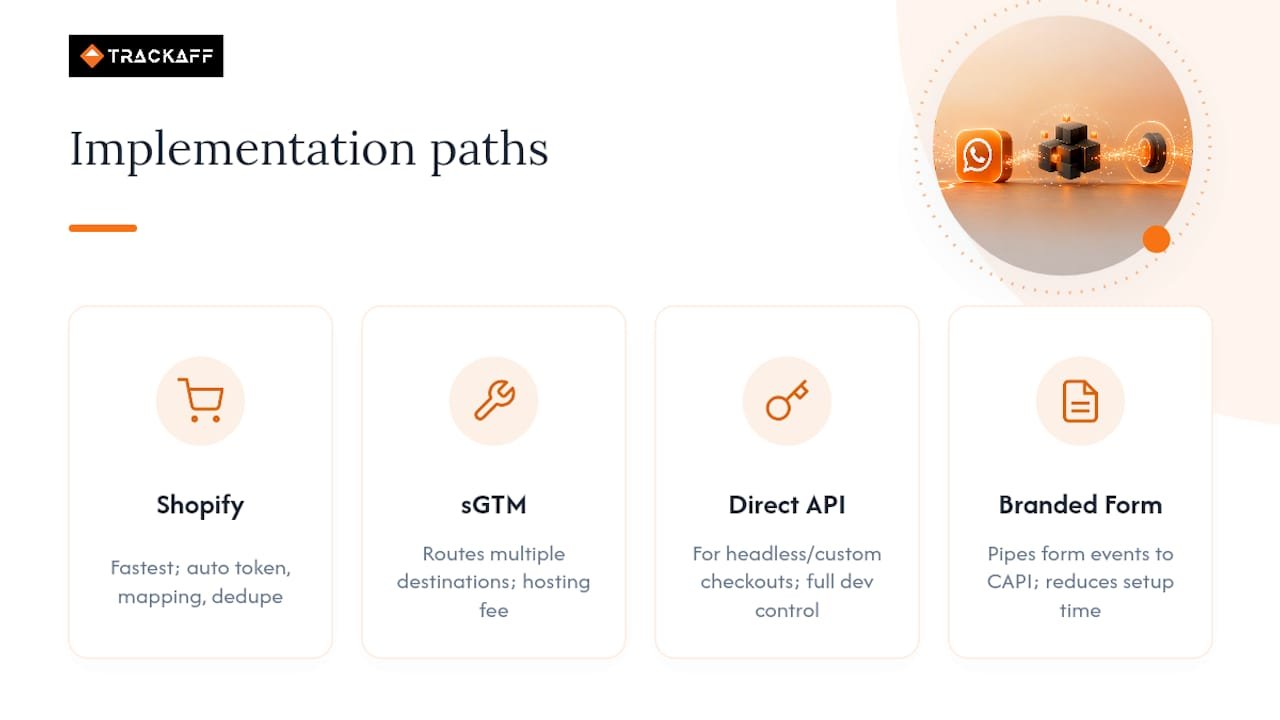
Shopify one-click setup is the fastest option if you’re on a standard Shopify store running native checkout. It handles token generation, field mapping, and basic deduplication automatically. If your funnel is a standard product page to checkout, start here.
Server-side Google Tag Manager (sGTM) fits teams that need to route events to multiple destinations, not just Meta, or that run custom events a native integration doesn’t support. The setup involves provisioning a server container, pointing your web GTM at it, and configuring a Facebook Conversions API tag with field mappings. Hosting providers like Stape charge a monthly fee for the container, and the tradeoff is more control at a moderate cost.
Direct API integration is for headless commerce, custom checkouts, or CRM-driven events that don’t fit any template. Your developers send events straight to Meta’s endpoint. Full control, but you own every field mapping and every failure mode.
A branded-form SaaS layer sits between your funnel and Meta, collecting the conversion event from your form and piping a copy straight to CAPI. This is where TrackAff operates: purpose-built for capturing post-click and off-site events without your engineering team building a custom pipeline from scratch. For sales teams and agencies managing multiple client funnels, this path cuts the setup time from weeks to days.
How Do You Verify Events Are Actually Working?
Verification is not optional, and it’s not a one-time check either. Run it before every major campaign change.
- Open Meta Events Manager and navigate to Test Events. Trigger a real purchase or lead on your funnel.
- Confirm you see both a Browser row and a Server row for the same action. Within 30 to 60 seconds, those two rows should merge into a single deduplicated event sharing the same event_id.
- Compare Meta’s reported purchase count against your backend order count over the same date window. A variance beyond 10 to 15 percent means something upstream is broken.
- If rows aren’t merging, check your event_id generation first. That’s the root cause more often than anything else.
The most common failure modes, in order of frequency: mismatched event_id between pixel and server (causes double-counting), missing fbclid persistence (breaks CRM attribution for delayed conversions), incorrect SHA‑256 hashing on email or phone, and event_name casing mismatches that Meta silently fails to match.
Pro Tip: If you see duplicate unmerged rows in Test Events, don’t touch your campaign budgets yet. Fix the event_id logic first. Chasing a “performance drop” that’s actually a tracking bug wastes ad spend on a phantom problem.
Setting Up Conversion Events in Meta Ads Manager
Start inside Events Manager, not Ads Manager. Under Data Sources, select your Pixel and add a Conversions API connection either through a partner integration or direct API credentials.
Define your custom conversion events next. If your funnel captures a WhatsApp inquiry that later converts to a sale, deposit, or registration off-platform, you need a custom event name that reflects the actual business outcome. Something like WhatsAppLeadQualified or WhatsAppPurchase, not a generic “Lead” that gets reused across five different funnel types.
In Ads Manager, when building your campaign, select Conversions as your objective and choose that custom event as your optimization target. This tells Meta’s algorithm to bid toward people who actually convert after clicking through, not just people who click.
One detail teams miss constantly: verify your event is receiving both browser and server data before you launch. An event with zero server-side volume looks fine on paper but is quietly starving your optimizer of half the signal it needs.
Set up a value-based rule if your conversions carry different dollar amounts (a $50 deposit versus a $500 purchase, for instance). Feeding accurate value data into the event lets Meta’s bidding actually prioritize higher-value outcomes instead of treating every conversion as equal. This single change often does more for ROAS than any creative tweak.
Connecting Your CRM to Meta’s Conversions API
Your CRM holds the truth about what actually happened after the click. Most WhatsApp inquiries, off-site sales, and deposit confirmations get recorded there first, days or weeks after the original ad interaction. The job is getting that data back to Meta without losing the attribution link.
The fix is capturing the fbclid at the moment of initial contact and storing it permanently on the contact record. When your sales team later marks a lead as “closed” or “deposited” in the CRM, that status change should trigger a webhook that fires a CAPI event carrying the original fbclid alongside the hashed customer identifiers.
Most CRM systems support this through native webhooks or a middleware layer like Zapier or Make. The webhook fires on a status change, packages the event_name, event_id, value, and stored fbclid, and sends it to Meta’s endpoint. For teams that don’t want to build and maintain that webhook logic themselves, a branded-form SaaS layer can automate the CRM-to-CAPI handoff without custom development.
The event_id you generate at CRM sync time still needs to match whatever identifier your form used at initial capture, if you want deduplication to work across the full customer journey. Skip this step and you’ll see the same lead reported as two separate conversions: once at form submission, once at CRM close.
Designing Forms That Actually Capture Post-Click Data
A branded form works only if people fill it out, and filling it out is where most funnels leak conversions. Design for speed first. Every field beyond email, phone, and the specific action you’re measuring is a reason someone abandons the form before submitting.
Match the form’s visual identity to your ad creative. A form that looks disconnected from the ad that drove the click reads as suspicious, and suspicion kills conversion rates. Keep the branding, the color scheme, and the offer language consistent from ad to landing page to form.
Capture the fbclid parameter as a hidden field the instant the page loads, before the visitor does anything else. If they abandon the form halfway through, you’ve still got the click data stored for retargeting or later CRM attribution once they convert through another channel.
Place the value or transaction-type field where your team can populate it accurately. If you’re tracking deposits of varying sizes, don’t force a generic “submitted” event. Capture the actual dollar value so Meta’s optimizer can distinguish a $20 signup from a $2,000 deposit.
Test the form on mobile first. Most Meta ad clicks land on a phone, and a form that requires horizontal scrolling or takes eight seconds to load will bleed conversions before the tracking pixel ever gets the chance to matter.
Privacy Compliance for Server-Side WhatsApp Tracking
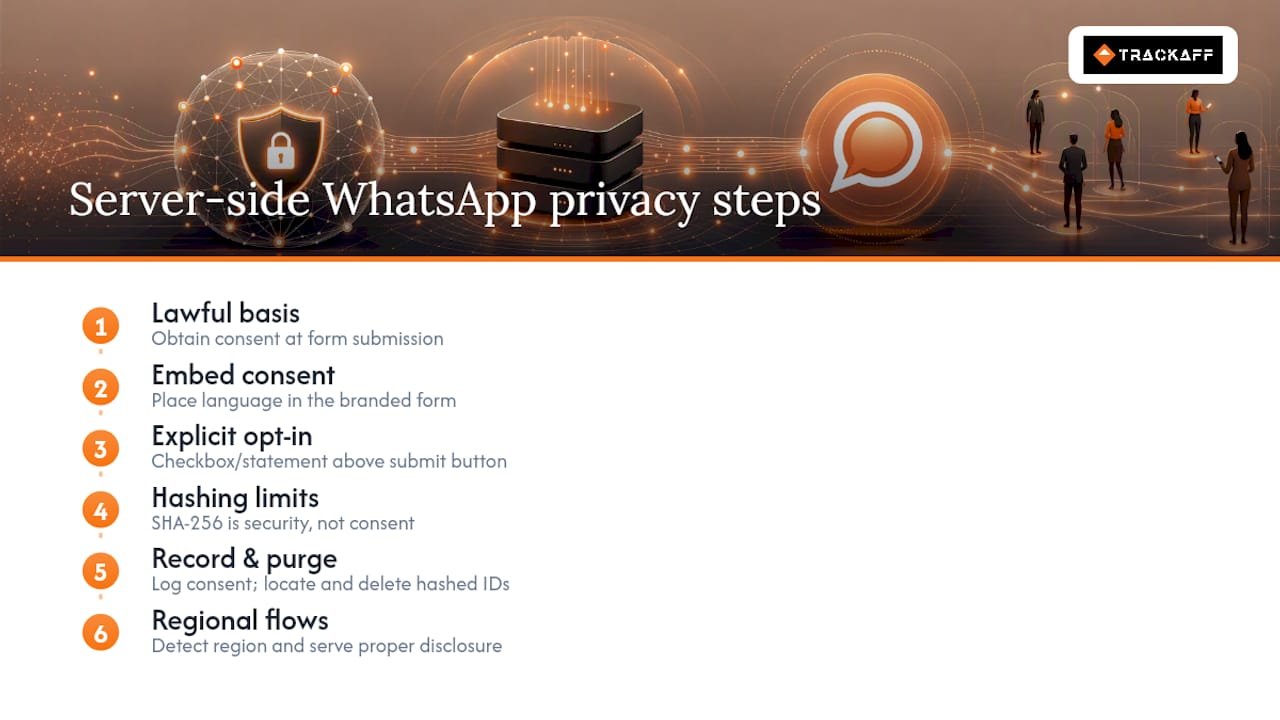
Server-side tracking moves data collection off the browser, but it does not move it outside the law. You still need a lawful basis to collect and hash personal identifiers, and that basis usually comes from consent captured at the point of form submission.
Build your consent language directly into the branded form, not buried in a separate privacy policy link nobody clicks. A checkbox or clear statement confirming the visitor agrees to have their information processed for marketing and analytics purposes should sit right above the submit button.
Hashing with SHA‑256 before transmission is a security practice, not a substitute for consent. Regulators in the EU under GDPR and in California under the CCPA treat hashed personal data as personal data still, so your retention policy and deletion process need to cover it the same way they cover raw records.
Keep a record of what consent language was live at the time each lead converted. If a visitor requests deletion months later, you need to be able to locate and purge their hashed identifiers from both your CRM and any downstream systems that received the CAPI event, including Meta’s own data retention on their end.
Regional rules vary enough that a single global consent flow rarely covers every jurisdiction correctly. If you’re running ads across multiple countries, build your consent capture to detect the visitor’s region and serve the appropriate disclosure rather than a one-size version that under-discloses somewhere.
Why Attribution Breaks: Delayed Data and Journey Gaps
Delayed data is the single most common complaint from teams new to this setup, and it’s usually not a bug. A WhatsApp inquiry that converts to a deposit three weeks later will show up in Meta’s reporting three weeks late too, because the CAPI event fires when the CRM status changes, not when the ad was clicked. Build your reporting expectations around that lag instead of panicking when Tuesday’s spend doesn’t show Tuesday’s results.
Incomplete customer journeys happen when the fbclid gets lost somewhere between the ad click and the final conversion. This usually traces back to a redirect that strips URL parameters, a form that doesn’t capture the hidden field early enough, or a CRM import process that drops custom fields during a data migration.
Attribution mismatches, where Meta reports a different conversion count than your backend, almost always come down to one of three causes: a broken event_id chain, a form that’s firing duplicate submissions on page refresh, or a CRM webhook that retries and sends the same event twice with a new event_id each time. Check the webhook retry logic first. It’s the quiet culprit in more broken setups than any pixel issue.
What Cleaner Signal Actually Buys You Commercially
Cleaner conversion data doesn’t just look better in a dashboard. It changes how Meta’s optimizer behaves. Feed the algorithm accurate purchase and deposit events instead of a partial pixel-only picture, and it starts finding more of the people who actually buy, not just the people who click. That shift shows up as lower wasted spend within days, not months.
The advice I’d give any team fixing this: verify your tracking before you touch budgets or creative. A campaign that looks like it’s underperforming might just be underreporting. Chasing that false signal with new creative or a budget cut wastes money solving a problem that doesn’t exist.
This measurement gap between ad click and real business outcome is exactly what branded forms and server-side reporting exist to close, and it’s the problem TrackAff was built around.
— Terry
Get Guaranteed Reporting With TrackAff
Trackaff turns your funnel into the missing link between an ad click and a reported sale. Instead of hoping a browser pixel survives ad blockers and iOS privacy settings, you get a branded form built into your funnel that captures the purchase, deposit, or registration event directly, hashes the identifier, and reports it to Meta through the Conversions API automatically.
The setup includes deduplication support so your pixel and server events merge cleanly instead of double-counting, CRM webhook integration so a status change downstream still reports back to the original ad click, and manual approval mode if your sales team needs to confirm a deal before it counts as a conversion. Pricing is structured with tiered plans based on the number of connections; details and trial availability can be found on the client’s website.
Start your free trial with TrackAff and connect your first funnel today, or visit the company page if you’d rather talk through your setup with the team first.
Where to Verify These Setup Steps
Meta’s own Conversions API guidance documents the CPA improvement data cited above. For hands-on setup comparisons across five CAPI methods, including Shopify native integration and server-side GTM, that guide walks through each path in more technical depth than covered here.
Sources
- How to Set Up the Meta Conversions API (5 Methods, Compared) | Mako Metrics
- How to Set Up Meta Conversions API: The Complete 2026 Guide
FAQ
What Does WhatsApp Conversion Tracking Mean in This Guide?
It means capturing post-click and off-site conversions, purchases, deposits, or registrations, through a branded funnel form and reporting them to Meta via the Conversions API, run alongside the standard Pixel.
Do I Still Need the Meta Pixel if I Set Up CAPI?
Yes. CAPI complements the Pixel rather than replacing it, and running both with proper deduplication gives you the most complete conversion picture Meta can act on.
How Do I Stop Meta From Double-Counting My Conversions?
Use the exact same event_id, event_name, and a closely matched event_time on both your pixel and server events, and confirm they merge into one row in Test Events before scaling spend.
Can CRM Events Be Attributed Back to the Original Ad Click?
Yes, as long as you capture and store the fbclid at the point of initial conversion and include it in the CRM event you later send through CAPI.
What’s the Fastest Way to Start Tracking Post-Click Conversions?
For most businesses, a branded-form SaaS layer can enable reporting in days by handling the form, hashing, deduplication, and CAPI connection without a custom engineering build.
Recommended
Your deals close off the pixel. Meta never finds out.
TrackAff reports your real conversions back to Meta the moment they happen, tied to the exact ad that produced them. 10-minute setup, no code.
Start free 14-day trial → Card required · No charge until day 14 · Cancel in one click