
- trackaffadmin
- 0 Comments
- 25 Views
A micro conversion is any meaningful step a visitor takes on the way to buying — viewing a product, starting checkout, downloading a resource. A purchase, or macro conversion, is the revenue event itself. Track micro conversions for diagnostics and speed of signal. Optimize campaigns and budget decisions around purchases whenever revenue is the goal, using GA4 for on-site measurement and server-side Meta Conversions API reporting for off-site verification.
TL;DR:
- Micro conversions provide early indicators of funnel friction and move faster to help identify issues before purchase data confirms them.
- Tracking consistent, sequential micro events like add to cart and begin checkout offers actionable insights, while unrelated events are just noise.
- Off-site verification of purchases through server-side APIs ensures accurate attribution and prevents inflated revenue reports caused by duplicate events.
- Mispurchased micro signals, attribution gaps, and tracking noise often distort data, making it essential to align micro events closely with the final purchase goal.
- Validating every micro event against actual purchase data is crucial before scaling up any micro conversion improvements.
Table of Contents
- Micro Conversions vs Purchases: Definitions Marketers Can Actually Use
- Why Micro Conversions Matter (and Where They Lie to You)
- How to Map Micro Events to the Purchase Funnel
- Measuring Micro Conversions and Purchases: GA4 and Meta Server-Side Reporting
- Common Pitfalls That Wreck Micro Conversion Data
- Eight Micro Events Worth Tracking (and a Rollout Checklist)
- What Years of Funnel Data Actually Teach You
- Verify Purchases, Not Just Clicks, With TrackAff
- Where to Go Deeper
- Sources
- FAQ
Micro Conversions vs Purchases: Definitions Marketers Can Actually Use
The distinction isn’t about size. It’s about role. A micro conversion is an intentional step tied to your primary business outcome, one that could trigger a real action on your end, like retargeting a visitor who added to cart but didn’t check out. A purchase is the outcome itself: the transaction that pays your bills.
NN/g’s framing splits micro conversions into two types, and the distinction matters for how you use each one:
- Process-milestone micro conversions: sequential steps a user must pass through to reach purchase (view product, add to cart, begin checkout).
- Secondary-action micro conversions: optional behaviors that predict intent but aren’t required (newsletter signup, wishlist add, live chat opened).
Here’s how that maps across business models:
- Ecommerce: product view → add to cart → begin checkout → purchase.
- SaaS or lead gen: pricing page view → demo request → trial signup → paid conversion.
- Content or publishing: article scroll depth → newsletter signup → account creation → subscription purchase.
Not every click qualifies. A generic pageview or scroll event is a diagnostic signal, not a conversion, unless it’s tied directly to an action you’d actually take based on the result.
Why Micro Conversions Matter (and Where They Lie to You)
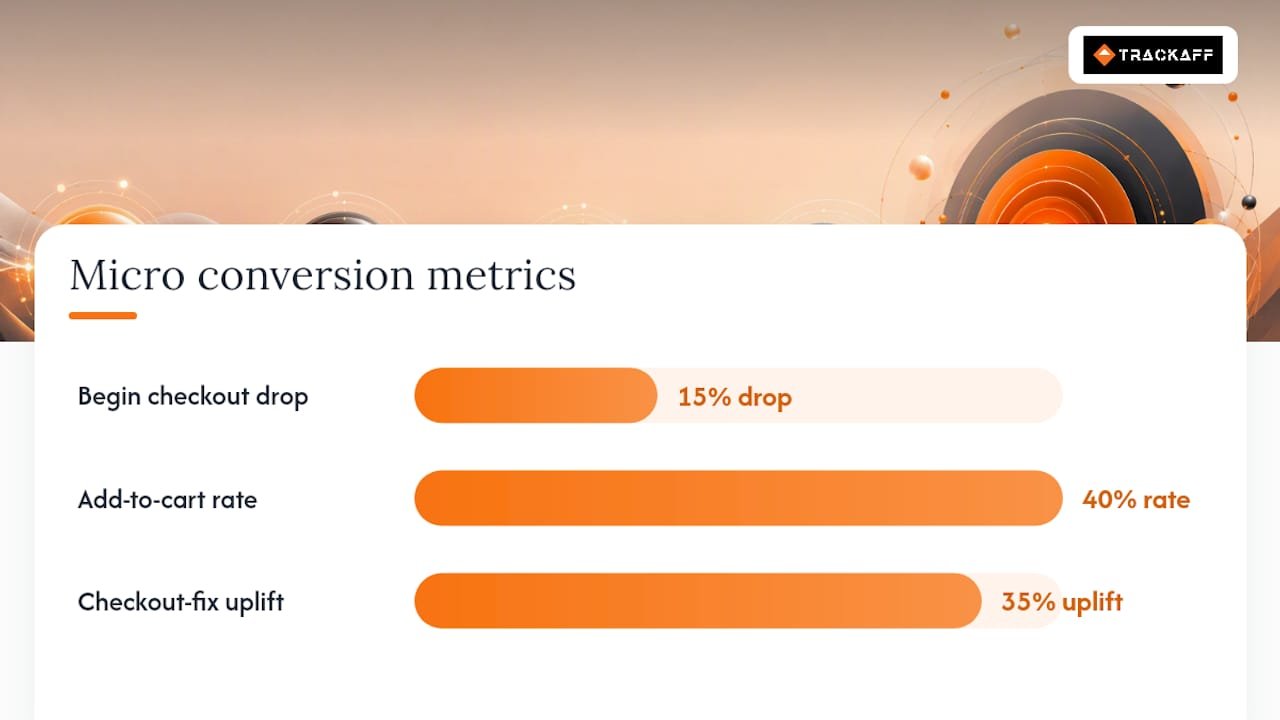
Micro conversions move fast. Because they happen more often than purchases, you get a usable sample size in days instead of weeks, which is exactly why Optimizely recommends them for early-stage experiments. If your begin_checkout rate drops 15% after a redesign, you don’t need to wait a month for purchase data to know something broke.
Pro Tip: Watch step-to-step completion rates, not blended conversion rates. A 40% add-to-cart rate tells you nothing if you don’t know what percentage of those carts convert to purchase.
The limit is just as real. Baymard’s checkout research found checkout usability fixes can drive an average uplift of roughly 35% in conversion rate for large sites, which tells you exactly where the disconnect between micro and macro usually lives: not at the top of the funnel, but at the last click. A rising micro metric that never shows up in purchase data isn’t progress. It’s noise, or worse, a quality problem masquerading as a win.
How to Map Micro Events to the Purchase Funnel
Work backward from the purchase, not forward from whatever your analytics tool happens to track by default.
- Start from the macro conversion. Write down the exact purchase, deposit, or registration event that pays your business.
- List the process milestones between first touch and that outcome. For most funnels, three to five steps is enough.
- Apply the selection test: would knowing this event’s rate change what you do next? If yes, track it. If you’d shrug either way, drop it.
- Instrument events in sequence, then measure step-to-step rates rather than raw totals, using GA4’s funnel reporting structure to see exactly where users drop off.
- Standardize event names, transaction IDs, and deduplication rules before you launch, not after you’ve collected a month of unreliable data.
Pro Tip: If a micro event doesn’t have a clear next action attached to it, it’s a vanity metric, not a conversion. Cut it from your dashboard.
Measuring Micro Conversions and Purchases: GA4 and Meta Server-Side Reporting
On-site, GA4’s standard ecommerce event set gives you the full sequence: view_item, add_to_cart, begin_checkout, and purchase, all documented by Google for exactly this kind of funnel diagnostics. Run these through GA4’s funnel reports to see abandonment by step, not just a single blended rate.
Off-site, for Meta ad optimization, the requirements shift. You need to preserve ad and campaign identifiers all the way through the funnel, record micro events for segmentation, and send verified purchases back through a server-side Conversions API path with deduplication built in.
- Preserve
utm_source,utm_campaign, and click IDs across every funnel step, not just the landing page. - Record micro events (form starts, pricing views) for audience segmentation, but don’t send them to Meta as purchase signals.
- Send verified purchase events server-side with transaction IDs and item-level data intact, per Google’s purchase event setup guidance.
- Handle refunds by referencing the original transaction ID so revenue totals don’t inflate.
| Event Layer | Where It Lives | What It’s For |
|---|---|---|
| Micro (view_item, add_to_cart) | Client-side GA4 | Diagnosing funnel friction |
| Micro (form start, pricing view) | Client-side / CRM | Segmentation, retargeting |
| Purchase (verified) | Server-side Conversions API | Ad optimization, revenue reporting |
Tying every event to source, medium, and campaign is what lets you separate a channel that drives cheap add-to-carts from one that actually drives buyers. Agencies handling paid media across Google, Meta, and multi-channel campaigns run into this constantly: the channel with the best cost-per-click is rarely the channel with the best cost-per-purchase.
Common Pitfalls That Wreck Micro Conversion Data
Most tracking problems aren’t technical. They’re conceptual, and they start with treating every clickable thing on a page as a conversion.
- Counting noise as signal: pageviews and scroll depth aren’t conversions unless tied to a specific action you’d take.
- Duplicate purchase events: firing the same transaction twice inflates both revenue and confidence in a bad campaign.
- Optimizing micro signals that hurt buyer quality: a form that gets more submissions but fewer closes isn’t a win.
- Attribution gaps: mismatched lookback windows and missing deduplication rules make micro and macro data disagree.
The guardrail is simple: pick goals as close to purchase as your data allows, estimate the expected macro uplift before you scale a micro win, and never call a test successful until purchase data confirms it.
Eight Micro Events Worth Tracking (and a Rollout Checklist)
- Product view (ecommerce)
- Add to cart (ecommerce)
- Begin checkout (ecommerce)
- Payment page reached (ecommerce)
- Pricing page view (SaaS)
- Resource download (SaaS/lead gen)
- Form start (SaaS/lead gen)
- Newsletter signup or video watched to 75%.
(content)
Rollout checklist: choose your macro conversion, pick three to five micro events tied to it, instrument each with consistent IDs, run a short test, then validate every apparent win against purchase data before rolling it out wider. If add-to-cart climbs 20% but purchases stay flat, the fix belongs at checkout, not further up the funnel.
What Years of Funnel Data Actually Teach You
Micro conversions earn their keep in low-traffic testing and early funnel triage, where they surface a broken step long before purchase data would catch it. They mislead the moment a team chases the metric instead of the buyer, especially when a “successful” micro test quietly drags down lead or purchase quality. Tools that preserve ad identifiers through the funnel and report verified purchases back to platforms like Meta give you a way to check micro wins against the only number that ultimately matters.
— Terry
Verify Purchases, Not Just Clicks, With TrackAff
TrackAff exists for the exact gap this article keeps circling back to: the moment a Meta ad click leaves your site and you lose the ability to prove it turned into a sale. The platform uses a branded form built into your funnel to capture purchases, deposits, or registrations, then reports those verified events back to Meta through the Conversions API, so the algorithm optimizes toward actual buyers instead of leads that never close.
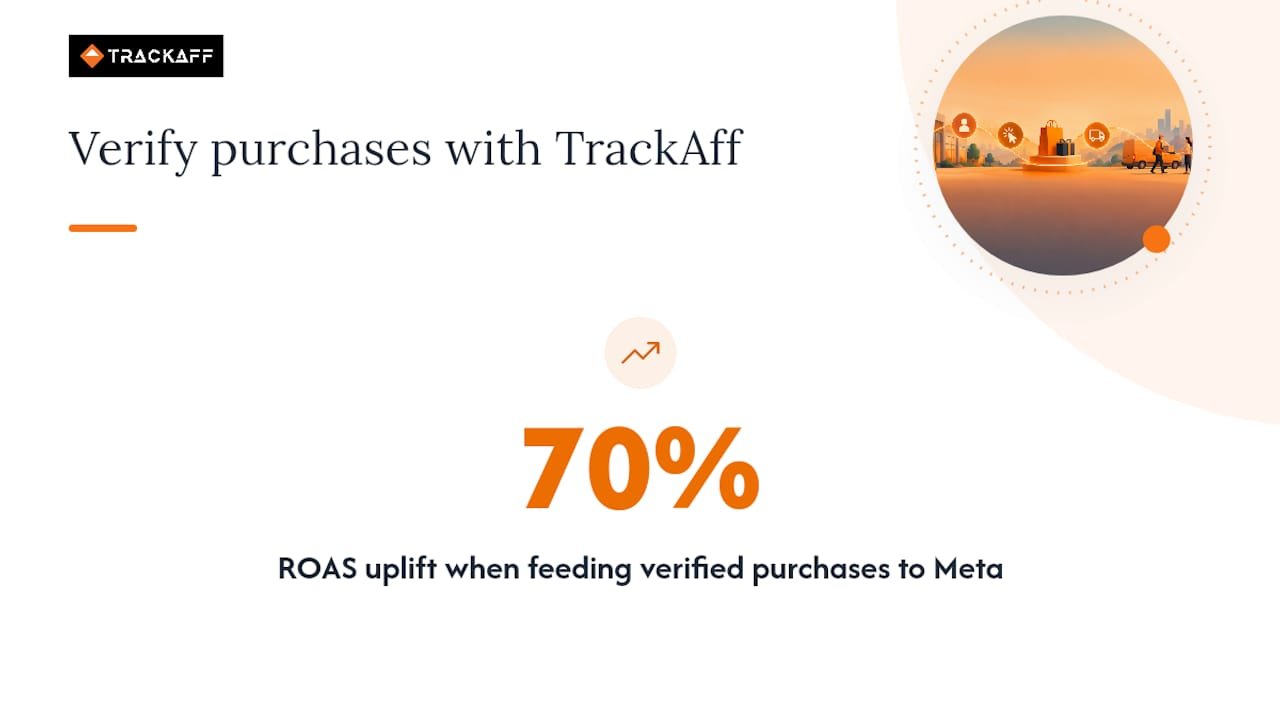
That matters because Meta can only optimize for what it can see. Feed it verified purchases instead of form fills, and campaigns start targeting people who resemble your real customers, not just people who resemble your form-fillers. Businesses using this approach have seen ROAS improve by up to 70% by cutting the wasted spend that comes from optimizing toward the wrong signal.
If you’re running Meta ads and want your reported conversions to match what actually landed in your bank account, check TrackAff’s pricing plans and start a free trial to see verified purchase data flow into your campaigns.
Where to Go Deeper
For the technical event names and funnel setup referenced above, Google’s GA4 ecommerce and funnel reporting documentation are the primary references. For the conceptual split between micro conversion types, see NN/g’s article. For checkout-specific fixes, Baymard’s benchmark research is worth bookmarking.
Sources
- Overview | Google Analytics | Google for Developers
- Macro vs. Micro Conversions — NN/g
- Ecommerce checkout usability report and benchmark — Baymard
- Track macro and micro-conversion events – Optimizely Support
FAQ
What Are Micro Conversions?
Micro conversions are intentional actions a visitor takes on the way to a purchase, like adding an item to cart or starting checkout, that predict or move toward the final outcome. They’re useful when the result would change what you do next; if it wouldn’t, it’s not worth tracking as a conversion.
What Is the Difference Between CVR and CTR?
Click-through rate (CTR) measures how many people clicked your ad out of everyone who saw it. Conversion rate (CVR) measures how many of those clickers completed a specific action, whether that’s a micro event or a purchase, so a high CTR with a low CVR usually points to a targeting or landing page mismatch.
What Is the Difference Between Macro and Micro Conversions?
A macro conversion is the primary business outcome, typically a purchase, deposit, or registration. Micro conversions are the smaller steps leading up to it, and according to NN/g, whether an action counts as one or the other depends entirely on your site’s primary goal.
Why Am I Getting Clicks but No Conversions?
This usually means a mismatch between what your ad promises and what your landing page or checkout delivers, or a tracking gap where conversions happen but aren’t being recorded. Server-side tools that report verified purchases back to platforms like Meta, such as TrackAff, help rule out the second possibility by confirming whether real sales are actually landing before you troubleshoot the funnel itself.
Your deals close off the pixel. Meta never finds out.
TrackAff reports your real conversions back to Meta the moment they happen, tied to the exact ad that produced them. 10-minute setup, no code.
Start free 14-day trial → Card required · No charge until day 14 · Cancel in one click