
- trackaffadmin
- 0 Comments
- 28 Views
Offline event sets are dataset containers you create to send in-store, CRM, and phone conversions back to ad platforms for attribution. They exist to close the gap between an ad click and what actually happens off-site, whether that’s a signed contract or a completed sale. The immediate action: create or map a dataset in Events Manager, capture hashed match keys like email and phone, and start sending events through the API or a batch upload before your next campaign optimization cycle.
TL;DR:
- Offline event sets require accurate, hashed match keys like email or phone to connect real-world actions to ad campaigns effectively.
- Meta consolidates offline data through its Conversions API with unified tokens, while TikTok maintains separate credentials for each client, increasing management complexity.
- Using post-click forms that capture hashed user data immediately after ad click significantly improves offline match rates and attribution accuracy.
- Batch uploads of offline events can take 24 to 48 hours to fully match, so plan for slow initial reporting and monitor match rates weekly.
- Starting with a single campaign and event type allows validation of match quality before scaling to broader offline tracking efforts.
Table of Contents
- What Are Offline Event Sets, and Where Do They Fit?
- How Meta and TikTok Handle Offline Events Differently
- What Data Fields Does an Offline Event Actually Need?
- Setting Up an Offline Event Set: A Step-by-Step Checklist
- Real-Time API, Batch Uploads, or a Connector: Which Fits Your Stack?
- Using Post-Click Capture to Improve Offline Match Quality
- Fixing Low Match Rates and Duplicate Events
- Where To Start If You’re Building This From Scratch
- Trackaff: Turning Post-Click Data Into Ad Platform Signal
- Where to Go for the Technical Specs
- Sources
- FAQ
What Are Offline Event Sets, and Where Do They Fit?
An offline event set (Meta calls it a dataset; TikTok calls it an Offline Event Set) is a container that stores conversion data happening away from your website or app. It’s the mechanism that lets Meta or TikTok match a real-world action, like a mattress purchase at a retail store, back to the specific ad that drove the customer through the door.
Advertisers typically send these offline conversion types into a dataset:
- In-store purchases recorded at point-of-sale
- Phone orders logged by a call center or sales rep
- Appointment bookings confirmed by staff after a lead comes in
- CRM deal closures, especially in B2B or high-ticket sales cycles
These events complement, rather than replace, your Pixel and Conversions API (CAPI) web events. Pixel and CAPI capture what happens online. Offline event sets capture what happens after someone leaves your site or never visits it at all, such as calling a number from an ad. Combined, they give the ad platform a fuller picture of which campaigns generate revenue instead of just clicks.
How Meta and TikTok Handle Offline Events Differently
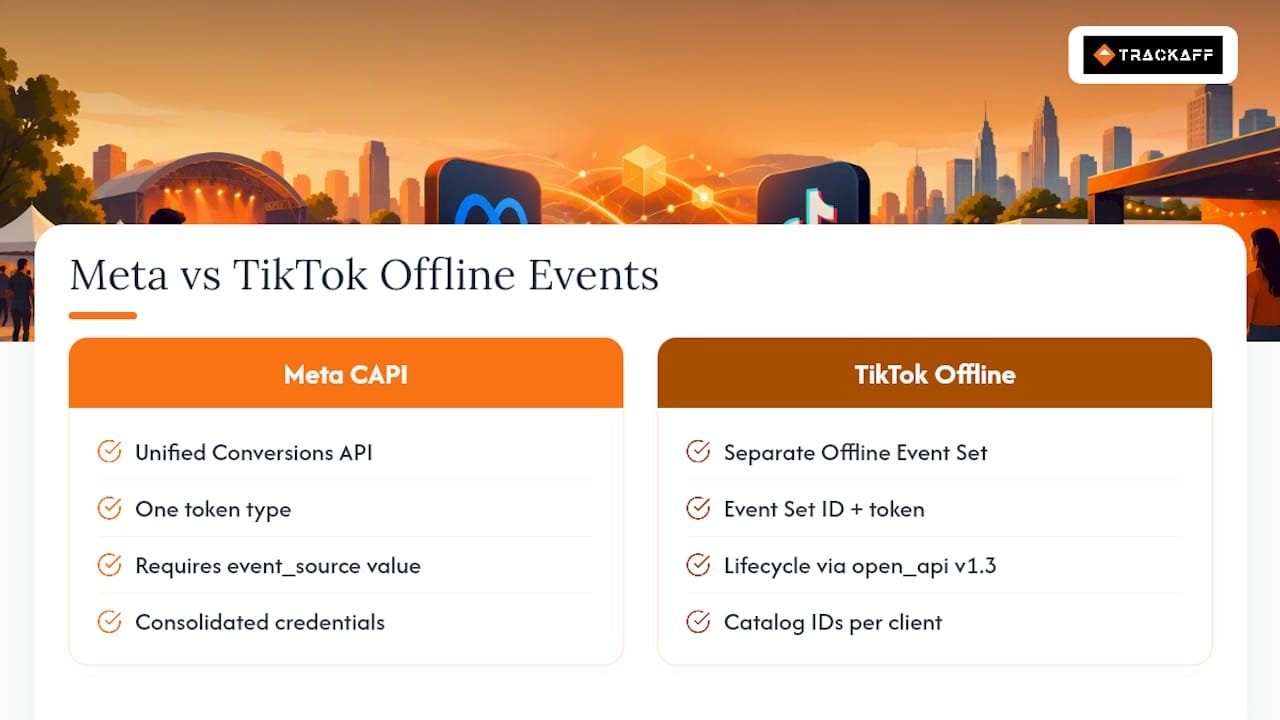
Meta retired its standalone Offline Conversions API in 2025. Offline uploads now route through the unified Conversions API, which requires an action_source value such as “physical_store” or “system_generated” on every event. If your team built integrations against the old API, they need rework, not just a URL swap.
TikTok takes a different path. You create an Offline Event Set in Events Manager, which issues an Event Set ID and access token. Partners and API calls need both to submit events. TikTok’s Business API also exposes lifecycle actions (offline_create, offline_update, offline_get, offline_delete) through its open_api v1.3 endpoints.
The practical takeaway: Meta consolidates everything under one API and one token type. TikTok separates offline tracking into its own credential set, so agencies running both platforms need to catalog IDs and tokens per client to avoid mis-attributing one customer’s purchase to another’s campaign.
What Data Fields Does an Offline Event Actually Need?
Every offline event needs three required fields: event_name, event_time, and action_source. You also need at least one match key, usually a hashed email or hashed phone number, so the platform can connect the event to a known user.
Recommended fields improve match quality and reporting accuracy:
order_id(ties the event to a specific transaction)currency, formatted per ISO 4217 (USD, EUR, GBP)value(the transaction amount)shop_id(useful for multi-location retailers)
Statistic to know: large batch uploads can take 24 to 48 hours to fully match against a platform’s identity graph, so don’t panic if match numbers climb slowly after a bulk import.
Hashing matters as much as the fields themselves. Lowercase every value, trim whitespace, and apply SHA256 when the platform requires it. A phone number stored as “(555) 123-4567” will not match the same phone number hashed as “5551234567,” even though they’re the same customer.
Deduplication runs on the combination of event_id and event_name. If your Conversions API setup sends the same conversion twice with different event IDs, the platform counts it twice, inflating your reported conversions and skewing optimization.
Setting Up an Offline Event Set: A Step-by-Step Checklist
Getting a dataset live takes less time than most teams expect, but skipping a step here causes match-rate problems later.
- Create the dataset or event set inside Events Manager and name it something your team will recognize six months from now.
- Copy the Event Set ID (TikTok) or dataset ID (Meta) immediately. You’ll need it for every API call or connector configuration.
- Choose your match keys. Email and phone are standard; add order ID if your CRM supports it.
- Assign system users or roles with access to the dataset, and generate access tokens for any partner or agency that needs to submit events on your behalf.
- Decide your submission method: direct API for real-time events, batch CSV for bulk historical data, or a connector if you’re routing through a CDP.
A typical Meta event payload includes event_name, event_time, a user_data object with hashed identifiers, and a custom_data object for order value and currency.
Pro Tip: Generate your access tokens under a dedicated system user, not a personal admin account. When an employee leaves and their account gets deactivated, a token tied to a system user keeps working; one tied to a person’s login does not.
Real-Time API, Batch Uploads, or a Connector: Which Fits Your Stack?
Three methods exist for getting offline data into a platform’s hands, and the right one depends on your data volume and how fast you need the platform to react.
- Real-time API calls offer the lowest latency and work best for high-value events you want to optimize your campaigns immediately, like a closed sale from a sales rep’s CRM update.
- Batch uploads (scheduled CSV exports) suit teams pulling data from a POS or CRM system on a daily or weekly cadence. They’re simpler to build but come with processing delays and size limits per file.
- CDP or connector routes, such as Tealium’s TikTok Offline Events connector, automate a lot of the hashing and batching work. Very large merchants should split payloads into smaller batches to avoid queuing delays, since connectors enforce batch size caps.
Even with a connector handling the technical lift, someone on your team still needs to verify which fields get passed through and confirm they’re hashed correctly. Automation reduces manual work; it doesn’t eliminate the need to audit the setup.
Using Post-Click Capture to Improve Offline Match Quality
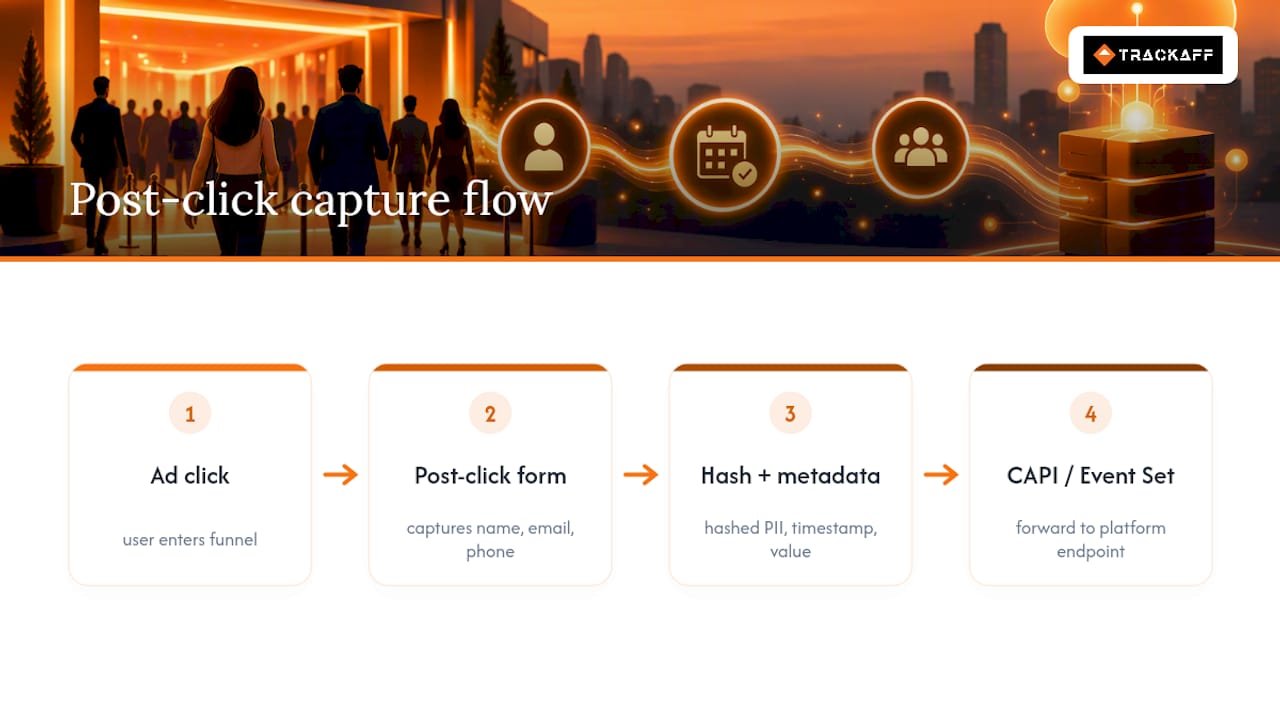
One implementation pattern that consistently improves match rates: a branded post-click form placed inside the funnel, positioned after the ad click but before the sale completes. The form captures the buyer’s name, email, and phone at the moment of highest intent, then maps that data to an order_id or event_id you generate and persist.
That hashed PII, along with event metadata like timestamp and value, forwards into the platform’s CAPI or Event Set endpoint. A tool like Trackaff operates on this exact pattern for Meta campaigns, capturing purchase and registration data before the sale disappears into a CRM black hole.
If you’re evaluating a vendor for this job, ask four questions: what hashing scheme they use, how they handle deduplication, whether they support CRM webhooks, and how they map events to your existing event_id structure.
Fixing Low Match Rates and Duplicate Events
Low match rates almost always trace back to three culprits: inconsistent hashing, malformed phone formats, or missing match keys entirely. Check those first before assuming the platform’s identity graph is the problem.
Duplicate events usually come from inconsistent event_id values between Pixel and CAPI, mismatched event_name casing, or uploads submitted long after the original conversion happened.
- Capture click identifiers (
fbclid,fbc) at the moment of the click, not after the fact. - Run Pixel and CAPI together rather than choosing one over the other.
- Monitor match-rate metrics weekly, not just after a campaign ends.
Pro Tip: Generate the event_id client-side the moment a browser action happens, then persist that same ID through to your server-side event. Even if the CAPI event fires hours later, keep the original event_time, not the upload time. That preserves the matching window the platform relies on.
Where To Start If You’re Building This From Scratch
Pilot one campaign and one event type before rolling out anything platform-wide. Validate your match rate on that single flow first. Lean on the API for high-value, time-sensitive conversions, and save batch uploads for bulk historical backfills. If you bring in a connector partner for scale, audit their hashing and deduplication logic yourself. Don’t take the vendor’s word for it.
— Terry
Trackaff: Turning Post-Click Data Into Ad Platform Signal
Trackaff exists for the exact problem this article walks through: getting real purchase, deposit, and registration data back to Meta without building your own CAPI pipeline from scratch. The platform uses a branded post-click form to capture buyer information right after the ad click, hashes it, and forwards it along with your CRM webhook data so Meta can optimize toward actual buyers instead of leads who never convert.
If your match rates are inconsistent, your sales funnel spans multiple steps before a close, or you’re an agency needing white-label reporting across client accounts, this is the kind of gap Trackaff is built to close. Pricing runs on a per-connection basis: the Starter Rate at $99 per month per connection, Growth Rate at $69, and Scale Rate at $49, with Enterprise pricing available on request. A free trial is available if you want to test match-rate improvement on one funnel before committing further.
Where to Go for the Technical Specs
For exact API parameters and field requirements, go straight to the source. TikTok’s connector specifications live in the Tealium TikTok Offline Events documentation, which lists batch limits and hashing rules in detail. Meta’s migration notes and current Conversions API requirements are covered in Adamigo’s CAPI offline data sync analysis. For a walkthrough of dataset creation and sample payloads, Luc Flynn’s setup guide is worth bookmarking.
Sources
- Twilio Segment — TikTok Offline Conversions destination docs
- Luc Flynn — Offline Conversion Import for Meta Ads: Complete Setup Guide (2026)
FAQ
What Are Offline Events?
Offline events are conversion actions that happen away from a website or app, such as an in-store purchase, a phone order, or a CRM deal closing. Advertisers upload them to an offline event set so ad platforms can match the action back to the ad that drove it.
What Are Offline Events in Meta Ads?
In Meta Ads, offline events are conversions uploaded to a dataset through the Conversions API, tagged with an action_source like “physical_store” or “system_generated.” Meta uses them to attribute in-person or CRM-based sales to specific campaigns and optimize delivery toward buyers who actually convert.
Can I Create a Facebook Event Without Publishing It?
Yes, but that typically refers to a public Facebook Event (like a store opening), which is a separate feature from an offline conversion dataset used for ad attribution. You can save a public event as a draft in Events Manager and publish it later without affecting any offline conversion tracking setup.
How Do I Set Up an Offline Event Set?
Create the dataset in Events Manager, copy the Event Set ID or dataset ID, and choose your match keys such as hashed email or phone. From there, pick your submission method: real-time API for immediate attribution, batch CSV for bulk uploads, or a tool like Trackaff to automate post-click capture and CRM-to-platform mapping.
Recommended
Your deals close off the pixel. Meta never finds out.
TrackAff reports your real conversions back to Meta the moment they happen, tied to the exact ad that produced them. 10-minute setup, no code.
Start free 14-day trial → Card required · No charge until day 14 · Cancel in one click