
- trackaffadmin
- 0 Comments
- 46 Views
Facebook CPA tracking measures what you spend to generate one specific action, but in 2026 a Pixel-only setup routinely underreports that number because ad blockers, ITP, and App Tracking Transparency intercept browser signals. The single highest-priority fix is running Meta Pixel and Conversions API together with matching event_id deduplication, that combination recovers lost conversions and gives you a CPA figure you can actually trust.
TL;DR:
- Running Meta Pixel with Conversions API and matching event_id is essential to recover up to 30 percent of lost conversions caused by browser tracking limitations.
- Properly aligning attribution windows and avoiding blending different event types significantly improve CPA accuracy and reduce reporting discrepancies.
- Regularly verifying Event Match Quality scores and deduplication rates above 80 percent ensures Meta’s optimization remains effective and CPA remains reliable.
- Offline conversions and CRM data integration are crucial for accurately capturing true business outcomes, especially in long sales cycle industries.
- Comparing Meta’s reported CPA with backend sales data helps identify tracking issues and confirms that optimization targets revenue-generating actions.
Table of Contents
- What CPA Means on Meta: Actions, Cost Per Result, and Why Benchmarks Vary
- How to Calculate CPA and Why the Attribution Window Changes the Number
- The 2026 Tracking Stack: Pixel Plus Conversions API, Fixed Deduplication
- Where Meta Shows CPA and Which Attribution Settings to Check
- Reconciliation and Troubleshooting: When Meta CPA Doesn’t Match Your Backend
- Optimization Playbook to Lower CPA Once Tracking Is Reliable
- Setting Up and Interpreting Facebook’s Attribution Models in Detail
- How to Configure and Use Custom Conversions for More Accurate CPA Tracking
- Best Practices for Offline Conversions and CRM Data Integration
- Limitations and Discrepancies Versus Other Analytics Platforms
- TrackAff’s View: Closing the Post-Click Gap in CPA Reporting
- Get Accurate Post-Click Data Without Building It Yourself
- Implementation Docs and Guides Worth Bookmarking
- Sources
What CPA Means on Meta: Actions, Cost Per Result, and Why Benchmarks Vary
CPA, cost per acquisition, or cost per action, all describe the same math: what you paid to get one qualifying event. On Meta, that event could be a purchase, a lead form submission, a completed registration, or an app install. The “Cost per Result” column in Ads Manager is Meta’s own label for this metric, and it changes meaning depending on which conversion event you optimize for and which attribution model applies to the account.
This is where a lot of accounts get sloppy. If you’re optimizing for “Lead” but reporting CPA against “Purchase,” the number you see doesn’t reflect the business outcome you actually care about.
- Define one primary conversion event per campaign objective (Purchase for e-commerce, Lead for service businesses, Registration for SaaS trials).
- Never blend multiple event types into a single CPA calculation. A campaign averaging leads and purchases together produces a number that means nothing.
- Check that the event triggering “Cost per Result” matches the event driving your actual revenue.
Benchmark CPAs swing wildly across verticals and even within the same account, largely because attribution windows and event definitions differ from one campaign to the next.
How to Calculate CPA and Why the Attribution Window Changes the Number
The formula is simple: Total ad spend ÷ total conversions = CPA. The complexity comes from which conversions you count and over what window.
Meta defaults to a 7-day click / 1-day view attribution window, but you can switch to 1-day click only, or a custom window in some ad account configurations. A campaign showing 200 conversions under a 7-day click window might show 120 under 1-day click, and your CPA moves accordingly even though spend didn’t change.
- Pull total spend for the reporting period from Ads Manager at the campaign, ad set, or ad level.
- Pull the conversion count for the same period using the same attribution window you use for optimization.
- Divide spend by conversions to get CPA, then add the “Cost per Result” column directly in Ads Manager so you don’t have to calculate it manually.
- Export the breakdown by campaign, ad set, and ad to spot which layer is driving cost inflation.
Keep the reporting window and the optimization window aligned. Comparing a 7-day click CPA against a 1-day click benchmark is comparing two different metrics wearing the same name.
The 2026 Tracking Stack: Pixel Plus Conversions API, Fixed Deduplication
Pixel-only accounts typically report 15 to 30 percent fewer conversions than accounts running Pixel and Conversions API together with proper deduplication. That gap comes from ad blockers, Safari’s Intelligent Tracking Prevention, and iOS App Tracking Transparency, all of which block or limit browser-side pixel firing. Device distribution data backs this up: a meaningful share of Facebook traffic comes through mobile browsers and in-app environments where browser-side tracking is inherently unreliable.
CAPI closes that gap by sending the same events from your server, where browser limitations cannot intercept them. You have multiple practical routes to implement it:
- Meta-hosted CAPI setup through Events Manager, best for teams with developer resources who want granular control over parameters.
- Shopify’s native integration, which ships with built-in CAPI and automatic deduplication, making it the fastest path for e-commerce merchants who don’t want to touch server code.
- Google Tag Manager server-side container, a middle ground that gives more flexibility than Shopify’s native tool without requiring full custom development.
Deduplication is the part teams get wrong most often. Generate a unique event_id client-side when the Pixel fires, then reuse that exact same event_id when the matching event fires server-side through CAPI. Meta uses that shared identifier, plus the event name, to recognize both signals as one event rather than counting it twice. Send hashed email and phone number, the _fbp and _fbc browser cookies, plus value and currency, and content IDs where relevant, because these parameters directly raise your Event Match Quality score.
Aim for an EMQ of 6 or higher, ideally 7+, and a deduplication rate above 80 percent on your primary conversion event. Below those thresholds, Meta’s own optimization gets weaker, and CPA tends to drift upward even when your actual sales haven’t changed.
Pro Tip: Run a staged test purchase after any tracking change. Watch Events Manager’s Test Events and Diagnostics tabs in real time to confirm the event_id matches between Pixel and CAPI before you trust a single dollar of reported CPA.
Where Meta Shows CPA and Which Attribution Settings to Check
Ads Manager surfaces CPA through the “Cost per Result” column, but you have to add it manually at each reporting level, campaign, ad set, and ad, because the default column set often hides it behind generic metrics like CPM or CPC.
- Add “Cost per Result” and “Cost per Action Type” as custom columns in your Ads Manager reporting view, saved as a preset so you don’t rebuild it every session.
- Pick one attribution window for optimization and a matching one for reporting, then leave both alone for at least a full reporting cycle before comparing performance across campaigns.
- In Events Manager, check the connection method column for each event source, confirming it reads “Browser and Server” rather than “Browser” alone.
- Review the deduplication rate and Event Match Quality score for your primary conversion event weekly, not just when CPA spikes.
- Run Test Events before launching any new campaign that relies on a recently modified conversion event.
Mixing attribution windows between the account settings and your manual spreadsheet calculations is one of the most common reasons CPA numbers look inconsistent week over week, even when nothing on the ad side actually changed.
Reconciliation and Troubleshooting: When Meta CPA Doesn’t Match Your Backend
A weekly reconciliation habit catches tracking drift before it wrecks a month of budget decisions. Pull three numbers every week: Meta’s reported spend and conversions, GA4’s revenue for the same period, and your backend’s actual order count.
- Calculate the ratio of Meta-reported revenue to GA4-reported revenue for the same date range.
- Compare that ratio against a normal range. A Meta-to-GA4 ratio between 1.2x and 1.6x is typical because of attribution window differences and last-touch versus multi-touch modeling. A ratio above 2x usually signals a tracking problem, not a modeling difference.
- If Meta reports higher conversions than your backend, check for broken deduplication first, then check for refunded or canceled orders still counted as conversions.
- If Meta reports lower conversions than your backend, check whether CAPI is actually firing and whether Event Match Quality has dropped.
- Place one test order, confirm it appears in Test Events with a matching event_id, and verify currency, value, and timestamp fields are populated correctly.
Most reconciliation failures trace back to one of two causes: deduplication silently breaking after a website update, or CAPI parameters going stale because a developer changed the checkout flow without telling the marketing team.
Optimization Playbook to Lower CPA Once Tracking Is Reliable
Accurate tracking is the precondition for optimization, not a substitute for it. Once your EMQ and deduplication numbers are solid, these levers actually move CPA:
- Add hashed email and phone number to every CAPI event you send, not just purchases. Richer identity signals improve both Event Match Quality and the quality of any lookalike audiences you build from that data.
- Replace underperforming creative on a fixed schedule, not reactively. Waiting until CPA visibly spikes means you’ve already burned budget on a fatigued ad.
- Build lookalike audiences from deduplicated purchase events specifically, not from all site visitors or add-to-cart events, which tend to produce broader but lower-intent matches.
- Let Meta’s automated bidding run once your Event Match Quality and deduplication rate are stable. Manual bid caps make more sense during the first weeks of a new pixel setup, when data volume is still thin.
- Cross-check any budget reallocation against GA4 revenue or a marketing mix model before scaling a campaign purely on Meta’s self-reported CPA.
Pro Tip: If two ad sets show identical CPA in Ads Manager but very different backend revenue per order, the tracking is fine, the ad targeting isn’t. Don’t blame the pixel for a creative or offer problem.
For accounts scaling spend fast, pacing creative refresh against actual fatigue signals rather than a calendar matters more than most teams assume, a point covered in more depth in this guide to scaling Facebook ads without wrecking ROAS.
Setting Up and Interpreting Facebook’s Attribution Models in Detail
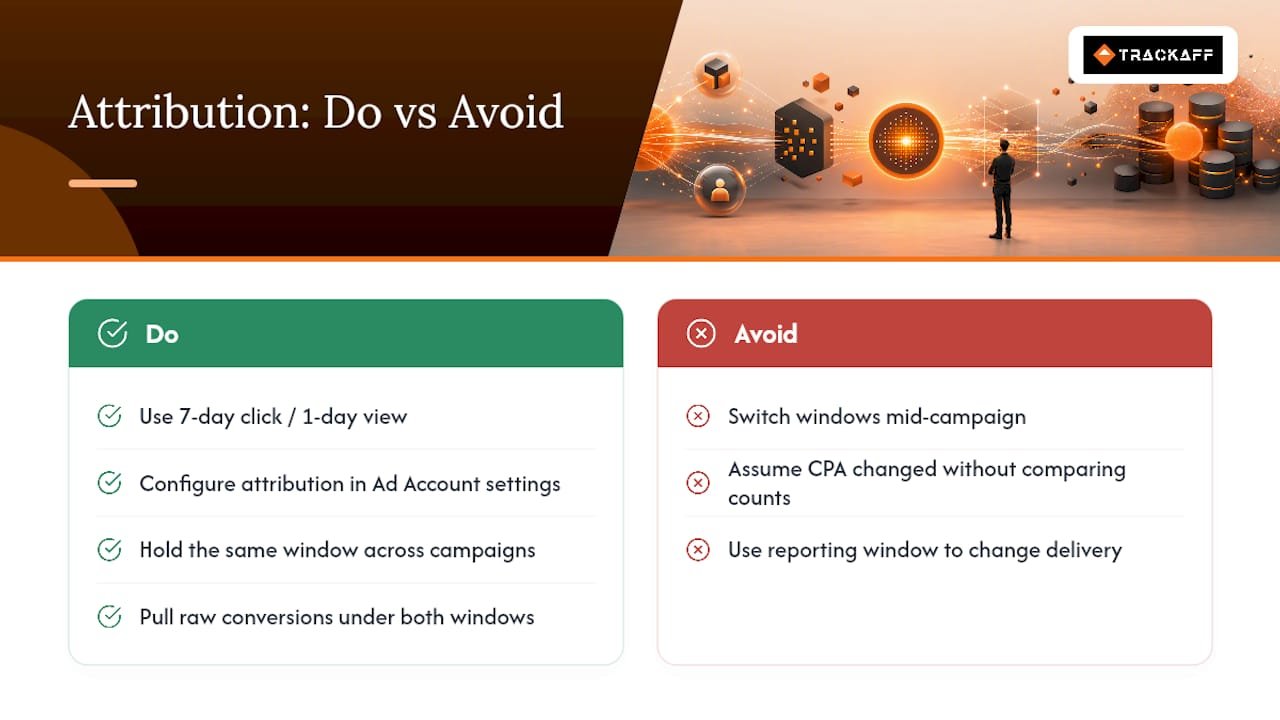
Meta offers several attribution settings, and picking the wrong one for your business model quietly distorts every CPA number downstream. The default 7-day click / 1-day view window credits a conversion to an ad if someone clicked it within the past week or viewed it within the past day before converting. That’s reasonable for impulse purchases, but it overstates the influence of ads for businesses with longer consideration cycles, like B2B software or high-ticket services.
You configure attribution settings at the ad account level under Ads Manager’s settings menu, where you can select a reporting window separate from the optimization window Meta uses to actually deliver your ads. This distinction matters: the optimization window determines what data the algorithm learns from, while the reporting window only affects what you see in your columns. Changing the reporting window doesn’t change how the ads are delivered, only how the results are displayed to you.
When interpreting a shift in CPA after changing attribution windows, isolate whether the change is real (more or fewer actual conversions) or purely representational (the same conversions, counted under a different rule). Pull the raw conversion count under both windows side by side before concluding your campaign performance actually changed.
For most direct-response advertisers, sticking with 7-day click / 1-day view and holding it constant across all campaigns produces the most comparable CPA data over time. Switching windows mid-campaign to chase a better-looking number defeats the purpose of tracking CPA at all.
How to Configure and Use Custom Conversions for More Accurate CPA Tracking
Standard events cover common actions like Purchase and Lead, but custom conversions let you define a rule based on URL patterns or specific pixel parameters, useful when your business has a conversion event Meta’s standard list doesn’t cleanly capture.
To build one, go to Events Manager, select Custom Conversions, and define a rule, typically a URL contains condition (like /thank-you-consultation) or a specific event parameter value. You can layer a value on top of the rule so Meta reports revenue alongside the conversion count, which matters if you want CPA and ROAS reported together rather than calculated separately.
Custom conversions are especially useful for businesses running multiple funnels through one pixel. A mortgage broker running both a “request a quote” funnel and a “download a rate guide” funnel needs separate custom conversions for each, otherwise Meta lumps low-intent guide downloads in with high-intent quote requests, and your blended CPA looks artificially good while your actual sales pipeline stays thin.
One limitation worth knowing: custom conversions based on URL rules can misfire if your site’s URL structure changes during a redesign, silently breaking the rule without any error message in Ads Manager. Check custom conversion rules any time your dev team ships a URL structure change, and confirm the rule still fires correctly using Test Events before trusting a week of reported CPA against it.
Best Practices for Offline Conversions and CRM Data Integration
Facebook ads frequently drive actions that happen away from your website entirely: a phone call that converts into a signed contract, a walk-in visit, a deal that closes in a CRM weeks after the ad click. None of that shows up in standard Pixel or CAPI events unless you deliberately close the loop.
Meta’s Offline Conversions API lets you upload conversion events tied to a phone number, email, or click ID captured earlier in the funnel, matching them back to the original ad exposure even when the actual sale happened offline. Most CRM platforms support this through a webhook or a batch upload, sending closed-deal data back to Meta on a scheduled basis, daily or weekly depending on your sales cycle length.
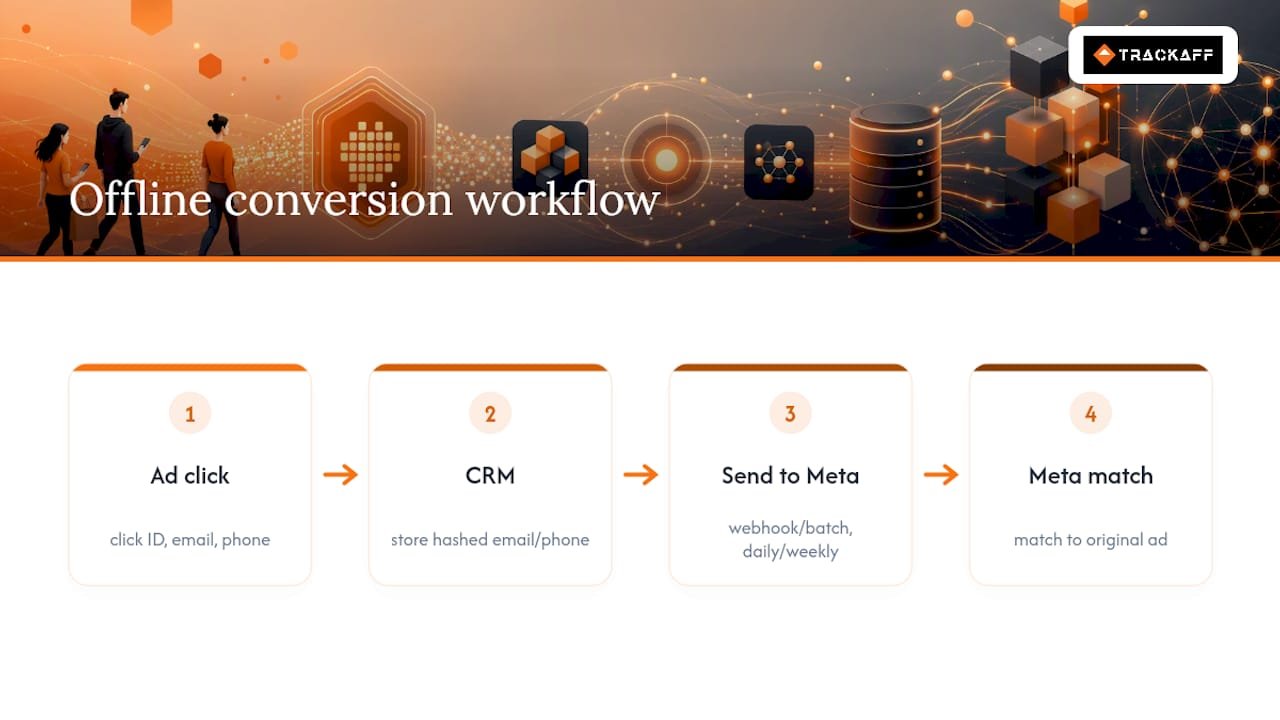
The practical challenge is match quality. Offline conversion matching relies on hashed identifiers, typically email and phone, so your CRM needs to capture that data cleanly at the point of ad click, not just at the point of final sale. If your sales team enters phone numbers inconsistently (with or without country codes, with dashes versus without), match rates drop and your offline-adjusted CPA understates real performance.
For businesses with long sales cycles, mortgage brokers, insurance brokers, real estate agents, and B2B service providers, offline conversion integration is often the difference between a CPA number that looks bad and one that reflects actual signed business. Without it, Meta only sees the lead form submission, not the client relationship that closes six weeks later.
Limitations and Discrepancies Versus Other Analytics Platforms
Meta’s reported CPA will rarely match GA4 or your backend order system exactly, and expecting perfect alignment misunderstands how each platform counts. Meta uses its own attribution model (typically 7-day click / 1-day view) and can credit a conversion to an ad even when the user’s last interaction before purchase came from an organic search or direct visit. GA4, by contrast, generally applies a data-driven or last-click model across all channels, not just Meta’s ads.
This isn’t a bug in either system, it’s a structural difference in how each platform decides which touchpoint gets credit. A Meta-to-GA4 revenue ratio in the 1.2x to 1.6x range is normal for that reason alone, even with flawless tracking on both sides.
Server-side limitations add another layer. Even a well-configured CAPI setup can’t recover events from users who never interacted with your domain at all, someone who saw an ad, called a phone number directly, and never touched your website leaves no pixel or CAPI trail unless you’ve built offline conversion tracking specifically for that path. And Meta’s own deduplication logic, while generally reliable, occasionally miscounts when event_id values aren’t generated consistently across every touchpoint in a funnel.
The practical takeaway: treat Meta’s CPA as directionally useful for in-platform optimization, and treat your backend order data as the ground truth for actual business decisions. Reconcile the two regularly rather than expecting either one to be independently perfect.
TrackAff’s View: Closing the Post-Click Gap in CPA Reporting
Pixel and CAPI solve the browser-versus-server problem, but neither one tells Meta whether a lead actually became a paying customer once the conversion happens off-platform, in a phone call, a CRM, or a sales team’s pipeline. That’s the gap a branded post-click form closes: it sits inside the funnel, captures the real outcome (a completed purchase, a funded deposit, a signed registration), and reports it back to Meta through server-side events with deduplication support baked in. Businesses running on lead volume alone tend to optimize for the wrong thing. Optimizing for actual closed sales, reported directly to Meta, is what moves CPA in a direction that matches revenue, not just form fills.
— Terry
Get Accurate Post-Click Data Without Building It Yourself
Pixel and CAPI fix what happens on your website. They can’t tell Meta what happens after someone submits a lead form, books a call, or gets approved for a loan, the events that actually determine whether your ad spend produced revenue or just noise. Trackaff closes that specific gap: a branded form sits inside your funnel, captures the real post-click outcome, and reports it to Meta through server-side events with deduplication already built in.
That means your CPA optimization target shifts from “someone filled out a form” to “someone actually became a customer,” which is the number that should be driving your bid strategy in the first place. Setup connects directly to your existing Meta account, supports manual approval before events get sent, and works alongside your current CRM webhook integration. If you’re running Meta ads for a business where the real conversion happens after the click, mortgage, insurance, agency, or high-ticket service, check the Trackaff pricing plans and start a trial to see your actual cost per acquisition, not just your cost per form fill.
Implementation Docs and Guides Worth Bookmarking
For the technical build itself, Meta’s own Events Manager and Conversions API documentation remains the primary reference for parameter requirements and deduplication rules. For platform-specific setup, the Pixel and CAPI implementation walkthrough covers Shopify’s native integration in detail, and this attribution and reconciliation guide offers a useful framework for keeping Meta, GA4, and backend numbers aligned over time. Bookmark both alongside your account’s Events Manager Diagnostics tab for ongoing troubleshooting.
Sources
- How to Track Facebook Ads Conversions: Pixel + CAPI Setup (2026) | AdsGo Blog
- Facebook ads attribution tracking: 2026 guide
- Distribution of Facebook users by device — Statista
Recommended
Your deals close off the pixel. Meta never finds out.
TrackAff reports your real conversions back to Meta the moment they happen, tied to the exact ad that produced them. 10-minute setup, no code.
Start free 14-day trial → Card required · No charge until day 14 · Cancel in one click