
- trackaffadmin
- 0 Comments
- 43 Views
Offline conversions are real-world actions, in-store purchases, phone orders, CRM-closed deals, that happen away from your website but still trace back to a Meta ad click. The Conversions API (CAPI) is now the standard way to send them, since Meta retired the older Offline Conversions API. Three things matter immediately: capture fbclid, fbc, and _fbp at the point of contact, hash and persist those identifiers alongside CRM records, and route events through CAPI or a vetted connector instead of a manual upload.
TL;DR:
- Using the Conversions API requires capturing and hashing identifiers like fbclid, fbc, and _fbp at contact points before routing events through CAPI.
- Running pixel and CAPI together with proper deduplication ensures more accurate offline conversion data, but mismatched fields or formatting errors can lower match rates below 30 percent.
- Build a reliable pipeline by capturing data at source, persisting it in CRM, normalizing identifiers, and sending structured payloads with event_id for deduplication; monitoring every response is critical.
- High-volume, automated integrations via direct CAPI control work best for maximizing match rates, while connectors and CSV uploads are less reliable and suited for low-volume use cases.
- Troubleshooting low match rates requires checking unhashed identifiers, phone formatting, event timing, and logging responses to identify where data loss occurs.
Table of Contents
- Facebook Offline Conversions Checklist Before You Start
- How Do Offline Conversions Reach Meta Today?
- How to Send Offline Events to Facebook Step by Step
- Direct CAPI, Connectors, or CSV: Which Fits Your Setup?
- Why Is My Offline Conversion Match Rate Low?
- Where Do Offline Events Show Up in Ads Manager?
- TrackAff Closes the Gap Between Ad Click and Real Sale
- What to Fix First When You Migrate Offline Conversion Tracking
- Try TrackAff for Managed Offline Conversion Tracking
- Sources
Facebook Offline Conversions Checklist Before You Start
Get these fundamentals locked down before touching any code or connector settings.
- Confirm admin access to Business Manager and Events Manager, then create an Offline Event Set or dataset to receive events.
- Capture these fields at minimum: fbclid, fbc, _fbp, email, phone, first/last name, zip code, event_time, and order_id.
- Hash identifiers with SHA‑256, always lowercase and trimmed, with phone numbers formatted to include country codes and no symbols.
- Pick stable event names tied to actual business outcomes (“Purchase,” “Deposit,” “QualifiedLead”) rather than generic labels that shift meaning over time.
Get the naming convention right the first time. Renaming events mid-campaign breaks historical reporting and confuses anyone auditing match rates later.
How Do Offline Conversions Reach Meta Today?
Meta deprecated the Offline Conversions API and pushed advertisers toward the Conversions API, a shift that changed how offline events get built, not just where they get uploaded. CAPI runs server-side, so it isn’t subject to browser cookie blocking or iOS tracking restrictions that degrade pixel-only setups. That reliability is the whole reason CAPI became the default rather than an optional upgrade.
Most advertisers still run pixel and CAPI together, and that’s intentional. The pixel captures fast, client-side signals the moment a visitor acts; CAPI adds durable, server-side confirmation, plus access to events that never touch a browser (a phone sale, a CRM-closed deal). When both fire for the same action, Meta deduplicates using event_id, matching events received within a 48-hour window so the same purchase doesn’t get counted twice. The action_source field needs to match reality too: use “website” for on-site events, “phone_call” for sales reps, “physical_store” for in-person transactions, and “system_generated” when no human triggered the event directly.
How to Send Offline Events to Facebook Step by Step
Building a reliable offline conversion pipeline comes down to four stages: capture, persist, hash, and send. Skip any one of them and match rates suffer.
- Capture at the source. Extract fbclid from the landing page URL and write it into a cookie formatted as fb.1.{timestamp}.{fbclid}. Capture the _fbp cookie whenever it’s present, since both identifiers enable cross-device matching when paired with hashed personal data.
- Persist in your CRM. Add explicit fields, meta_click_id, original_campaign_id, lead_created_at, and offline_event_sent_at, so the click survives the gap between ad click and closed sale, which can be days or weeks.
- Hash and normalize. Run emails and phone numbers through SHA‑256 after lowercasing, trimming whitespace, and stripping non-numeric characters from phone fields; always include the country code.
- Construct the payload. Send event_name, event_time as a Unix timestamp, hashed user_data arrays, custom_data (value, currency, order_id), and an event_id for deduplication against any pixel-side event.
Upload cadence should match your sales cycle: near real-time for e-commerce, daily batches for lead generation, and weekly only for pure reconciliation work. Build retry logic and idempotency keys into every batch job so a failed upload doesn’t silently vanish or duplicate on retry.
Pro Tip: Log every CAPI response you receive, not just the ones that fail. A quiet drop in accepted events is often the first sign of a broken field mapping, and you’ll only catch it if you’re watching the healthy responses too.
Direct CAPI, Connectors, or CSV: Which Fits Your Setup?
The right integration path depends on volume and how much engineering time you actually have.
- Direct CAPI integration gives you full control and the best reliability, and it’s the right call for high-volume, automated event flows where every percentage point of match rate translates to real ad spend savings.
- Partner connectors and middleware, tools built on platforms like Treasure Data, deploy faster and cost less engineering time, which suits agencies and CRM-led teams that already export data elsewhere.
- CSV or manual uploads work fine for a quick proof of concept or genuinely low volume, but they’re fragile, delayed, and useless for real-time optimization.
Whichever path you choose, plan for API tokens, rate limits, batch size caps, and error handling upfront. Skipping that planning is how teams end up with silent data loss three weeks into a campaign.
Why Is My Offline Conversion Match Rate Low?
Before anything goes to production, run events through a test_event_code and check them in the Test Events panel inside Events Manager. This catches malformed payloads before they contaminate live reporting.
Match rate benchmark: Well-configured offline event setups typically land between 40% and 65%, according to practitioner data. A match rate under roughly 30% is a strong signal something in your hashing or formatting is broken, not that your audience is simply hard to match.
Common culprits and fixes:
- Unhashed identifiers slipping through, usually from a code path that bypasses the hashing function entirely.
- Phone formatting errors, especially missing country codes or leftover punctuation.
- Timestamp problems, where event_time is sent in the wrong format or falls outside Meta’s accepted window.
- API errors or rate limiting that get swallowed silently if you’re not logging every response.
Set alerts for any sudden drop in accepted events or match rate. That kind of drop almost always means a field mapping broke somewhere upstream, not that conversion behavior changed overnight.
Where Do Offline Events Show Up in Ads Manager?
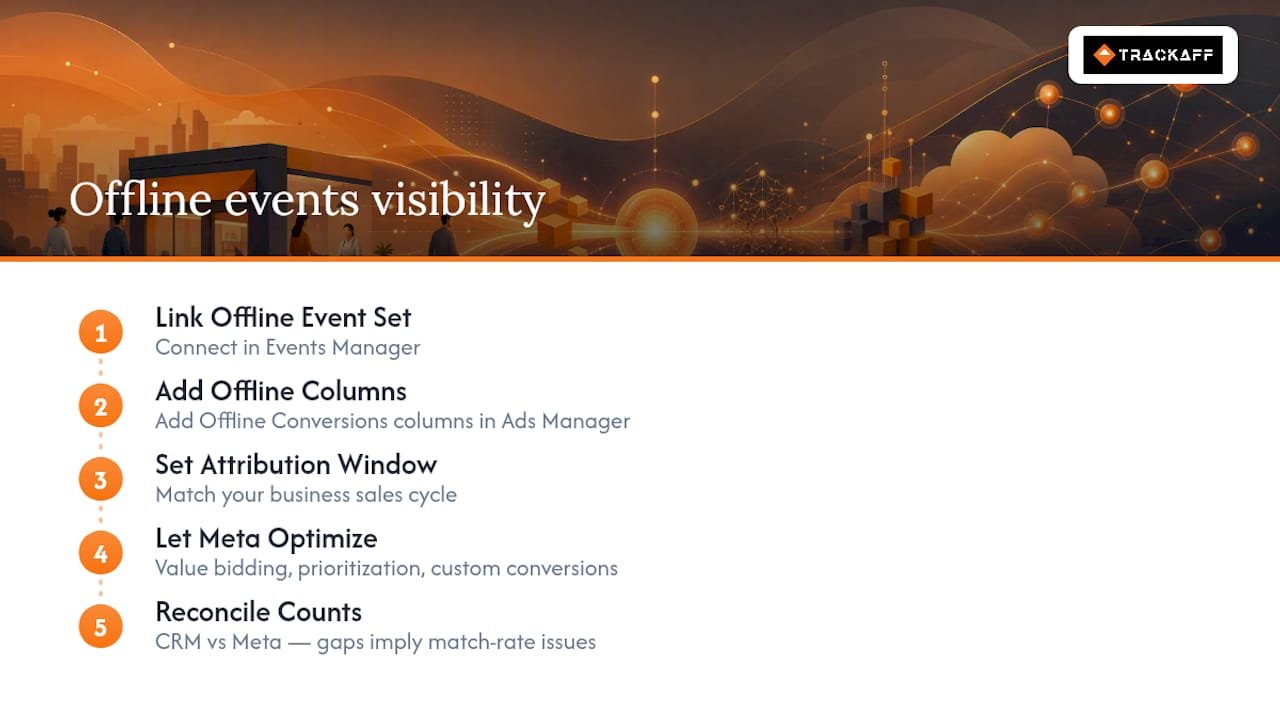
Add Offline Conversions columns directly in Ads Manager, and confirm your Offline Event Set is properly linked inside Events Manager, that link is what makes the data visible at the campaign level at all.
Attribution windows should match how your business actually closes deals. A car dealership with a six-week sales cycle needs a longer window than a retailer converting same-day, and events uploaded outside the platform’s lookback window may not be eligible for attribution at all regardless of how accurate the data is.
Once the data is flowing, offline events feed value-based bidding, event prioritization, and custom conversions, letting Meta optimize toward buyers instead of clicks or leads. When you reconcile CRM totals against Meta’s reported counts, expect some gap; a persistent, growing one usually points to a match-rate problem, not a tracking failure.
TrackAff Closes the Gap Between Ad Click and Real Sale
Building and maintaining a CAPI pipeline in-house takes real engineering time, ongoing monitoring, and someone accountable when match rates slip. TrackAff captures post-click conversion events through branded forms embedded in your funnel and reports them to Meta via server-side integration, handling hashing, deduplication, and CRM webhooks so the pipeline doesn’t depend on a single developer’s bandwidth.
For teams running Meta ads without dedicated engineering support, TrackAff offers campaign-level attribution and manual approval controls that most in-house builds skip in the rush to launch. Publisher-reported results show up to 70% improved ROAS once optimization signals reflect actual buyers instead of raw sign-ups, a meaningful shift when every optimization decision was previously based on incomplete data.

What to Fix First When You Migrate Offline Conversion Tracking
Start with capture at the source. Make fbclid and fbc collection non-optional in your CRM intake flow; everything downstream depends on it existing in the first place.
Second, automate hashing and CAPI sends for your highest-value events before touching lower-priority ones. Manual uploads for six-figure deals is a decision most teams regret within a quarter.
Third, get event_id deduplication and monitoring running before you scale volume. A pipeline that works at 50 events a day can quietly fail at 500 if nobody’s watching accepted-event counts. Build the daily health check into your routine now, not after the first unexplained match-rate drop.
— Terry
Try TrackAff for Managed Offline Conversion Tracking
Building the capture, hashing, and CAPI pipeline described above takes real engineering hours, and most in-house builds still miss edge cases that quietly erode match rates. Trackaff is the alternative to a custom-built pipeline for teams running Meta ads, it hands you branded forms that capture post-click purchases, deposits, and registrations, then reports them to Meta with hashing and deduplication already handled.
That means you skip months of engineering work and start seeing campaign-level attribution that reflects actual buyers, not just form fills. If you’re running Meta campaigns and want ROAS reporting you can trust, start a free trial with TrackAff and see your funnel’s real conversion data flow into Ads Manager within days.
Sources
For implementation specifics, keep these close: Meta’s Conversions API parameter documentation covers exact field requirements, the deduplication guide explains event_id mechanics, and Meta’s Business Help Center covers viewing offline events in Ads Manager. For connector-driven migrations, Treasure Data’s integration docs detail field mappings for batch exports.
- Changes impacting Facebook Offline Conversions users — Zapier
- Treasure Data — Facebook Offline Conversions integration docs
Recommended
Your deals close off the pixel. Meta never finds out.
TrackAff reports your real conversions back to Meta the moment they happen, tied to the exact ad that produced them. 10-minute setup, no code.
Start free 14-day trial → Card required · No charge until day 14 · Cancel in one click