
- trackaffadmin
- 0 Comments
- 20 Views
Zero-party data is information a customer deliberately hands you: a stated preference, a quiz answer, a declared purchase intent. For Meta advertisers, the move is simple. Collect it through preference centers, forms, and surveys, then push it into Custom Audiences and report conversions through the Conversions API. That combination restores targeting precision that iOS privacy changes took away, without touching a single cookie.
TL;DR:
- Collecting zero-party data is only effective if it is actively integrated into audience segmentation and conversion reporting, not just stored in spreadsheets.
- Using preference centers, quizzes, and post-purchase surveys alongside timing and matching strategies increases the chances of capturing valuable customer intents.
- Properly hashing and uploading zero-party data as Custom Audiences, then pairing it with server-side conversion events, significantly improves ad targeting accuracy.
- Building a server-side reporting pipeline to track actual off-site conversions from clicks is essential to closing the post-click attribution gap.
- Ensuring transparent privacy disclosures and data retention policies are legally compliant while supporting effective audience building is critical for responsible data use.
Table of Contents
- What Zero-Party Data Facebook Advertisers Actually Collect
- Why Declared Preferences Matter More on Meta Now
- How to Collect Zero-Party Data Without Annoying Your Audience
- Turning Declared Data Into Meta Audiences and Server-Side Signals
- Privacy and Consent Rules for Declared Preferences
- A Practitioner’s View: Closing the Post-Click Gap
- The Real Bottleneck Isn’t Collection, It’s Follow-Through
- Get Reliable Post-Click Reporting With Trackaff
- Sources
- FAQ
What Zero-Party Data Facebook Advertisers Actually Collect
Zero-party data is information customers intentionally hand over. A shopper picks their skin type in a quiz. A subscriber tells you their preferred product category in a preference center. A buyer notes, in a post-purchase survey, that they bought a gift and want gift-specific emails going forward. All of it is proactively shared, not inferred, which is what separates it from the other two data types marketers lump together.
First-party data is what you observe. Page visits, past purchases, email opens. It’s accurate but retrospective. Third-party data is what you buy or license from outside brokers. It’s often stale and, on Meta specifically, increasingly restricted. Zero-party data sits above both because the customer typed it themselves, on purpose, expecting something back.
Where the three types typically show up in a marketing stack:
- Zero-party data: preference center selections, quiz results, stated purchase intent, self-reported demographics.
- First-party data: purchase history, site behavior, email engagement, CRM notes.
- Third-party data: aggregated interest categories, licensed audience segments, data co-ops.
Most CRMs store zero-party fields as custom attributes attached to a contact record, which is exactly what makes them portable. That same field, hashed correctly, becomes a match key when you build a Custom Audience in Ads Manager. The data doesn’t just describe the customer. It becomes the connective tissue between your CRM and Meta’s targeting engine.
Why Declared Preferences Matter More on Meta Now
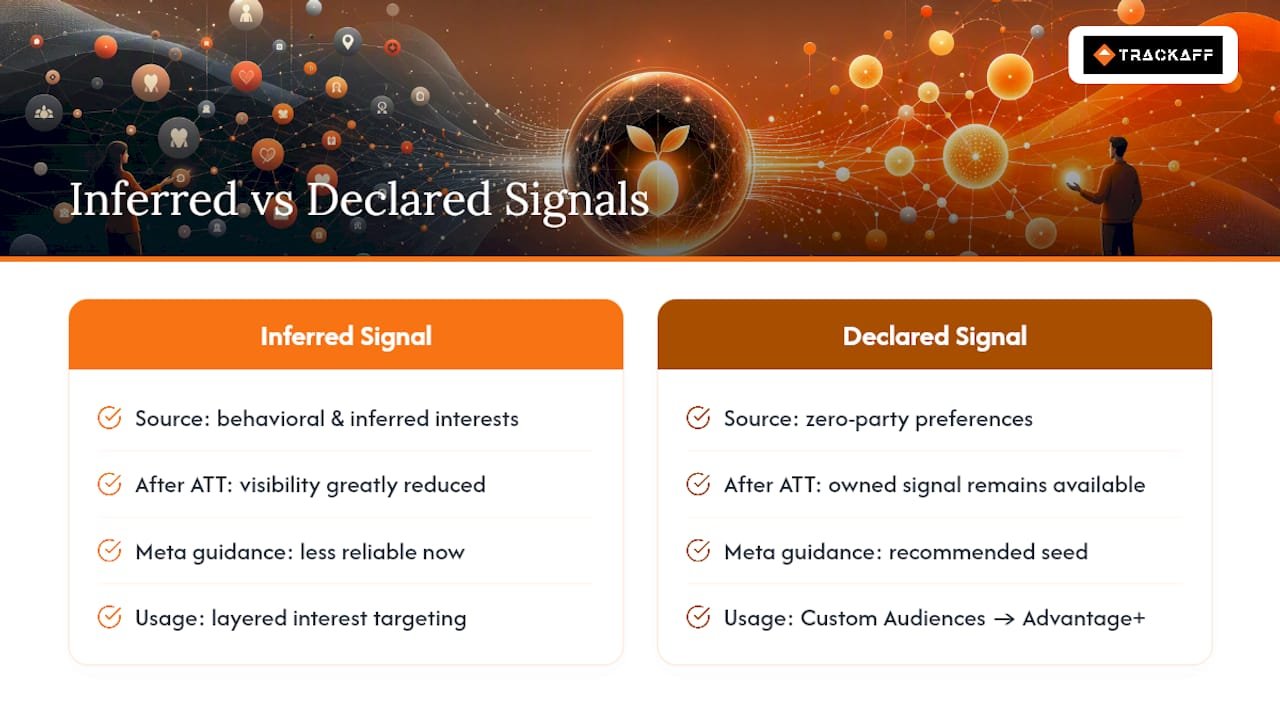
Apple’s App Tracking Transparency framework cut off a huge share of the behavioral signal Meta used to build detailed targeting. Detailed targeting exclusions have narrowed. Attribution windows shrank. The net effect: Meta has less visibility into what happens after the click, and advertisers who relied on inferred interest stacks are seeing that precision erode.
Meta’s own guidance has shifted accordingly, supported by tools like the Facebook Ad Generator from AmmarAI that help match messaging to declared segments and produce creative at scale. Ad targeting in 2025 and 2026 leans on owned signals, meaning Custom Audiences built from your own customer lists, seeded into Advantage+ rather than layered interest targeting. The algorithm still does the heavy lifting on expansion. It just needs a better seed than a guessed interest category.
Zero-party data by the numbers: Emarsys reports that most brands are already collecting zero-party data but failing to act on it, the disconnect between collection and activation, rather than a lack of collection tools, is the actual bottleneck for most advertisers.
That gap is the whole story. Advertisers who bother to collect preference data but stop before feeding it into an audience or a conversion event are leaving the highest quality signal available sitting in a spreadsheet.
How to Collect Zero-Party Data Without Annoying Your Audience
Collection tactics only work when there’s a reason for someone to bother answering. A shopper won’t fill out four fields for nothing. Offer a discount code, a personalized recommendation, or early access, and completion rates change immediately. That’s the value exchange principle behind every format below.
- Quizzes. A short “find your product match” quiz on a landing page doubles as segmentation and as a lead magnet. Map each answer to a CRM field on submission.
- Preference centers. Let existing subscribers choose categories, frequency, and content type. This is the highest-accuracy source because it’s self-maintained.
- Post-purchase surveys. Ask one question right after checkout, while intent is fresh: “What made you choose this?” or “Who’s this for?”
- Multistep popups. Break a single form into two or three micro-questions instead of one long one. Drop-off is lower when each step feels small.
- Chat and DM flows. A Messenger sequence triggered by a Story reply can ask a single qualifying question before handing the contact to a human or a nurture flow.
- Story stickers and comment keyword automations. A poll sticker or a “comment SIZE for sizing help” prompt captures declared intent directly inside the Meta ecosystem, though platform timing rules apply: one private reply per comment within seven days, and a 24 hour window once a DM thread opens.
For in-Meta collection specifically, Lead Ads and Instant Forms let you ask two or three qualifying questions without sending traffic off-platform, which keeps cost per lead lower. For site-based capture, quizzes and popups work better when timed to intent, a popup on exit intent performs differently than one that fires on page load, and both need their field names to match your CRM schema exactly, or the sync breaks quietly.
Pro Tip: Don’t ask everything at once. Progressive profiling, one or two questions per touchpoint spread across several visits, produces higher completion rates and richer profiles than a single long form, because no individual ask feels like a toll booth.
Turning Declared Data Into Meta Audiences and Server-Side Signals
Collection is only half the job. The data has to become something Ads Manager can use, which means segmenting, uploading, and pairing it with reliable conversion reporting.
Start by naming segments the way you’d name a campaign, specific enough that six months from now you remember what’s in it:
- “Preference: Budget shoppers, quiz respondents Q1”
- “Intent: Gift buyers, post-purchase survey”
- “Category: Skincare, dry skin, preference center”
Each of those uploads as a Custom Audience built from a customer list, matched by email or phone. Meta hashes the match keys on upload, so a properly hashed CSV or an API-based push through a CRM integration keeps the data privacy-preserving in transit.
Once the audience exists, seed it directly into Advantage+ rather than only building a 1% lookalike. Advantage+ expands from whatever signal you give it, and a declared-preference list is a stronger seed than an inferred interest stack, because every person in it opted into that category on purpose.
The other half of activation is proving the conversion actually happened. Pixel data alone misses events that occur off-site, a phone call, a form fill on a partner page, a deposit confirmed days later. Setting up the Conversions API to report those events server-side, deduplicated against the Pixel using a shared event ID, closes that gap. A specialized server-side reporting tool can handle that layer directly, capturing the post-click event and pushing it back to Meta so the algorithm optimizes toward actual buyers instead of just form submissions.
A reasonable sequencing: build the segment, upload it as a Custom Audience, confirm CAPI events are flowing and deduplicated, then hand the segment to Advantage+ and watch performance for two to three weeks before adjusting.
Privacy and Consent Rules for Declared Preferences
Zero-party data is still personally identifiable information the moment it includes an email, phone number, or name, and it creates the same disclosure and security obligations as any other PII you hold.
At minimum, the collection form needs to say what the data is for, whether it’s shared with a third party (including Meta, for audience matching), and how long it’s kept. Vague language like “we may use your data to improve your experience” doesn’t meet that bar.
Operationally:
- Hash sensitive fields before they leave your database, both at rest and in transit.
- Restrict access to the CRM fields that feed Custom Audience uploads to the people who actually build the audiences.
- Set a retention window and actually delete data past it. Indefinite retention is a liability, not a feature.
- Loop in legal or a data protection lead before launching any new form that collects new categories of data, not after.
A short checklist line on the form itself, “used to personalize offers, shared with our ad platforms for matching, deleted after 24 months”, covers most of what a reviewer will ask for later.
A Practitioner’s View: Closing the Post-Click Gap
Collecting the preference is the easy part. The harder problem is proving what happened after someone clicked the ad, especially for businesses where the real conversion (a purchase, a deposit, a signed contract) happens off-site, sometimes days later.
Pixel tracking stops at the click. What matters to a media buyer is the deposit or the purchase that closes three days after that click, and standard tracking has no way to report that back to Meta with any reliability.
A branded post-click form that sits inside the funnel after the click captures the actual outcome—purchase, deposit, registration—and reports it through the Conversions API. That closes the gap between “someone clicked” and “someone bought,” with deduplication against the Pixel so Meta isn’t double-counting. The operational benefit shows up as better match quality on the audience side and a campaign-level view of attribution that isn’t guessing based on last-click data alone.
The Real Bottleneck Isn’t Collection, It’s Follow-Through
Most of the zero-party data conversation online focuses on forms, quizzes, and preference centers, as if the hard part is getting someone to answer a question. It isn’t. The hard part, and the part most guides skip, is what happens after the data lands in a spreadsheet nobody connects to an ad account.
Advertisers who treat zero-party collection as a checklist item end up with rich CRM fields and flat campaign performance, because nothing declared ever reaches Ads Manager as a Custom Audience or a CAPI event. The conventional advice stops at “ask better questions.” The actual leverage is in the pipeline after the answer: hashing it correctly, naming the segment so someone remembers what it is, seeding Advantage+ instead of guessing at interest targeting, and making sure the conversion that eventually happens gets reported back with the same rigor as the click.
If you’re prioritizing one thing first, it’s not a fancier quiz. It’s building the server-side reporting layer so that whatever preference data you do collect has somewhere real to go. Everything else is optimization on top of that foundation.
— Terry
Get Reliable Post-Click Reporting With Trackaff
This solution addresses the gap this guide describes: the distance between a Meta click and the deposit, purchase, or signup that actually happens off-site.
The branded post-click form fits into the existing funnel, captures the real conversion event, and reports it back to Meta through the Conversions API, deduplicated against the Pixel so match quality and campaign-level attribution both improve. CRM webhook support means declared preference data and conversion events can flow into the same reporting pipeline instead of living in separate systems.
A practical first 30 days might include connecting one funnel, verifying CAPI events are deduplicating correctly against Pixel data, then comparing cost per acquisition against prior reporting methods before rolling it out across additional campaigns. Start a free trial to see whether your reported conversions match what Meta’s algorithm needs to optimize toward real buyers.
Sources
- What Is Zero-Party Data? A Guide to Collection, Activation, and Real Results — Emarsys / SAP
- Facebook ad targeting: guide to audiences and recent changes — Hootsuite
FAQ
What does zero-party data mean?
Zero-party data is information a customer deliberately and proactively shares with a brand, such as a stated preference, a quiz answer, or a declared purchase intent, rather than data inferred from behavior.
How do I stop Meta from collecting my data as an advertiser?
You can’t fully stop Meta from collecting standard platform signals, but you control what you send it. Limiting Pixel events and relying only on data customers explicitly consented to share keeps your own data practices privacy-forward, even as platform-level collection continues.
What is the difference between zero-party and first-party data?
Zero-party data is explicitly stated by the customer, such as a preference center selection. First-party data is observed by the business, such as purchase history or site visits, without the customer directly declaring it.
Why does Facebook seem to use so much data now?
Meta relies more heavily on owned signals like Custom Audiences and Advantage+ seeding because privacy changes such as Apple’s App Tracking Transparency reduced the behavioral data it can infer, pushing the platform toward whatever declared and server-reported data advertisers choose to share.
How does this solution help with zero-party data activation on Meta?
It reports post-click conversions tied to declared segments, like purchases or deposits, back to Meta through the Conversions API, so campaigns optimize toward the audiences that actually convert rather than just the ones that click.
Recommended
Your deals close off the pixel. Meta never finds out.
TrackAff reports your real conversions back to Meta the moment they happen, tied to the exact ad that produced them. 10-minute setup, no code.
Start free 14-day trial → Card required · No charge until day 14 · Cancel in one click