
- trackaffadmin
- 0 Comments
- 23 Views
Fix tracking first: implement Conversions API with event deduplication, then choose an attribution window that matches your sales cycle, and confirm results with an incrementality test. That order matters more than which model you eventually pick. Skip the CAPI step and every downstream decision, from budget shifts to creative testing, gets built on incomplete data.
TL;DR:
- Implement Conversions API with event deduplication before adjusting attribution windows to ensure data completeness and accurate optimization.
- Use a 7-day click window for most campaigns, but extend it with offline CRM data for longer sales cycles like B2B purchases.
- Recognize that Meta numbers often exceed GA4 due to view-through attribution and modeled conversions, which answer different questions.
- Monitor Event Match Quality scores weekly and fix low match parameters to improve data reliability and campaign performance.
- Use off-site conversion reporting tools like TrackAff to capture outcomes beyond your website and reduce undercounting in long sales processes.
Table of Contents
- What Attribution Modeling for Facebook Ads Actually Means
- Attribution Windows and Models: Which One Fits Your Sales Cycle
- Why Meta Numbers Never Quite Match GA4
- Practical Setup Checklist: Pixel, CAPI, and Event Match Quality
- Choosing Windows and Models for Your Campaigns
- Measuring Incrementality: Holdout Tests and MMM
- How TrackAff Closes the Gap Between Clicks and Real Conversions
- What I’d Prioritize First, and What I’d Skip
- Recover Off-Site Conversions With TrackAff
- Primary Sources for Configuration and Deeper Reading
- Sources
- FAQ
What Attribution Modeling for Facebook Ads Actually Means
Meta’s attribution system runs on three separate settings, and confusing them is the most common mistake marketers make when reading a Facebook ads report. The attribution window sets how long after an ad interaction a conversion still counts. The attribution action defines which interaction starts the clock, a click or a view. The attribution model determines how credit gets assigned when several ads touch the same person before they convert. Change any one of these and the numbers on your dashboard shift, even though nothing about your campaigns changed. Meta’s own documentation on attribution models and settings confirms that window choice also feeds directly into how the delivery algorithm optimizes, since it decides what counts as a “win” during learning.
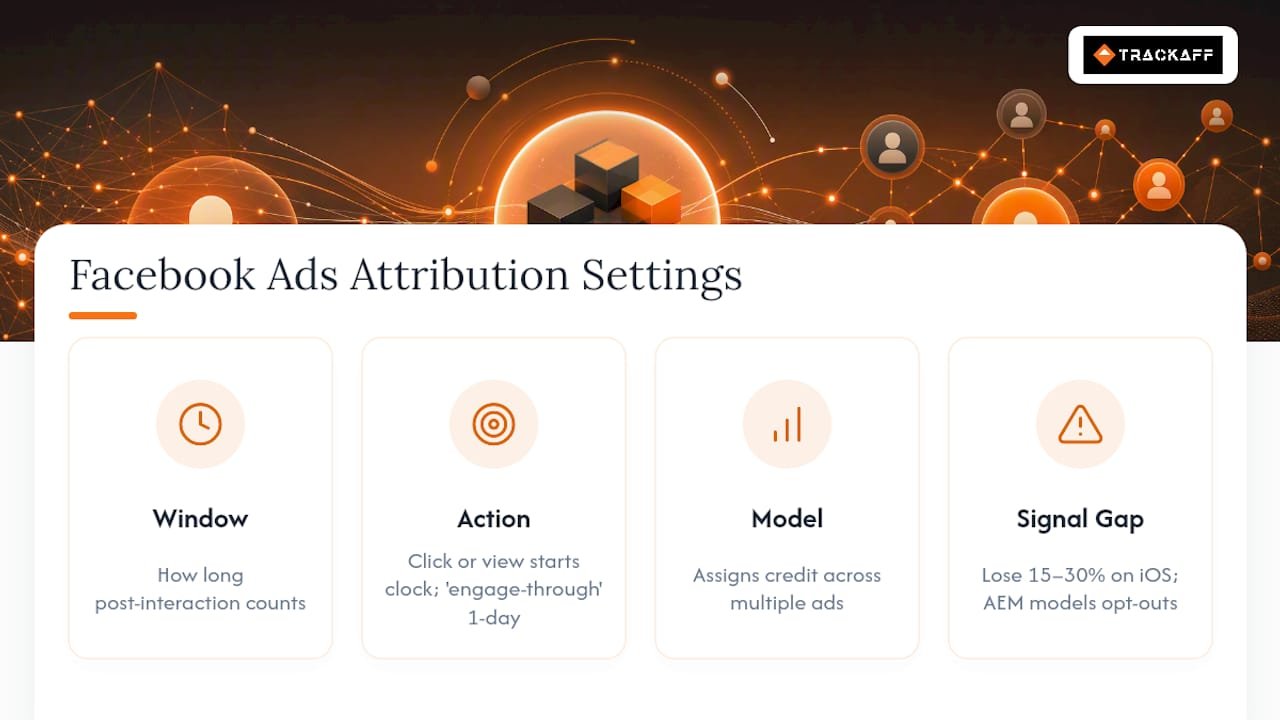
2026 has made this more consequential, not less. Meta retired its standalone Facebook Attribution tool back in 2021 and has steadily narrowed the windows available since, and the March 2026 click redefinition changed what actually counts as a click. Many interactions that used to register as click conversions, likes, shares, comments, now fall into a separate “engage-through” category with its own one-day window, as Meta explained in its social-first measurement update. That reclassification alone has shrunk reported conversions for accounts that leaned on social engagement rather than genuine link clicks.
Layer modeled conversions on top of this and the picture gets murkier. Aggregated Event Measurement (AEM) lets Meta report on iOS users who opted out of tracking by statistically estimating what likely happened, rather than recording an actual event. Those modeled numbers sit in the same dashboard as verified events, with no visual distinction.
The signal gap is real. Accounts without server-side tracking typically lose 15% to 30% of conversion events to iOS restrictions and browser blocking, before modeling ever tries to fill the hole back in.
Attribution Windows and Models: Which One Fits Your Sales Cycle
Meta currently offers a narrower set of windows than it used to, and each one tells the algorithm something different about what counts as success.
- 1-day click. Credits a conversion only if it happens within 24 hours of a click. This is the tightest, most conservative window, and it suits businesses selling low-consideration products where the buying decision happens fast.
- 7-day click. The default for most advertisers and the closest thing to a universal starting point. It captures the realistic gap between seeing an ad, thinking it over, and coming back to buy.
- 1-day view. Credits a conversion to someone who simply saw the ad, without clicking, within 24 hours. Useful for brand campaigns but easy to overstate if you are not watching it separately from click-based credit.
- Engage-through (1-day). The newer bucket for likes, comments, shares, and video engagement that Meta no longer folds into standard click attribution.
The tradeoff shows up fast once you compare an impulse purchase against a long sales cycle. A $30 skincare product sold on a landing page might convert within minutes of a click, so a 1-day click window captures almost everything real and reported ROAS stays close to true ROAS. A B2B software demo booked three weeks after the first ad impression tells a different story entirely: a 1-day window would undercount conversions so badly that Meta’s algorithm would starve the exact audience segments actually producing pipeline, because it never sees the delayed payoff.
Pro Tip: If your sales cycle runs longer than seven days, don’t just widen the window and call it solved. Pair a 7-day click window with a CRM-fed offline event so Meta eventually learns from the deals that closed weeks later, not just the ones it can see in real time.
For quick decision-making: ecommerce with same-day checkout defaults to 7-day click, lead-gen with a sales team follow-up needs 7-day click plus offline conversion imports, and B2B with multi-week cycles should treat Meta’s window as a leading indicator and lean on CRM-reported closed deals for the real number.
Why Meta Numbers Never Quite Match GA4
Meta and GA4 measure fundamentally different things, so expecting them to match is the wrong goal from the start. Four structural differences explain almost every gap:
- View-through attribution. Meta counts people who saw an ad and converted without clicking; GA4 generally does not.
- Modeled conversions. For opted-out iOS users, Meta estimates events statistically rather than recording them directly.
- Timestamp versus session logic. Meta attributes to the moment of ad interaction, while GA4 attributes based on session activity, which can land a conversion in a different day or even a different channel entirely.
- Cross-device journeys. Someone who clicks an ad on their phone and buys later on a laptop shows up differently depending on which platform’s identity resolution catches the link.
According to AdAdvisor’s analysis of Meta and GA4 discrepancies, Meta’s reliance on view-through credit and modeled data is the single biggest reason its conversion counts routinely run higher than GA4’s session-based numbers. Neither platform is “wrong.” They are answering different questions.
The practical fix is deciding which tool answers which question. Use Meta’s attribution to train the algorithm during active optimization, since that is the data it actually bids against. Use GA4 or a marketing mix model for cross-channel revenue reconciliation, board reporting, or any decision that spans more than one ad platform. Trying to force Meta and GA4 into agreement wastes time that’s better spent fixing the tracking gaps that widen the difference in the first place.
Practical Setup Checklist: Pixel, CAPI, and Event Match Quality
Recovering lost signal is mostly a sequencing problem. Do these steps in order and skip none of them.
- Install the Meta Pixel on every page in the funnel, not just the confirmation page.
- Enable Advanced Matching so the pixel automatically hashes and sends available customer data like email and phone.
- Implement server-side Conversions API (CAPI) so conversion events fire from your server, independent of browser restrictions and ad blockers.
- Send a shared event_id on both the Pixel and CAPI events for the same conversion, so Meta’s deduplication logic can merge them into one event instead of counting it twice.
- Map CRM webhooks so offline conversions, sales that close days or weeks after the click, feed back into Meta automatically.
- Monitor Event Match Quality and deduplication rate in Events Manager weekly, not quarterly.
- Fix low-match parameters by adding missing hashed identifiers (email, phone, external ID) rather than accepting a low score as a ceiling.
For diagnostics, aim for an Event Match Quality score in the 7 to 8 range; implementers generally treat EMQ scores above 6 to 7 as the threshold where matching starts producing reliably better optimization. A healthy setup should also show a high deduplication rate between Pixel and CAPI events, meaning most conversions are being caught by both systems and correctly merged rather than double-counted.
Pro Tip: If your reported conversions suddenly spike after adding CAPI, check your dedup rate before celebrating. A spike paired with a low dedup rate usually means you’re double-counting the same purchase, not suddenly converting better.
The most common failures worth checking first: missing event_id causing double-counted purchases, unhashed PII fields getting silently dropped instead of matched, and CAPI events firing with stale or missing timestamps that confuse the attribution window entirely.
Choosing Windows and Models for Your Campaigns
Window choice is not a set-and-forget setting. It actively shapes which audiences the algorithm decides to chase.
- Average decision time under a day: default to 1-day click. Anything longer just adds noise the algorithm has to guess around.
- Average decision time of several days to two weeks: use 7-day click, Meta’s practical default for most retail and service businesses.
- High-ticket or considered purchases spanning weeks: widen to 7-day click plus offline CRM events; a click-only window this short will systematically undercount your best campaigns.
- Brand awareness or top-of-funnel objectives: add 1-day view separately so you can see its contribution without letting it blur into your performance numbers.
A shorter window forces the algorithm to optimize only for what it can quickly verify, which can push spend toward audiences that convert fast but spend less. A longer window, backed by offline event imports, lets the algorithm chase your actual best customers even when they take three weeks to say yes.
Ask yourself three questions before touching a window setting: How long does a typical customer actually take to buy? Does your CRM already send closed deals back to Meta? Are you optimizing for immediate ROAS or for pipeline quality? The answers point to the window, almost automatically.
Measuring Incrementality: Holdout Tests and MMM
Attribution reports tell you what Meta thinks happened. Incrementality testing tells you what would have happened anyway, which is the only way to know if your spend is actually causing sales.
- Randomized holdout tests in Ads Manager split your audience, showing ads to one group and withholding them from a matched control group, then compare conversion rates between the two.
- Meta’s incremental attribution, available as a measurement option since 2025, applies this same lift logic at the platform level to estimate causal conversions rather than correlated ones.
- Media mix modeling (MMM) works better at larger, multi-channel budgets where a clean single-platform holdout is hard to isolate; see this guide to media mix modeling for how the statistical approach differs from platform-level lift tests.
Run a holdout test whenever you make a major setup change, a new campaign structure, a big budget shift, or a fresh audience strategy, since that’s when your existing attribution data is least trustworthy. Save quarterly MMM analysis for the moments you need to justify budget allocation across channels, not just within Meta. Reading the results requires patience: a lift test needs enough volume and enough time to reach statistical significance before you trust the confidence interval it spits out, and a promising early trend is not the same as a validated result.
How TrackAff Closes the Gap Between Clicks and Real Conversions
Standard Pixel and CAPI setups still stop at the events your own site can see. TrackAff addresses what happens after that, the purchases, deposits, or registrations that occur off-site or downstream in a broker’s, agency’s, or sales team’s own system.
The approach works in sequence: a branded form sits inside your existing funnel, captures the actual post-click outcome, then reports that event server-side to Meta through Conversions API. Deduplication and CRM webhook integration keep that event from colliding with anything your Pixel already captured, so Meta’s algorithm learns from a clean, complete signal instead of a partial one.
According to TrackAff’s own materials, businesses using this method report improved Event Match Quality, more reliable conversion events for the optimization engine to train against, and campaign efficiency gains that have translated into ROAS improvements of up to 70% for some advertisers. Those figures reflect vendor-reported results, not an independent audit, but the mechanism behind them lines up with everything the EMQ and deduplication data above already points to: Meta optimizes better when it sees more of what actually happened after the click.
What I’d Prioritize First, and What I’d Skip
Most attribution advice tells you to pick the “right” model as if that decision alone fixes reporting. It doesn’t. A perfectly chosen 7-day click window optimizing against incomplete, undeduplicated data will still mislead you, just more confidently.
Run technical health checks weekly: Event Match Quality and deduplication rate, not once a quarter when something already looks broken. Run a lift test or fast holdout any time you change something structural, a new funnel, a new audience strategy, a shifted budget tier. Save full media mix modeling for quarterly budget conversations, when the question has moved beyond one platform.
Treat Meta’s attribution as what it is built to be, an optimization engine, not a finance report. Let GA4 or MMM handle reconciliation across channels. The businesses getting this right in 2026 aren’t the ones with the cleverest model. They’re the ones who fixed their signal before arguing about which window to trust.
— Terry
Recover Off-Site Conversions With TrackAff
Pixel and CAPI still miss the conversions that happen after your funnel hands off to a sales call, a broker, or a manual approval step. TrackAff closes that gap with a branded form built into your existing funnel that captures the real outcome, purchase, deposit, or registration, and reports it back to Meta server-side through Conversions API with deduplication built in.
That means your campaigns get optimized against buyers who actually converted, not just leads who filled out a form and went quiet. Teams already running Meta ads and losing signal to iOS restrictions or long, multi-step sales cycles get the most out of this setup, since CRM webhook integration lets closed deals feed back into Meta automatically, days or weeks after the original click. If your attribution numbers have felt unreliable since the 2026 tracking changes, that’s usually a signal problem, not a model problem. Start a free trial with TrackAff and see what your Event Match Quality looks like once off-site conversions are actually reported.
Primary Sources for Configuration and Deeper Reading
- About Attribution Models and Attribution Settings, Meta Business Help Center
- About Actions Attributed to Your Ad, Meta Business Help Center
- Simplifying Ad Measurement for a Social-First World, Meta
- Facebook Conversions API: Technical Implementation
Sources
- About Attribution Models and Attribution Settings
- Meta Ads Attribution Models: The Complete Guide 2026
- Meta Ads Attribution: Windows, Why Meta and GA4 Never Agree, and Which Number to Trust | AdAdvisor
- About actions attributed to your ad
FAQ
What Is Attribution Modeling in Facebook Ads?
Attribution modeling is the set of rules Meta uses to decide which ad interaction, and which attribution window, gets credit when a conversion happens, combining the attribution window, action, and model into one reported number.
Can You Give an Example of an Attribution Model?
A common example is last-click attribution within a 7-day window: if someone clicks two different ads and converts within a week, Meta credits the ad clicked closest to the conversion, unless a data-driven or multi-touch model is applied instead.
What Does 7-Day Click, 1-Day View Attribution Mean?
It means Meta counts a conversion if it happens within seven days of a click or within one day of an ad view, whichever interaction occurred, giving credit to both engaged clickers and passive viewers.
Which Attribution Model Is Best for Facebook Ads?
There is no universal best model. A 7-day click window works for most retail and lead-gen businesses, while longer sales cycles need that window paired with CRM-fed offline conversions, and tools like TrackAff help fill in the off-site outcomes standard tracking misses.
Recommended
Your deals close off the pixel. Meta never finds out.
TrackAff reports your real conversions back to Meta the moment they happen, tied to the exact ad that produced them. 10-minute setup, no code.
Start free 14-day trial → Card required · No charge until day 14 · Cancel in one click