
- trackaffadmin
- 0 Comments
- 30 Views
Apple’s App Tracking Transparency framework cut off reliable IDFA access for non-consenting users, forcing Meta into modeled, aggregated measurement through Aggregated Event Measurement and SKAdNetwork. Reported conversions dropped and attribution windows shrank. The single highest-priority fix is verifying your domain and pairing your pixel with server-side conversion reporting, through the Conversions API or a tool like TrackAff, to restore the optimization signal Facebook lost.
TL;DR:
- Verifying your domain and pairing your pixel with server-side event delivery via the Conversions API or TrackAff is essential to restore meaningful attribution signals.
- Limiting your conversion tracking to only eight prioritized AEM events per domain prevents reporting instability caused by event ranking and resets.
- Moving to a seven-day attribution window and recalibrating automation rules helps account for delayed and less granular data, reducing misinterpretation of campaign performance.
- Implementing post-click server-side forms that feed data directly into your CRM and reporting systems improves the accuracy of conversion counts and reduces wasted ad spend.
- Expect measurement disruptions such as smaller retargeting pools, underreported ROAS, and less detailed audience insights until you align your tracking setup with the new privacy standards.
Table of Contents
- What Changed: Apple’s ATT and IDFA Mechanics
- How Meta Adapted: AEM, SKAdNetwork, and New Attribution Defaults
- Real Campaign Impacts You’ll See in Your Account
- What Should You Fix First to Recover Measurement?
- How Server-Side Post-Click Capture Works in Practice
- How Do You Test and Validate Data Quality After These Changes?
- Three Priorities for This Quarter
- Get Post-Click Tracking Working With TrackAff
- Sources
- FAQ
What Changed: Apple’s ATT and IDFA Mechanics
Apple’s App Tracking Transparency (ATT) framework arrived with iOS 14.5 and changed one thing above all else: apps now need explicit permission before they can access the Identifier for Advertisers, or IDFA, on a user’s device. Without that permission, the IDFA returns a string of zeros, which is functionally the same as having no identifier at all.
Apple defines “tracking” broadly. It covers linking data collected from your app with data from other companies’ apps, websites, or offline sources for advertising or measurement purposes, and it covers sharing user or device data with data brokers. If your app does any of that, you need to trigger the ATT prompt using Apple’s AppTrackingTransparency framework, and you need a purpose string, a short line of text explaining to the user why you want to track them.
Developers also carry a second obligation that gets less attention: App Store privacy disclosures. Every app in the App Store now has to declare what data it collects and how that data gets used, displayed on the product page before anyone even downloads it.
Opt-in rates vary sharply by app category, which matters more than most marketers realize when they’re sizing up expected data loss:
- Utility and productivity apps tend to see higher opt-in rates, since users perceive less risk in sharing device data with them.
- Social and entertainment apps often see lower opt-in, partly because users associate them more directly with ad targeting.
- Statista’s tracking of ATT opt-in behavior shows this variance is persistent, not a one-time launch effect.
That variance means a lookalike audience built from a fitness app’s user base behaves very differently than one built from a mobile game, even if both apps have similar install volumes.
How Meta Adapted: AEM, SKAdNetwork, and New Attribution Defaults
Meta didn’t have a way to keep deterministic, user-level tracking alive once ATT took effect, so it built two parallel systems instead. For web events, that’s Aggregated Event Measurement (AEM). For app install campaigns, it’s Apple’s own SKAdNetwork.
AEM aggregates conversion data at the campaign level rather than the user level, and it comes with a hard constraint: a limited number of conversion events per domain, ranked by priority. When a user triggers multiple events in one session, only the highest-priority event gets reported. Change that priority order and you trigger a short stability reset period, during which reporting gets unreliable and optimization can wobble.
SKAdNetwork has its own limits, and they’re stricter than most advertisers expect:
- Reporting is delayed, sometimes by hours or days, rather than near real-time.
- Data is aggregated at the campaign level, with no user-level breakdown.
- Demographic and creative-level granularity mostly disappears, per Meta’s own partner guidance.
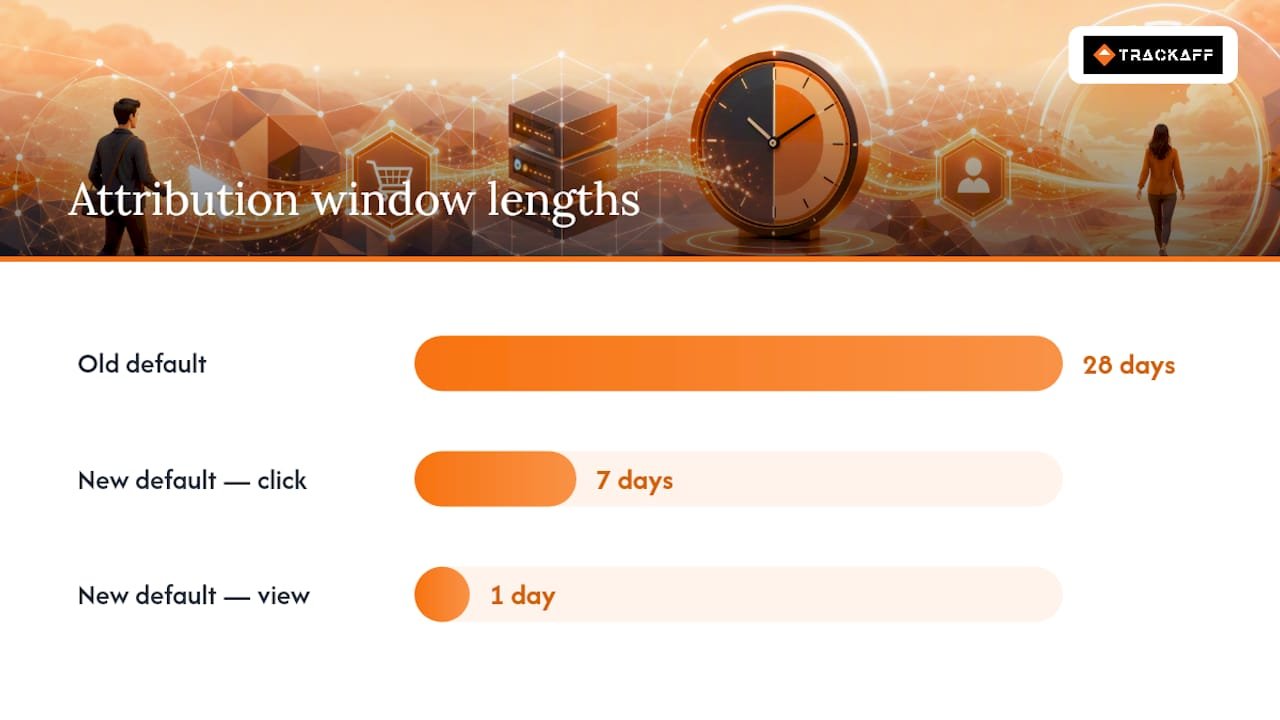
Attribution windows shrank too. Meta moved its default from the old 28-day click/1-day view standard to shortened attribution windows including 7-day click and 1-day view, with many advertisers now running 7-day click only. That single change alone can make a campaign’s reported conversions drop even when actual sales stay flat, simply because Meta is counting fewer days of activity.
You’ll also start seeing “modeled” conversions in Ads Manager. These are statistical estimates Meta generates to fill gaps left by missing device-level data, not raw counts. Industry analysis from AdExchanger frames AEM as legitimate privacy-compliant infrastructure rather than a broken stopgap, and that’s the right way to think about it: this is the new baseline, not a temporary workaround.
Real Campaign Impacts You’ll See in Your Account
The platform-level changes above translate into specific, observable symptoms inside Ads Manager. Here’s what shows up, roughly in order of how quickly you’ll notice it:
- Retargeting pools shrink. Fewer users carry a trackable IDFA, so custom audiences built from app or website behavior get smaller, and the deterministic user journey from ad click to purchase becomes harder to reconstruct.
- ROAS gets undercounted. Modeled and aggregated data tends to underreport real conversions, which biases your optimization decisions toward whatever the algorithm can actually see rather than what’s genuinely happening.
- Creative and demographic reporting thins out. Age, gender, and placement breakdowns become less reliable or disappear entirely for iOS-attributed conversions, making creative testing harder to evaluate.
- Audience Network monetization takes a hit. Publishers running Meta’s Audience Network see reduced fill rates and lower CPMs, since less targeting data means lower ad value across the whole network.
- Cross-account aggregation gets messier. Agencies managing multiple ad accounts for the same client often see inconsistent totals between platform reporting and their own analytics, because each system models the gaps differently.
Business Insider’s reporting on the fallout put real financial numbers behind this, documenting measurable revenue impact across the advertising ecosystem, not just anecdotal frustration from individual advertisers. If your dashboards look worse than your actual sales pipeline, that gap is the expected pattern, not a sign something’s broken on your end.
What Should You Fix First to Recover Measurement?
Not every fix matters equally, and doing them out of order wastes time. Here’s the priority sequence that gets you back to reliable optimization signal fastest.
Priority 1: Domain verification and server-side pairing. Verify your domain in Business Manager as an important foundational step. It’s a prerequisite for configuring AEM events and it establishes which business controls event prioritization for that domain. Once that’s done, pair your Meta pixel with server-side event delivery, whether through the Conversions API or a tool like TrackAff, and test event deduplication using a shared event ID and timestamp so the same conversion doesn’t get counted twice.
Priority 2: Configure your eight AEM events deliberately. You get a limited number of conversion events per domain, ranked by priority. Map those eight slots to the actions that actually matter to revenue, purchases, deposits, qualified leads, not vanity metrics like page views. When you do need to change priority order, batch the changes and expect a short stability reset period before reporting normalizes again.
Priority 3: Update attribution-window settings and automation rules. Move your reporting expectations to match Meta’s default 7-day click windows, and if you’re running automated rules based on ROAS or CPA thresholds, recalibrate them against the new windows before turning enforcement back on. Run a comparison period where you view both old and new windows side by side so you know exactly how much of any dip is measurement, not performance.
- Broaden prospecting targeting rather than narrowing it, since smaller iOS-attributed audiences make tight targeting less reliable.
- Build lookalike audiences from CAPI-enhanced match data, which tends to carry richer signal than pixel-only data.
- Accept that conversion signals will arrive slower but with better quality once server-side capture is running.
- Update your app’s privacy notices, purpose strings, and App Store disclosures to stay compliant with both Apple’s requirements and your own consent messaging.
Pro Tip: Run your comparing-window test for at least two full weeks before making budget decisions off it. Attribution data stabilizes slowly, and a five-day snapshot will lie to you.
For a broader look at how these constraints reshape lead generation strategy end to end, Citric Media’s guide to Facebook ad execution walks through campaign structure decisions that pair well with the fixes above.
How Server-Side Post-Click Capture Works in Practice
Server-side tracking solves a specific problem: it moves conversion reporting off the browser, where ad blockers, cookie restrictions, and ATT opt-outs degrade signal, and onto your server, where that interference doesn’t reach. Sending events server to server improves event matching quality, but it does not override an ATT opt-out. If a user declined tracking, they remain untrackable at the device level regardless of how sophisticated your server-side setup is.
Some tracking tools address the gap most discussions skip: what happens after the click. Meta’s pixel and Conversions API both stop at the events your website fires, but many real conversions happen off-site, over a phone call, inside a CRM, at a physical deposit or registration step. Certain platforms place a branded form inside marketing funnels to capture those post-click events (purchases, deposits, registrations) and report them back to Meta, so the algorithm can optimize around actual buyers instead of stopping at a lead form submission.
Businesses using this kind of guaranteed sales tracking see improved targeting and lower cost per acquisition, with reported notable ROAS improvements once optimization shifts from leads to confirmed conversions.
A practical integration checklist looks like this:
- Place the branded form at the exact point in your funnel where a lead becomes a customer, not earlier.
- Wire the form to your CRM or existing webhook so conversion data flows automatically, without manual entry.
- Map each captured event to one of your eight AEM priority slots, matching event names exactly so deduplication works.
- Test deduplication against your existing pixel and Conversions API events before going live, using shared event IDs.
- Review real integration patterns for how this looks across different funnel types before building your own.
How Do You Test and Validate Data Quality After These Changes?
Confirming your fixes actually worked requires a different testing approach than the pre-ATT era allowed.
- Skip user-level holdout tests that rely on IDFA. Partial iOS signal makes those holdouts unreliable; test at the campaign or geographic level instead.
- Use Meta’s comparing-windows feature in Ads Manager to see how attribution-window changes affect your numbers before you commit to new automation rules, and read the “modeled” annotations as estimates, not raw counts.
- Run offline matchbacks weekly, reconciling your CRM’s actual sales against what Meta reported, and treat event lag under 48 hours as acceptable; longer than that signals a pipeline problem.
- Set alert thresholds for anything beyond a 15 to 20 percent swing in reported conversion volume week over week, since that’s usually the point where it’s worth investigating rather than assuming normal variance.
Pro Tip: Keep a rolling log of every attribution-window or event-priority change you make, with dates. When reporting looks strange three days later, that log is the fastest way to tell if it’s your last change or a platform-side shift.
Three Priorities for This Quarter
Fix measurement integrity first. Verify your domain, pair your pixel with server-side reporting, and stop treating that as optional. Then widen prospecting while you lean on higher-quality signal to guide optimization, and handle event-priority changes conservatively. Expect that 72-hour reset every time, and plan around it rather than fighting it.
— Terry
Get Post-Click Tracking Working With TrackAff
Everything in this article points to the same conclusion: server-side capture is the fix, but most setups stop at pixel and Conversions API events, missing everything that happens after the click, phone sales, deposits, registrations completed off-site. TrackAff closes that specific gap with a branded form built into your funnel, reporting confirmed conversions back to Meta so campaigns optimize around real buyers.
TrackAff’s approach has already been applied across different funnel types, including mobile app campaigns, where post-install events are notoriously hard to capture cleanly under SKAdNetwork’s limits. Businesses running this setup report increased closing ratios and less wasted ad spend, since Meta’s algorithm finally sees the conversions that used to disappear between the click and the sale.
If your Ads Manager numbers have looked worse than your actual pipeline since iOS 14, that gap is exactly what TrackAff was built to close. Start a free trial at TrackAff and connect your first funnel to see confirmed conversions flow back into your campaigns within days.
Sources
- About iOS 14 updates – Apple Support (IS)
- App Store privacy and data use – Apple Developer
- Preparing our Partners for iOS 14: Actions for Partners and Mobile Web Advertisers
- Facebook soldiers on post-ATT with much-needed tweaks to its measurement suite | AdExchanger
- How Apple’s ATT privacy update derailed Facebook – Business Insider
FAQ
How Do I Turn Off Facebook App Tracking on My iPhone?
Go to Settings, then Privacy & Security, then Tracking, and toggle off “Allow Apps to Request to Track.” You can also deny the prompt individually the first time the Facebook app requests permission.
Is iOS 14 Still Usable in 2026?
iOS 14 still functions, but Apple has released several major versions since, and running an outdated iOS version means missing security patches and losing compatibility with newer app features, including current Facebook app requirements.
How Can I Tell if Someone Is Tracking Me on Facebook?
You can’t see individual tracking attempts directly, but checking your ad preferences under Facebook’s Settings shows which advertisers have uploaded your contact information, and your iPhone’s Privacy Report under Settings shows which apps have requested tracking permission.
What Version of iOS Is Required for Facebook?
Meta updates minimum iOS requirements periodically alongside its app updates; current requirements are listed on the app’s App Store page, and running a recent iOS version ensures full compatibility with ATT-related privacy prompts and features.
Does Server-Side Tracking Bypass ATT Opt-Outs?
No. Server-side tracking through the Conversions API or a tool like TrackAff improves event matching and reduces browser-based signal loss, but it still respects a user’s ATT decision. Users who opt out remain untrackable at the device level.
Recommended
Your deals close off the pixel. Meta never finds out.
TrackAff reports your real conversions back to Meta the moment they happen, tied to the exact ad that produced them. 10-minute setup, no code.
Start free 14-day trial → Card required · No charge until day 14 · Cancel in one click