
- trackaffadmin
- 0 Comments
- 31 Views
The Facebook event ID is the advertiser-defined identifier Meta uses, alongside event_name, to deduplicate a single conversion when it arrives from both the browser Pixel and the Conversions API. Send the exact same stable ID from both paths. Watch the spelling: Pixel expects eventID, CAPI expects event_id. If those two values don’t match character for character, Meta counts the same purchase twice.
TL;DR:
- Using the same exact event_id on both Pixel and Conversions API is crucial; mismatched or inconsistent IDs cause duplicate event counts and skewed data.
- Event_id should be a stable, deterministic value tied to your existing records like orderID or leadID, not randomly generated each time.
- Confirm that event_id is sent as a top-level field at the correct payload location and maintains consistent spelling across systems, such as eventID and event_id.
- Failures in deduplication often stem from timing issues, mismatched spelling, or duplicate generation points, which can be troubleshot by verifying payload shape and ID consistency.
- For off-site conversions, relying on tools like Trackaff ensures event_id persistence and accurate reporting, preventing duplication and improving data integrity.
Table of Contents
- What a Facebook Event ID Does and Why Deduplication Depends On It
- Sending event_id Correctly: Pixel vs. Conversions API
- Best Practices for Generating and Persisting Event IDs
- Troubleshooting Deduplication Failures Step by Step
- How to Find or Verify a Facebook Event ID
- Why Deterministic Event IDs Are the Real Fix, Not a Workaround
- Get Reliable Server-Side Reporting Without Rebuilding Your Stack
- Where to Verify These Field Names and Examples
- Sources
- FAQ
What a Facebook Event ID Does and Why Deduplication Depends On It
An event_id doesn’t identify a person or a session. It identifies one specific occurrence of an event, like a single checkout completion, separate from anything you already have tracking who did it or when. That distinction matters more than most implementation guides admit, because a lot of broken deduplication comes from developers treating event_id like a user ID or a click ID.
Meta’s own deduplication documentation lays out the mechanism plainly: the platform matches events using the pair of event_name and event_id sent within a defined window. If both the Pixel and the server fire a “Purchase” event with the identical ID, Meta merges them into one conversion for reporting and optimization. If the IDs don’t match, or one path never sends one at all, you get two separate purchase records for a single sale.
That single mismatch has real downstream consequences:
- Inflated conversion counts feed the algorithm wrong signals about what’s working.
- Cost-per-result metrics look artificially better than reality.
- Campaign optimization skews toward audiences and creative that didn’t actually convert twice.
Sending event_id Correctly: Pixel vs. Conversions API
The two implementations look similar on paper and diverge in exactly the spot that breaks most integrations. On the browser side, fbq takes the event ID as a separate object, the fourth argument, not buried inside your event properties. A working example looks like this:
fbq('track', 'Purchase', {value: 12.00, currency: 'USD'}, {eventID: 'purchase.123'});
On the server side, the Conversions API’s server-event parameters treat event_id as a top-level field in the payload, sitting next to event_name, not nested inside user_data or custom_data:
{
  "event_name": "Purchase",
  "event_id": "purchase.123",
  "event_time": 1700000000,
  "user_data": { ... },
  "custom_data": { "value": 12.00, "currency": "USD" }
}
A Stack Overflow thread on sending event_id with the Pixel documents this exact pattern and the confusion around it. The three mistakes that show up over and over:
- Wrong nesting. Developers drop
event_idinsidecustom_dataoruser_dataon the server side instead of at the top level, where Meta’s parser expects it. - Spelling drift.
eventIDon the client andevent_IDoreventIdon the server look close enough to a human eye but fail an exact string match. - Independent generation. The client generates its own random ID and the server generates a different one for the same conversion, which defeats deduplication before it starts.
Pro Tip: Generate the ID once, server-side, at the moment the conversion is confirmed. Return that same value to the browser in your success response, then fire the Pixel event with it. Never let two systems invent their own ID for the same sale.
Best Practices for Generating and Persisting Event IDs
Deterministic beats random every time. The most reliable pattern ties the event_id to something your business already generates and stores, rather than a fresh UUID conjured independently by two systems that don’t talk to each other.
- Use an existing
orderIDorleadIDas the event_id, or a stable prefix likepurchase.{orderID}. - If you need a synthetic value, derive it from a deterministic hash:
sha256(orderID + event_name + salt). - Avoid pairing independently generated random UUIDs or timestamp-only strings on client and server. They will not match.
- Persist the event_id alongside the conversion record in your database the moment it’s created, so retries and delayed server-side sends reuse the exact same value instead of minting a new one.
- Hash the final value before it leaves your system if the raw ID is sequential or exposes internal order volume to anyone inspecting network requests.
If your infrastructure needs strict ordering across a stream of events, a sortable format like a ULID or Snowflake-style ID is worth considering over a plain UUID, since it stays lexicographically ordered even across distributed servers, a detail covered in guidance on idempotent event ID generation.
Pro Tip: Treat the event_id like a receipt number, not a password. It should be boring, reproducible, and traceable back to one specific transaction in your own records.
Troubleshooting Deduplication Failures Step by Step
The most common warning you’ll see in Events Manager reads something close to “Purchase Event Missing Some Deduplication Parameters.” Nine times out of ten, that means one of the two paths never sent an event_id, or sent one that doesn’t match its counterpart.
Run through this order when it happens:
- Check payload shape first. Confirm event_id sits at the top level of the CAPI JSON body, not inside
user_dataorcustom_data. - Check spelling next. Compare
eventIDin your Pixel call againstevent_idin your server call, byte for byte. - Check timing. Meta’s dedup window is generous but not infinite; a server event sent hours after the browser event may fall outside the match window.
- Check for duplicate generation points. Look for any code path, especially retry logic, that regenerates a new ID instead of reusing the persisted one.
- Check retries and network resends. A flaky connection that triggers a second Pixel fire with a new random ID will produce a second unmatched event.
Meta’s own Payload Helper tool and the “Event deduplication” panel inside Events Manager both show you which parameters matched and which didn’t, event by event. A dedup rate that’s consistently low, rather than occasionally low, usually points to a systemic placement or spelling bug rather than a timing fluke, and it’s worth fixing at the code level before you trust any campaign optimization built on top of that data.
How to Find or Verify a Facebook Event ID
Sometimes the question isn’t how to send an event_id. It’s how to locate the ID for an existing Facebook event, or confirm that a number you have actually points to an event and not a page or a group.
- Parse the URL. Every event page follows the pattern
https://www.facebook.com/events/<ID>. The trailing numeric string is the event ID, as shown in this walkthrough on finding a Facebook event ID, wherehttps://www.facebook.com/events/148397769056786yields the ID148397769056786. - Verify programmatically. Facebook assigns numeric FBIDs across many object types, people, pages, events, and groups, and the digit patterns alone don’t reliably tell you which is which, a point covered well in Nayuki’s breakdown of Facebook ID structure.
- Call the Graph API with metadata. Requesting
/<id>?metadata=1returns atypefield in the response, giving you a definitive answer instead of a guess based on ID length or format.
Why Deterministic Event IDs Are the Real Fix, Not a Workaround
Most teams treat event_id as a checkbox on a Meta integration list. It deserves more attention than that, because it’s the single field standing between clean conversion data and a reporting dashboard that quietly lies to you about performance.
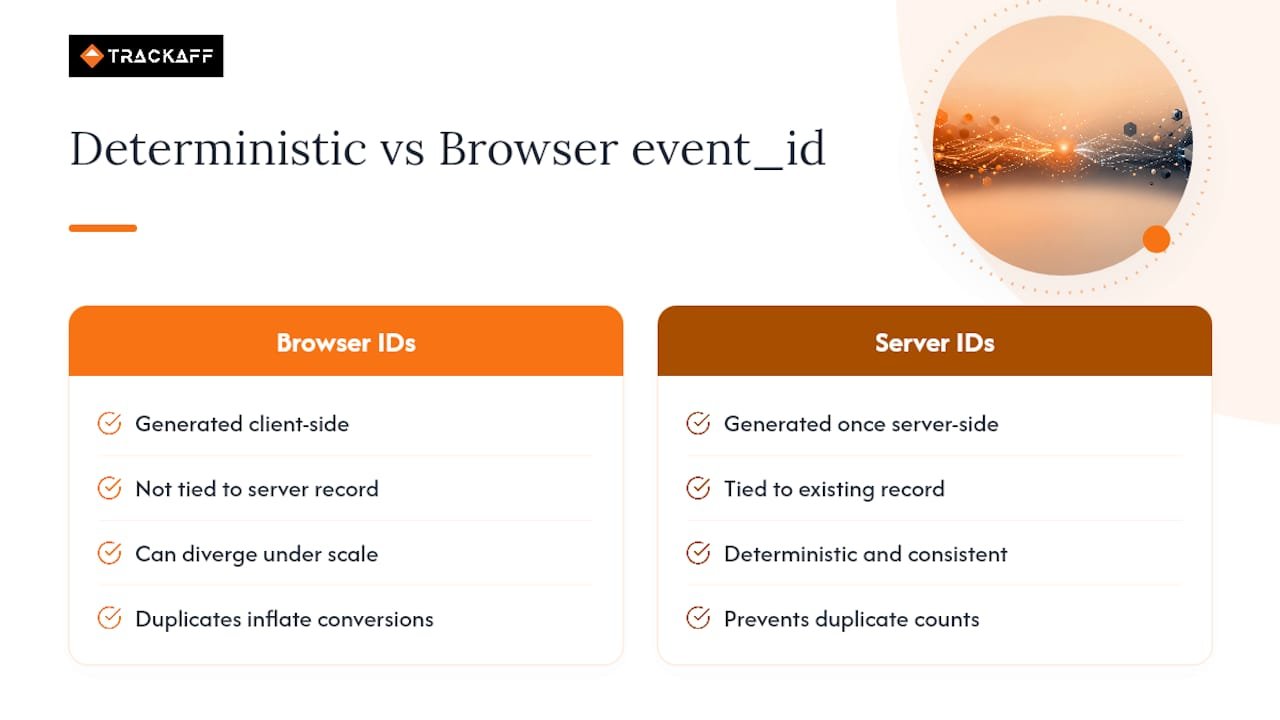
The pattern that actually holds up under scale is boring: generate the ID once, server-side, tied to a record you already store, and hand it to the browser rather than letting two systems each invent their own. Teams that skip this step usually don’t notice until their cost-per-acquisition looks suspiciously good, then discover half their “conversions” are duplicates inflating the count.
This is also where server-side reporting earns its keep. When conversions happen off-site, a purchase confirmed on a third-party checkout, a deposit made in a separate app, a signed contract, the browser Pixel often never fires at all, and the entire dedup conversation becomes moot unless something reliable is reporting that event back to Meta with a consistent identifier. That’s the exact gap TrackAff was built to close for businesses running Meta ads on funnels where the sale doesn’t happen on the page the Pixel is watching.
— Terry
Get Reliable Server-Side Reporting Without Rebuilding Your Stack
There are options for teams whose real conversions, a closed sale, a funded deposit, a completed application, happen somewhere the Pixel can’t see: a phone call, a third-party checkout, a CRM update days after the click. Instead of guessing at deduplication logic yourself, Trackaff’s branded forms capture the off-site conversion and report it to Meta through the Conversions API, with support for the deduplication and event ID persistence this article just walked through.
That means the event_id your funnel generates at the moment of conversion gets reused consistently across the reporting path, instead of two disconnected systems each inventing their own value. For agencies and performance marketers managing multiple funnels, Trackaff’s pricing plans scale by connection rather than by event volume, so higher sales months don’t trigger surprise costs. If your Meta campaigns are optimizing on incomplete or duplicated conversion data, start a free trial and see what your actual dedup rate looks like once the reporting is fixed at the source.
Where to Verify These Field Names and Examples
For exact field names and payload structure, check Meta’s deduplication guidance and server event parameters docs directly, plus the Stack Overflow thread for working code. Teams managing cross-domain checkout flows should also review how to preserve click context across external pages, and marketers focused on organic reach alongside paid can reference this Facebook algorithm playbook for related distribution factors.
Sources
- Handling Duplicate Pixel and Conversions API Events
- How do I send event_id with Facebook pixel?
- How to find Facebook event ID?
- Understanding Facebook IDs
FAQ
How Do You Look Up an Event on Facebook?
Search Facebook directly, or if you already have the event URL, read the trailing numeric segment after /events/. That number is the event’s unique ID, as shown in this event ID lookup guide.
How Do I Get a Facebook Event Link?
Open the event page on Facebook, click the share or copy-link option, and the full URL, including the event ID at the end, copies to your clipboard. You can also construct it manually once you have the ID: https://www.facebook.com/events/<ID>.
How Do I Check a Facebook ID Link?
Take the numeric ID from any Facebook URL and query the Graph API endpoint /<id>?metadata=1. The response includes a type field that confirms whether the ID belongs to an event, page, group, or other object, per Nayuki’s guide to Facebook IDs.
Where Do I Find My Meta Pixel ID?
Your Pixel ID lives in Meta Events Manager under the Data Sources section, listed next to the Pixel’s name. It’s a separate identifier from the event_id, since the Pixel ID identifies your entire tracking asset while event_id identifies one single event occurrence.
Does Trackaff Handle event_id for Off-Site Conversions?
Yes. Trackaff reports off-site conversions to Meta through the Conversions API and supports the deduplication parameters, including event_id, covered throughout this article. Current pricing and connection tiers are listed on the Trackaff pricing page.
Recommended
Your deals close off the pixel. Meta never finds out.
TrackAff reports your real conversions back to Meta the moment they happen, tied to the exact ad that produced them. 10-minute setup, no code.
Start free 14-day trial → Card required · No charge until day 14 · Cancel in one click