
- trackaffadmin
- 0 Comments
- 15 Views
Every Facebook Conversions API event needs event_name, event_time, and action_source, with event_source_url added whenever action_source is set to web. Beyond those required fields, the parameters with the biggest payoff are user_data (at minimum one hashed identifier like email or phone), client_ip_address, client_user_agent, and the fbp and fbc cookie values. Add a stable event_id to every event for deduplication with the browser Pixel, and always send event_time within seven days of the actual event.
TL;DR:
- Using a stable event_id and matching it precisely between browser Pixel and server API events is crucial for accurate deduplication within a 48-hour window.
- Hash and normalize user_data fields like email, phone, and name before sending to ensure proper matching, but never hash IP address or user agent, which are always sent raw.
- Event_time must be a Unix timestamp in seconds, not older than seven days, or the event will be rejected by Meta.
- For commerce events, include value, currency, and product details with proper formatting to improve ad optimization and dynamic retargeting.
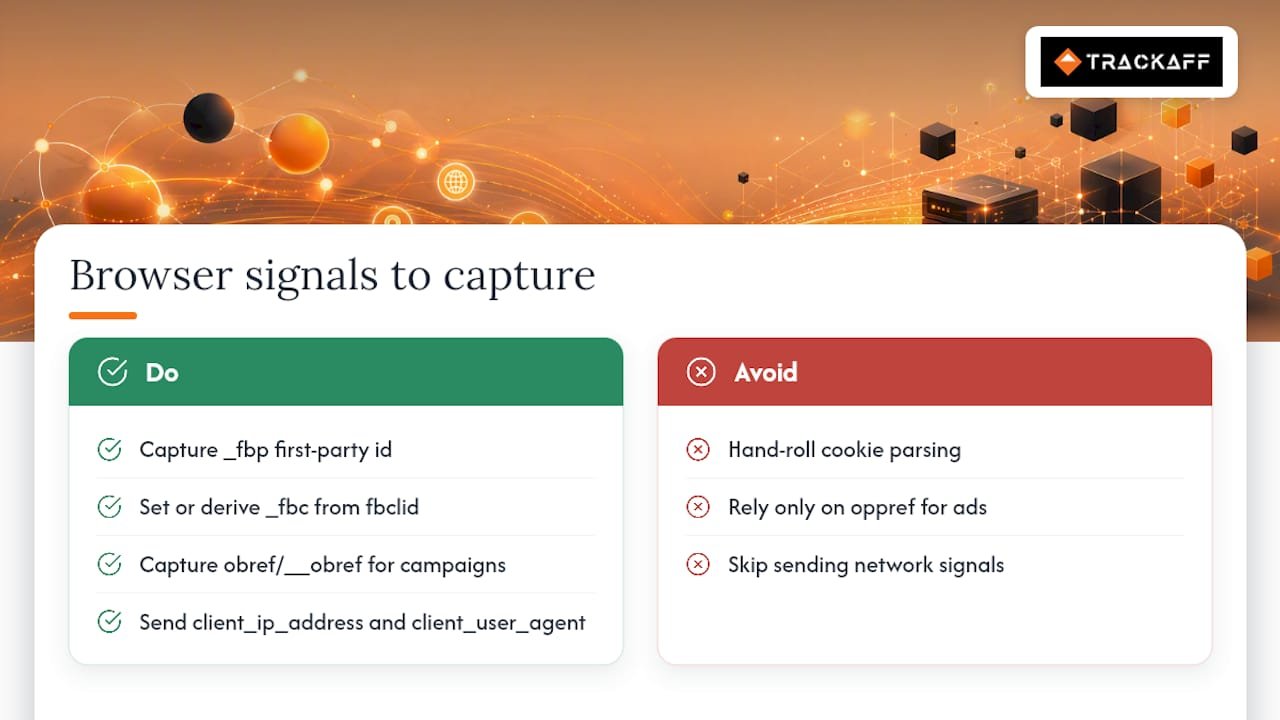
- Collect and forward client signals such as fbp, fbc, client_ip_address, and user_agent untouched from the browser to strengthen match quality.
Table of Contents
- Required server event parameters and the request envelope
- The user_data object: hashing, normalization, and what to leave raw
- Sending custom_data for purchases and dynamic ads
- Capturing fbp, fbc, and client signals in the browser
- Deduplicating events between Pixel and CAPI
- Batching, retries, and avoiding double counting
- A practical checklist to improve event match quality
- Why parameter completeness only gets you halfway
- A different route to guaranteed sales-level attribution
- FAQ
Required server event parameters and the request envelope
The Conversions API accepts a single POST request to /{pixelId}/events. The body is a JSON object containing a data array, where each item represents one event. The Facebook Server-Side API Swagger schema defines the required fields for each event object: event_name, event_time, user_data, and action_source.
A minimal request looks like this in structure: a top-level data array, with each object holding event_name, event_time, action_source, and a user_data block. Everything else builds on that skeleton.
A few rules govern the core fields:
- event_name uses Meta’s standard names (Purchase, Lead, CompleteRegistration) when the action matches a standard event, and a custom string otherwise; names are case-sensitive, so consistency between browser and server events matters.
- event_time is a Unix timestamp in seconds, not milliseconds, and Meta rejects events with a timestamp older than seven days from the send time, per the schema.
- action_source tells Meta where the event happened: website, app, phone_call, chat, physical_store, system_generated, or other. When action_source is web, event_source_url becomes mandatory.
- event_source_url should be the full page URL where the conversion occurred, useful for attribution debugging.
- test_event_code lets you route events into the Test Events tool in Events Manager without affecting live reporting, and a validate_only flag can check payload structure before you go live.
Getting this envelope right first prevents most downstream headaches: a malformed data array or a missing action_source will reject the whole batch, not just one event.
The user_data object: hashing, normalization, and what to leave raw
user_data carries the identifiers Meta uses to match a server event to a real person and, where possible, to an ad click. Most of these fields must be hashed with SHA-256 before they leave your server, and the hashing only works if the input is normalized first.
- Lowercase and trim email (em) before hashing: remove leading or trailing spaces and convert the entire address to lowercase.
- Strip formatting from phone numbers (ph) so only digits remain, and prepend the country code with no leading plus sign or spaces.
- Normalize names (fn, ln) to lowercase with no punctuation or accents where possible.
- Format date of birth (db) as YYYYMMDD before hashing.
- Normalize location fields (ct, st, zp, country): city and state lowercase with no spaces, ZIP as the first five digits for US addresses, country as a two-letter lowercase code.
- Pass external_id as your own internal user or customer identifier, hashed the same way as other text fields.
Hashing exists for two reasons at once: it protects the underlying PII in transit and it is the format Meta’s matching system expects, so skipping normalization before hashing (say, hashing an email with mixed case) produces a hash that will never match.
Some fields must never be hashed. client_ip_address, client_user_agent, fbp, and fbc are sent raw, because Meta’s matching engine reads them directly rather than comparing hashes. Mixing this up, hashing an IP address by mistake, quietly breaks matching without throwing an error.
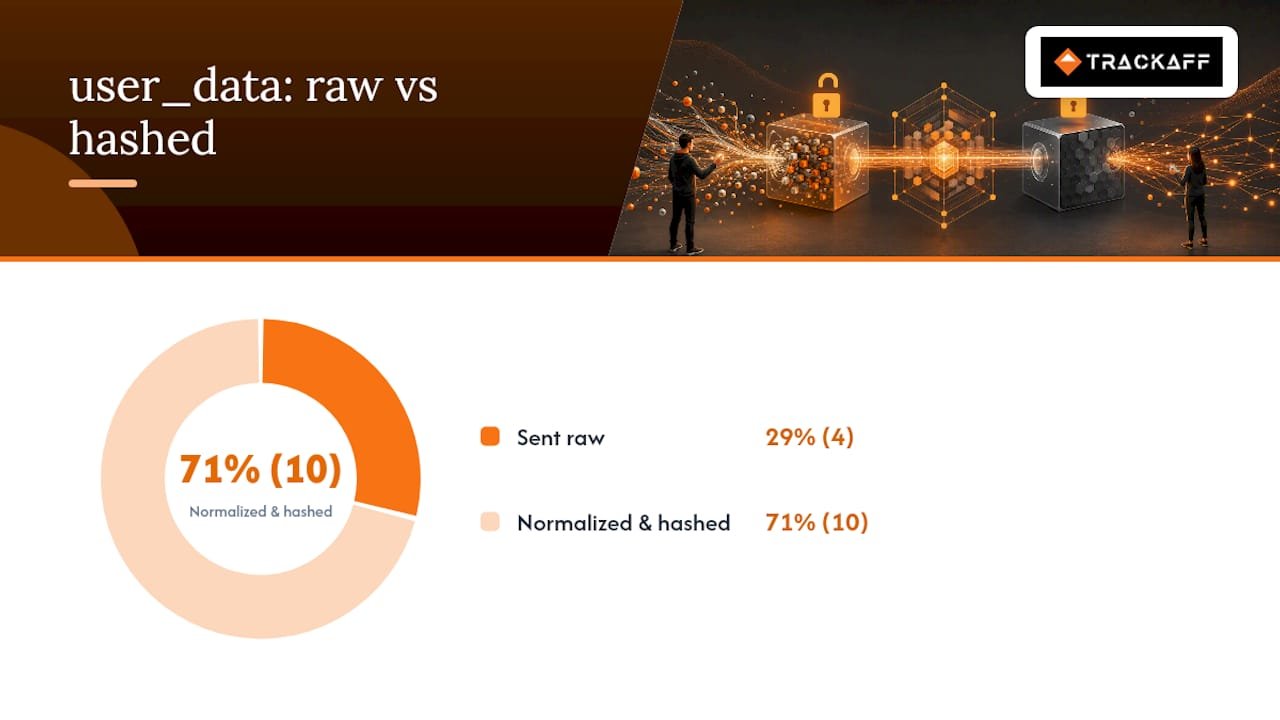
Pro Tip: Collect fbp, fbc, and the client’s IP and user agent in the browser, then forward them untouched to your server; normalize and hash only the PII fields server-side, or use a client library like the Node.js Conversions API package that applies hashing consistently on every call.
Sending custom_data for purchases and dynamic ads
custom_data is where commerce details live, and it directly feeds Meta’s optimization and dynamic ad retargeting. For a Purchase event, value and currency are the two fields Meta leans on most, and both need consistent formatting: value as a plain numeric string and currency as a three-letter ISO code such as USD or EUR.
For product-level detail, use a contents array:
- Each item in contents needs an id matching your catalog, a quantity, and an item_price.
- content_ids lists the same product identifiers separately, which Meta uses for catalog matching in dynamic ads.
- content_type should be set to ‘product’ when content_ids point to individual SKUs, or ‘product_group’ when they point to a parent grouping of variants, according to the server-side API schema and its SDK examples.
- order_id ties the event to a specific transaction and is useful for deduplication and refund handling.
- predicted_ltv and num_items are optional but relevant for subscription or multi-item purchase events.
Getting contents and content_type right matters more for businesses running dynamic product ads than for simple lead generation, where value and currency alone usually suffice.
Capturing fbp, fbc, and client signals in the browser
The _fbp cookie is Meta’s own first-party visitor identifier, set automatically by the Pixel. The _fbc cookie, or a derived fbc value, comes from the fbclid query parameter appended to a URL when someone clicks a Facebook or Instagram ad. If _fbc is not already set by the Pixel, your code can construct it directly from a present fbclid parameter.
Some implementations also reference obref or __obref values tied to specific ad placements, which differ from a general offsite referrer (oppref) in that they point to the originating ad rather than the page. Not every setup needs these, but they help when campaign-level attribution matters more than page-level.
client_ip_address and client_user_agent are worth capturing on every server request regardless of what else is available, since Meta uses these network-level signals directly in matching. The Conversions API param-builder SDK offers a processAndCollectAllParams method built specifically to standardize this collection and persist cookies across sessions.
Pro Tip: Prefer the param-builder SDK over hand-rolled cookie parsing; it handles fbc derivation from fbclid and keeps cookie persistence consistent across page loads.
Deduplicating events between Pixel and CAPI
When both the browser Pixel and the server-side Conversions API report the same conversion, Meta deduplicates them using event_name and event_id together. Get these two fields to match exactly between the two sources, and Meta counts the conversion once.
- Send the same event_id from both the browser Pixel call and the server-side CAPI call for the same action.
- Meta applies a 48-hour deduplication window, and when both events arrive within roughly five minutes of each other, the browser event generally takes precedence for attribution purposes.
- Use a stable value tied to the transaction, such as an order ID or a generated UUID created at the moment of the action, rather than a random ID assigned separately by each system.
- Verify deduplication is working inside Events Manager, where matched events show as a single conversion instead of two.
- A common failure mode is generating a new event_id server-side instead of reusing the one passed to the browser Pixel, which produces silent duplicate counting.
Batching, retries, and avoiding double counting
Sending events one at a time works, but it is inefficient at scale. The Conversions API accepts up to 1,000 events in a single request’s data array, according to examples in the Node.js client for Facebook’s Conversions API.
- Batch events into groups, shaping each request as one data array with multiple event objects rather than issuing hundreds of individual calls.
- Retry 5xx server errors with exponential backoff, since these usually indicate a temporary issue on Meta’s side.
- Never retry 4xx validation errors without fixing the payload first: the request will fail the same way every time until the structure or field values are corrected.
- Reuse the same event_id on any retry of the same logical event, so a retried request never creates a duplicate conversion.
- Use test_event_code during development to confirm payloads validate correctly before switching to live sends.
Reading the API’s error responses closely pays off: a validation error usually names the exact field at fault, and an outdated timestamp error means the event fell outside the seven-day window and needs to be dropped or logged separately.
A practical checklist to improve event match quality
Event Match Quality (EMQ) is Meta’s own score for how well your events are matching to real accounts, and it responds directly to how many usable identifiers you send. Work through these in order of impact:
- Send at least one hashed user_data field on every event, since some entries note this as a minimum for the request to be useful at all.
- Populate client_ip_address and client_user_agent on every server call, even when PII is missing.
- Capture fbp and fbc and forward them unmodified from browser to server.
- Set a stable event_id on every event that also fires from the Pixel.
- Include purchase value, currency, and contents on commerce events.
- Validate event_time on every request to avoid silent rejections.
- Monitor EMQ and deduplication rates weekly inside Events Manager rather than assuming the integration still works.
Match rate improves measurably with every additional user_data field added to a request. Twilio Segment’s integration documentation notes that sending more than the minimum required user_data key materially improves matching, alongside correctly configuring data_processing_options for regional privacy rules.
Troubleshooting starts in three places: the Events Manager diagnostics tab for field-level warnings, the API’s own JSON error response for structural problems, and your server logs for anything that never made it out as a request at all.
Why parameter completeness only gets you halfway
Getting event_name, user_data, and custom_data right solves the plumbing problem: Meta receives a clean, well-matched event. It does not solve the attribution problem for businesses where the real conversion happens off the ad platform entirely, in a phone call, a funded account, or a signed contract days after the click.
Consistent event_id and rich user_data matter because they are the connective tissue between a Pixel-fired lead event and whatever happens next. Teams selling high-value services often need to link that later off-site action, a completed deposit, a closed sale, back to the original ad with the same rigor they apply to the CAPI payload itself. Parameter completeness and post-click reporting are not competing priorities. They are the same job, done at two different points in the funnel.
— Terry
A different route to guaranteed sales-level attribution
Building CAPI parameters correctly gets Meta clean signals about clicks, leads, and on-site events. It does not tell Meta what happened after the click, whether a lead actually became a paying customer, a funded deposit, or a completed registration. That gap is where TrackAff fits.
TrackAff uses a white-label branded form placed inside your existing marketing funnel to capture real post-click outcomes and report them back to Meta through the Conversions API, so campaigns optimize toward actual buyers instead of raw leads.
- Businesses running Meta ads keep their existing CAPI setup and add TrackAff for the off-site conversion layer it does not cover.
- The platform supports manual approval mode, CRM webhook integration, and pixel and CAPI event deduplication out of the box.
- Pricing runs on the Starter Rate at $99.00 per month per connection, the Growth Rate at $69 per month per connection, or the Scale Rate at $49 per month per connection, with Enterprise pricing available on request.
Teams doing well-instrumented DIY CAPI work but still losing visibility on what happens after the click should consider a managed approach. Start a free trial at Trackaff and connect your first funnel.
FAQ
Can I add URL parameters to my Facebook ads?
Yes, Facebook ads support URL parameters, most commonly UTM tags and the fbclid parameter that Meta appends automatically to help track ad clicks. The fbclid value is what lets your server derive the fbc identifier used in Conversions API matching.
What is the 3 2 2 method of Facebook ads?
This refers to a campaign structure approach rather than a Conversions API parameter, and definitions vary between practitioners. It generally describes a ratio of ad formats or creative types within a campaign, not something governed by CAPI fields.
How do I access the Facebook Developer Settings?
Developer and API settings live inside Meta’s Business Manager under Events Manager, where you generate access tokens and pixel IDs needed to authenticate Conversions API requests. From there you can also retrieve the test_event_code used to validate payloads before sending live traffic.
Why do I need Meta Pixel and CAPI?
The Pixel captures browser-side events but is affected by ad blockers, cookie restrictions, and browser privacy settings, while CAPI sends the same events from your server, which is not subject to those blocks. Running both together, matched by a shared event_id, gives more complete and durable event coverage than either one alone.
Your deals close off the pixel. Meta never finds out.
TrackAff reports your real conversions back to Meta the moment they happen, tied to the exact ad that produced them. 10-minute setup, no code.
Start free 14-day trial → Card required · No charge until day 14 · Cancel in one click