
- trackaffadmin
- 0 Comments
- 52 Views
Aggregated Event Measurement (AEM) is Meta’s privacy-first protocol for measuring and optimizing iOS 14+ conversions through aggregated postbacks, not individual-level tracking. It only works as well as the data feeding it. If your Pixel and Conversions API send incomplete or duplicated events, AEM’s modeled output will reflect that. The single next step: confirm your Pixel and CAPI setup, then run Test Events in Events Manager before touching campaign optimization.
TL;DR:
- Ensuring your Pixel and Conversions API send complete and non-duplicative data is essential, as AEM models rely heavily on accurate inputs for reliable reporting.
- AEM reports are at the campaign level and tend to update faster than SKAdNetwork but may overlook granular details or subgroup performance.
- Test your setup thoroughly using Events Manager, focusing on avoiding deep-link routing conflicts, missing parameters, and duplicate triggers to prevent incorrect event counts.
- Combining AEM with SKAdNetwork and server-side capture provides broader, more accurate attribution, especially when tracking off-site conversions.
- Running short pilot programs that compare AEM and SKAdNetwork metrics help validate data quality and determine AEM’s effectiveness for specific funnels.
Table of Contents
- What Is Aggregated Event Measurement and Why Does It Exist?
- How Does AEM Actually Work Behind the Scenes?
- Implementation Checklist: Making AEM Work for Your Account
- Why Are My AEM Events Not Showing Up Correctly?
- What Should You Expect From AEM Reporting?
- Closing the Post-Click Gap With Server-Side Capture
- Building AEM Into a Modern Attribution Stack
- Start a Pilot That Proves AEM Actually Works for You
- Sources
What Is Aggregated Event Measurement and Why Does It Exist?
Apple’s App Tracking Transparency framework changed the rules for every advertiser running iOS campaigns. Once users could decline tracking, Meta lost direct access to the device-level identifiers (IDFA) that used to power granular attribution.
AEM is Meta’s answer. It’s defined in Meta’s own documentation as a protocol for measuring web and app events from iOS 14+ devices, including people who’ve opted out of tracking. Instead of following individuals, AEM processes aggregated conversion postbacks tied to campaign-level identifiers.
That shift matters for how you read your reports:
- AEM covers both web and app events, not just app installs.
- It replaces the granular, user-level view IDFA once provided with a modeled, campaign-level view.
- Reporting still works for opted-out users, just at a coarser resolution.
- Because it aggregates, individual actions get folded into counts, which can obscure edge cases if you’re not careful about interpretation.
That last point is worth sitting with. Aggregate data by nature summarizes many individual events into counts or modeled outputs, which means you’re reading a summary, not a ledger. Treat every AEM number as a model output, not a transaction record.
How Does AEM Actually Work Behind the Scenes?
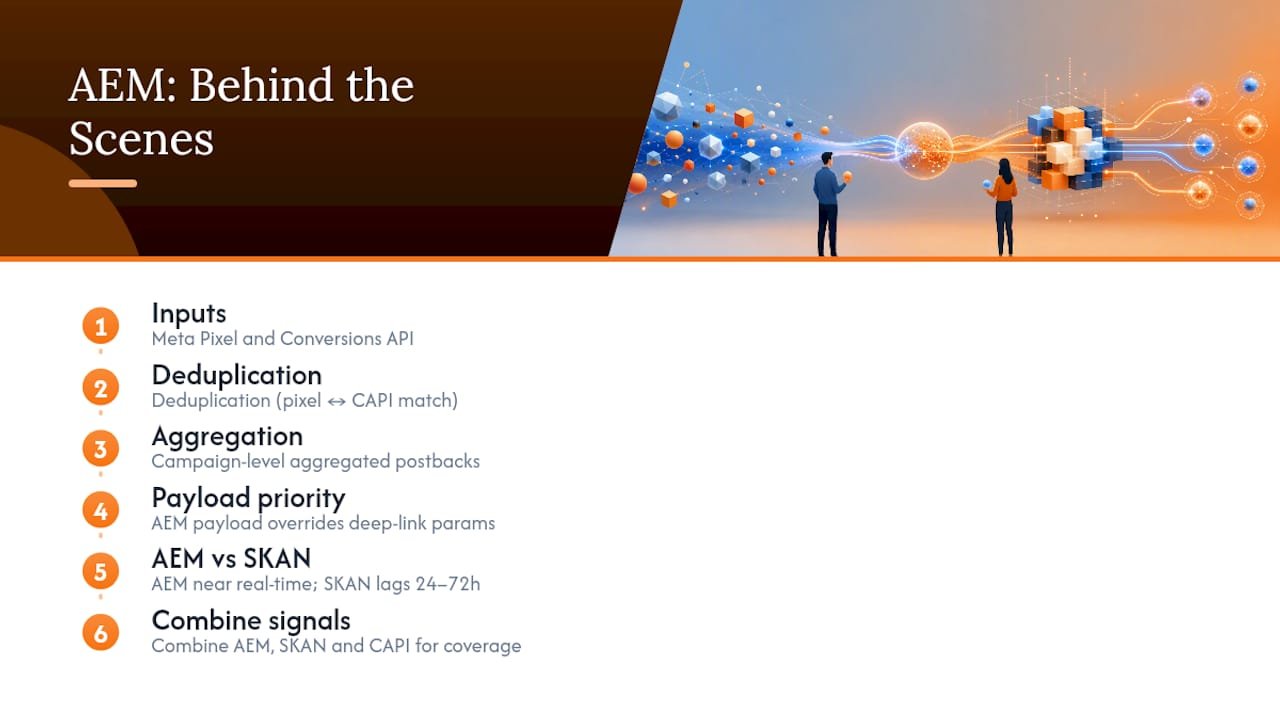
AEM runs on aggregated postbacks organized around campaign-level identifiers, including campaign_id, ad_id, and creative_id. When a conversion happens, Meta bundles the relevant signals and reports them back at the campaign level rather than the user level.
Two inputs feed this system: your Meta Pixel and the Conversions API. Both can report the same event, so Meta relies on deduplication logic (usually an event_id match) to avoid counting a single purchase twice. When Pixel and CAPI data don’t align, or when one channel is missing parameters the other sends cleanly, Meta has to guess which signal to trust. That guess is baked into your reporting.
One technical detail trips up more developers than any other: when Meta’s AEM payload arrives via al_applink_data, it takes priority over standard deep-link parameters. If your app doesn’t explicitly handle that field, deep-link routing can silently break for AEM-attributed sessions.
Quick fact: attribution partners note that AEM and Apple’s SKAdNetwork aren’t rivals. They’re often run in parallel, and combining AEM with SKAdNetwork and CAPI tends to produce broader coverage than relying on either alone. Expect AEM to report closer to near real-time, while SKAN-based numbers can lag by 24 to 72 hours.
Implementation Checklist: Making AEM Work for Your Account
Getting AEM to model your conversions accurately isn’t a settings toggle. It’s a sequence of checks across marketing and engineering.
- Confirm eligibility. Log into Meta Business Manager and Events Manager to verify your domain or app is verified and AEM-eligible.
- Validate your Pixel. Confirm it fires on every key page and passes standard parameters cleanly.
- Set up Conversions API. Use a server container or direct integration so purchase, deposit, or registration events reach Meta without relying solely on browser-side tracking.
- Standardize your event schema. Use identical event names and parameter structures across web, server, and app layers. Inconsistent naming is one of the fastest ways to fragment your signal.
- Implement deduplication. Match Pixel and CAPI events using a shared
event_idso Meta doesn’t double count. - For app server-to-server setups, make sure required parameters like IP address and IDFV are present where AppsFlyer’s documentation flags them as necessary for eligibility.
- Run Test Events and Diagnostics in Events Manager to confirm delivery and check eligibility status.
Pro Tip: After any configuration change, wait before judging results. Meta’s own guidance notes that propagation can take 24 to 48 hours, so checking numbers an hour after a fix usually just tells you the fix hasn’t kicked in yet.
Why Are My AEM Events Not Showing Up Correctly?
Most AEM problems trace back to a small set of repeat offenders.
- Deep-link routing conflicts. If your app doesn’t explicitly parse
al_applink_data, AEM’s payload can override your intended deep link entirely. Test this scenario specifically. Don’t assume your existing deep-link tests cover it. - Masked IPs or missing IDFV. Server-to-server app events that arrive without a real IP address or IDFV often get marked ineligible. Check raw server payloads, not just dashboard summaries.
- Duplicate or spammy triggers. A Pixel firing twice on page reload, or a bot hammering a form endpoint, corrupts your event volume and confuses deduplication logic. Clean up client-side triggers before blaming AEM itself.
- Test Events failures. When Events Manager flags a failed test, the diagnostics panel usually names the missing or malformed parameter directly. Fix that field first before resubmitting.
Most of these show up the moment you run Test Events, which is exactly why that step belongs early in your checklist, not as an afterthought.
What Should You Expect From AEM Reporting?
AEM reports at the campaign level, using identifiers like campaign_id and ad_id. Don’t expect every field to populate consistently. campaign_name in particular can show up blank depending on how the postback was structured, so don’t build a reporting dashboard that assumes every label will be there.
Reporting speed is one of AEM’s real advantages. It tends to update closer to real time, while SKAdNetwork-based numbers on the Apple side can trail by 24 to 72 hours. That gap changes how often you should realistically check performance. Daily budget shifts based on SKAN numbers alone often chase noise rather than signal.
A few practical habits help:
- Feed AEM with high-quality CAPI inputs. The model only reflects what you send it.
- Cross-check AEM-modeled conversions against your actual off-site sales records periodically.
- Run short server-side pilots when testing new event configurations, rather than flipping settings for your entire account at once.
- Remember that aggregated summaries can mask subgroup-level differences, so a healthy-looking aggregate number doesn’t guarantee every campaign segment is performing evenly.
Closing the Post-Click Gap With Server-Side Capture
AEM only models what it receives, and most Meta advertisers lose visibility the moment a click leaves the ad and lands off-site, on a call, a form, or a manual sales process. Trackaff addresses that gap directly. It inserts a branded, white-label form into the funnel that captures confirmed purchases, deposits, and registrations, then submits those events through the Conversions API.

That server-side submission does double duty: it improves deduplication and keeps your event schema consistent, which are exactly the inputs AEM’s modeling depends on. Businesses using this kind of server-side conversion capture report significant improvements in return on ad spend, largely from feeding Meta real sales signals instead of proxy events like leads or sign-ups.
Building AEM Into a Modern Attribution Stack
The biggest mistake teams make with AEM is treating it like a dashboard to read rather than a model to feed. Prioritize CAPI quality and deduplication before experimenting with bid strategies or creative testing. Meta already automates event aggregation, so your leverage sits entirely in what data you send it.
A sensible sequence: audit your current Pixel and CAPI setup, pilot server-side capture on one funnel, then scale once the data holds up under SKAdNetwork comparison.
— Terry
Start a Pilot That Proves AEM Actually Works for You
Trackaff gives Meta advertisers something AEM alone can’t: proof that a click became a real sale. Instead of optimizing toward leads and sign-ups, you feed Meta confirmed purchases, deposits, and registrations captured through a branded post-click form and submitted via CAPI, with deduplication handled automatically.
A short pilot tells you everything you need to know. Run it for two to four weeks on a single funnel and track three numbers: off-site conversion lift, cost per acquisition, and return on ad spend. Compare those against your current Pixel-only baseline.
If you’re ready to see what clean, deduplicated conversion data does for your AEM-driven campaigns, start a free trial with Trackaff and connect your first funnel today.
Sources
- About Meta’s Aggregated Event Measurement
- Meta Aggregated Event Measurement
- Meta Ads—Aggregate Event Measurement (AEM) for iOS
Recommended
Your deals close off the pixel. Meta never finds out.
TrackAff reports your real conversions back to Meta the moment they happen, tied to the exact ad that produced them. 10-minute setup, no code.
Start free 14-day trial → Card required · No charge until day 14 · Cancel in one click