
- trackaffadmin
- 0 Comments
- 55 Views
For guaranteed post-click and off-site conversion attribution on Facebook and Meta ads, run the Meta Pixel and Conversions API together, tied by a shared event_id and hashed identifiers. This “conversion lift” for your account comes from recovering conversions that browser-only tracking misses, not from Meta’s holdout-group lift test. Teams that don’t want to build this in-house use a turnkey server-side solution such as TrackAff.
TL;DR:
- Proper setup requires sending hashed email and phone numbers, along with event_id, event_time, order_id, value, currency, and event_name, with testing for match rate and data quality.
- Inconsistent event_id, missing hashed PII, delayed server batch events, and duplicate Pixel firing are common tracking failures that diminish conversion accuracy.
- Meta’s lift test measures incrementality but depends on accurate, deduplicated event data; it does not recover lost conversions, which must be fixed first.
- Trusted verification includes checking diagnostic reports weekly, ensuring server events arrive within deduplication windows, and maintaining standardized hashing and attribution windows.
Table of Contents
- What Is Conversion Lift on Facebook, Really?
- Why You Need Both the Pixel and the Conversions API
- What Data You Need and How to Send It
- How Do You Know the Setup Is Actually Working?
- Fixing the Most Common Tracking Failures
- What Meta’s Conversion Lift Test Actually Measures
- Structuring a Reliable Measurement Approach
- Reading the Numbers Without Fooling Yourself
- Where Measurement Breaks Down
- How Conversion Lift Compares to Facebook Attribution and A/B Testing
- Why Post-Click Data Should Be Your Source of Truth
- TrackAff: Guaranteed Reporting Without the Engineering Lift
- Where to Verify This Yourself
- Sources
What Is Conversion Lift on Facebook, Really?
The term “conversion lift” gets used loosely across the ad-tech world, and it causes real confusion. For advertisers running branded forms, deposits, and CRM-tracked sales, what matters is recovering the conversions that happen after the click, off Meta’s own pixel-visible surface. That’s post-click and off-site attribution: purchases, deposits, and registrations captured downstream and reported back to Meta so the algorithm can optimize toward actual buyers.
This isn’t a debate about statistical test design. It’s an engineering problem. Meta’s Pixel alone sees a shrinking share of what happens after someone clicks your ad, especially once they leave your landing page for a phone call, a CRM-gated form, or a multi-day sales cycle. The fix is architectural: pair the Pixel with the Conversions API so Meta gets a second, more durable copy of every event.
Advertisers searching for a facebook ad conversion rate fix usually assume it’s a bidding or creative problem. Often it’s a data problem. If Meta never sees the sale, no amount of creative testing or audience refinement improves conversion tracking on facebook. The lift shows up when the missing data comes back, not when the algorithm tries harder with the data it already has.
Why You Need Both the Pixel and the Conversions API
The Pixel and CAPI aren’t redundant. They’re two different data paths that each fail in different ways, and running only one leaves a gap the other was built to close.
- The Pixel captures browser-side signals: page views, scroll depth, time on page, and click events, in real time, directly from the visitor’s device.
- The Conversions API sends the same events from your server, which means it isn’t affected by ad blockers, iOS tracking restrictions, or browser cookie limits.
- Deduplication ties the two together using a shared
event_idand an identicalevent_name, so Meta counts each conversion once instead of twice. - Privacy settings and ad blockers increasingly cut into what the Pixel alone can see, which is exactly the gap CAPI recovers server-side.
Pixel-only setups can lose a significant share of conversion data to these blockers and restrictions, according to a comparison of CAPI and Pixel performance. Running both paths with proper deduplication is how you close that gap without inflating your numbers.
What Data You Need and How to Send It
Getting this right comes down to sending the right identifiers and event fields, then choosing an implementation path that matches your team’s capacity.
Essential identifiers to capture and hash:
- Email address, hashed with SHA-256 before it ever leaves your server.
- Phone number, also hashed, formatted in E.164 where possible.
- Meta’s own browser cookies,
_fbpand_fbc, which carry click and browser context that Meta already recognizes.
Email-based matching tends to perform strongest, with match rates in the 85 to 92% range in offline attribution scenarios, while phone number matching typically lands in the 70 to 80% range, and click ID matching is highly accurate whenever fbclid is present, according to a guide on tracking offline conversions.
Beyond identifiers, each event needs specific fields to be usable:
- event_id, generated client-side as a UUID and forwarded unchanged to both Pixel and server calls.
- event_time, the Unix timestamp of when the conversion actually happened.
- order_id or a similar unique transaction reference, for deduplication against duplicate submissions.
- value and currency, formatted exactly as Meta expects.
- event_name, cased identically across every system touching the event (
Purchase, notpurchase).
For implementation, three paths exist. Custom server code sending directly to CAPI gives full control but demands ongoing engineering time. A server-side Google Tag Manager container is a practical middle ground, mapping browser and app events into CAPI format without a from-scratch build, as outlined in Meta’s Conversions API setup documentation. A managed SaaS platform like TrackAff removes the maintenance burden entirely by handling the branded form capture, hashing, and server-side reporting as a packaged service.
Pro Tip: Generate the event_id in client-side JavaScript before the user ever submits a form, then pass that same string through your CRM webhook to the server call. If the ID changes anywhere along that chain, deduplication breaks silently.
How Do You Know the Setup Is Actually Working?
Two numbers tell you almost everything: match rate and Dataset Quality score. Meta’s own guidance sets the bar at a match rate above 70% and a Dataset Quality score above 6.0 for reliable campaign optimization. Below those thresholds, Meta’s algorithm is working with too little signal to allocate spend intelligently.
Sending a hashed email address with every single event is the single highest-impact change you can make to Event Match Quality. Accounts that skip this step routinely stall below the 70% threshold even with CAPI fully implemented.
Field reports on server-side rollouts show a consistent pattern: accounts recover an average of roughly 22% additional attributed conversions within the first 30 days, with EMQ scores climbing from a typical mid-5s baseline to around 8.5. Results vary by account, industry, and how much PII you’re able to collect, but the direction is consistent across the field data.
Verification isn’t optional, and it isn’t hard:
- Use Meta’s Events Manager to fire test events and confirm Pixel and CAPI events share identical event_id values.
- Check the Diagnostics tab weekly for deduplication warnings, not just once at launch.
- Track your EMQ score on a weekly cadence rather than checking it once and forgetting about it.
- Run a small controlled test, holding one ad set on Pixel-only tracking briefly, to confirm CAPI is actually adding conversions rather than duplicating them.
Fixing the Most Common Tracking Failures
Most attribution problems trace back to a handful of repeatable mistakes. Here’s what tends to break and how to fix it.
- Mismatched event_id. Symptom: Meta reports two conversions for one sale. Fix: generate the ID once in the browser and forward it unchanged through every downstream system.
- Missing hashed PII. Symptom: EMQ stuck below 5. Fix: add hashed email and phone to every server event, not just Purchase events.
- Late server batches. Symptom: CAPI events arrive outside Meta’s deduplication window and get counted separately. Fix: send server events within minutes of the client event, not hours later in a nightly batch.
- Inconsistent event_name casing. Symptom:
purchaseandPurchaseshow up as separate event types in reporting. Fix: standardize casing in one shared configuration file all systems reference. - Pixel firing multiple times per page load. Symptom: inflated conversion counts even before CAPI enters the picture. Fix: audit tag triggers for duplicate firing conditions.
Pro Tip: To prove your fix worked, generate a test UUID in the browser console, trigger the conversion event, then search Events Manager for that exact event_id. If it appears exactly once, with both a Pixel and CAPI source listed on the same entry, deduplication is functioning correctly.
Keep consent enforcement wired into every step. Hash PII before it leaves the browser or server, never send raw email addresses, and gate data collection behind whatever consent mechanism applies in each user’s jurisdiction.
What Meta’s Conversion Lift Test Actually Measures
Meta also offers a separate measurement product, sometimes called a lift study, which uses randomized holdout groups to estimate how many conversions your ads caused that wouldn’t have happened anyway. It splits your audience into an exposed group that sees ads and a holdout group that doesn’t, then compares conversion rates between the two.
That test answers a different question than the one this article is built around. It tells you about incrementality, whether your ad spend is creating new conversions versus taking credit for ones that would have happened organically. It does not fix a data pipeline, and it does not recover conversions your Pixel never saw in the first place.
The two measurement approaches solve different problems for different teams. A brand advertiser trying to justify a large media budget to a finance team cares about incrementality. A performance marketer or affiliate running deposit-based or purchase-based campaigns with a branded form in the funnel cares about whether Meta’s algorithm can see the sale at all. If Meta never sees the conversion event, no incrementality study fixes that. The event has to exist in Meta’s system before any comparison, holdout or otherwise, means anything.
For advertisers focused on optimizing facebook campaigns around real revenue, the attribution pipeline comes first. Everything downstream, including any interest in measuring incrementality later, depends on Meta actually receiving accurate, deduplicated conversion events in the first place.
Structuring a Reliable Measurement Approach
Before running any kind of comparative test, whether that’s an incrementality study or a simple A/B creative test, your baseline data needs to be trustworthy. That means the test and control conditions you’re comparing have to be measuring the same underlying signal quality.
If one ad set has strong CAPI coverage and hashed identifiers on every event, and another ad set relies purely on Pixel data with a low match rate, comparing their reported conversion numbers tells you nothing real. You’re not comparing ad performance. You’re comparing data completeness.
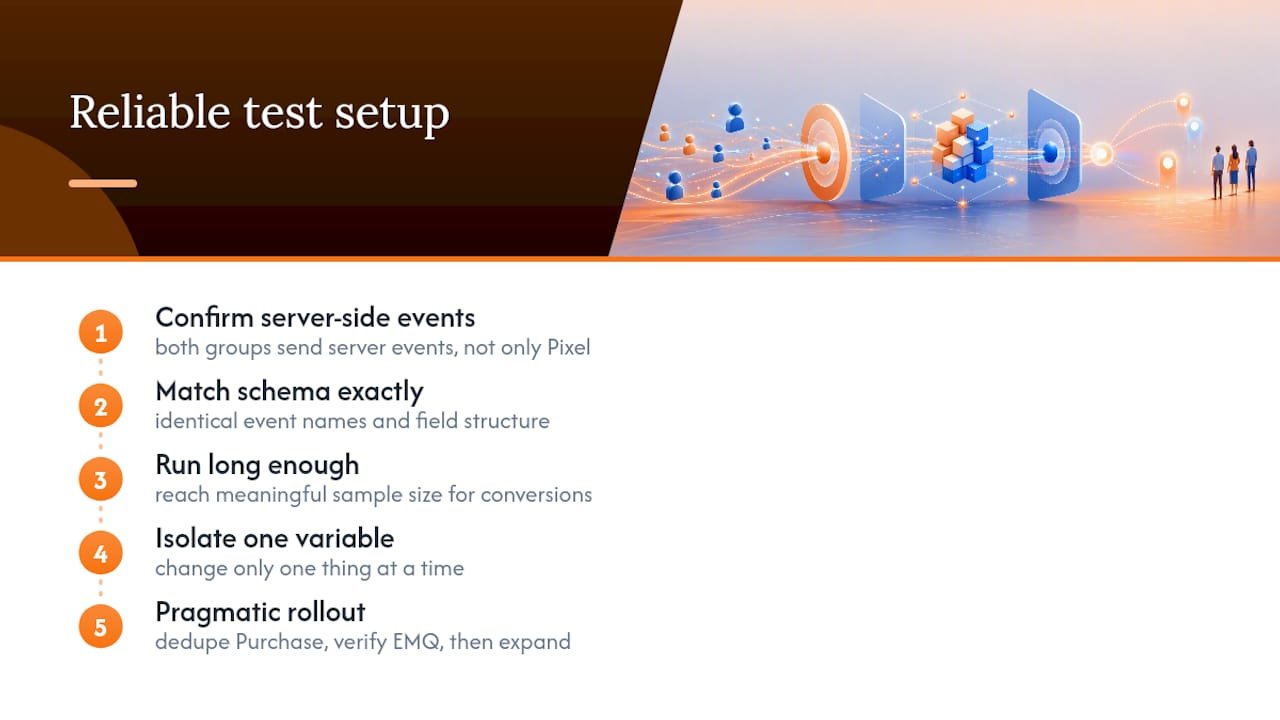
Set up test structures with a few core principles. First, confirm both groups you’re comparing send server-side events, not just Pixel events, so you’re measuring actual conversion differences rather than tracking coverage differences. Second, hold event naming and field structure identical across both groups. Third, run for long enough to reach a meaningful sample size for your conversion volume. High-AOV businesses with long sales cycles, common in B2B and financial services, benefit from longer windows and offline CRM uploads because the conversion event often happens days or weeks after the click, a pattern the offline conversion tracking guide covers in detail.
Fourth, isolate one variable at a time. Testing a new audience targeting strategy at the same time you change your event structure makes it impossible to know which change drove the result. A pragmatic rollout sequence works better: get Purchase and top-funnel events deduplicated and reliable first, verify EMQ, then expand into fuller funnel event tracking once the foundation holds.
Reading the Numbers Without Fooling Yourself
Raw conversion counts are the least useful number once your tracking spans Pixel, CAPI, and possibly offline uploads. What matters is whether the increase in reported conversions reflects real recovered data or duplicate counting.
Cross-check reported conversions against a source you trust completely, your CRM, your payment processor, or your booking system. If Meta reports 140 purchases for a week your CRM shows 95 actual sales, you have a deduplication problem, not a lift. Work backward through Events Manager’s diagnostics to find where the duplicate event_id or mismatched event_name is slipping through.
Cost per acquisition and ROAS are the metrics that actually reflect improved ad conversion rates in a way that matters to a budget conversation. When EMQ and match rate climb, Meta’s optimization engine gets more accurate signal about which users convert, and it should shift spend toward audiences that resemble your actual buyers rather than your form-fillers. That shift shows up gradually over one to two weeks as the algorithm relearns, not instantly.
Watch trend lines over rolling weekly windows rather than reacting to single-day spikes. Facebook advertising effectiveness metrics are noisy day to day, especially for accounts with moderate conversion volume, and a strong Tuesday followed by a weak Wednesday tells you almost nothing about whether your attribution work is paying off. Three to four weeks of stable, cross-verified data is a more honest signal than any single day’s dashboard.
Where Measurement Breaks Down
Every measurement approach on Meta’s platform has blind spots, and pretending otherwise leads to bad budget decisions. The most common pitfall is treating a Pixel-only conversion count as ground truth when it was never capturing the full picture to begin with. A second is running comparative tests, whether holdout-based or simple A/B splits, across audiences too small to produce a stable signal, which produces results that look meaningful but reverse the following week.
A third pitfall is attribution window mismatch. If your sales cycle runs two weeks but your reporting window is set to seven days, you’ll systematically undercount real conversions, especially for B2B or high-consideration purchases. Offline conversion uploads with proper event_time stamps help close this gap, but only if the upload cadence matches how quickly your sales team actually closes deals.
A fourth, less discussed pitfall: over-hashing or inconsistent hashing formats. If your email hashing strips whitespace and lowercases inconsistently between your CRM export and your live event stream, Meta treats the same customer as two different users, quietly depressing your match rate without any obvious error message.
Mitigating these issues comes down to discipline more than tooling. Standardize your hashing function once, in one place, and reference it everywhere. Set attribution windows that reflect your actual sales cycle, not a platform default. And treat any single week’s numbers as a data point, not a verdict, until you’ve confirmed the pattern holds across several weeks of cross-checked data.
How Conversion Lift Compares to Facebook Attribution and A/B Testing
Meta gives advertisers several distinct measurement tools, and confusing them leads to wasted effort. Facebook Attribution is a modeling tool: it assigns credit across touchpoints using rules-based or data-driven models, drawing on whatever conversion events your Pixel and CAPI have already reported. It’s only as accurate as the underlying event data feeding it, which loops back to why post-click attribution has to come first.
A/B testing on Meta compares two ad variables, creative, audience, or placement, against each other using a live split of your active audience. It answers “which version performs better” using the conversion data you’re already sending, again dependent on that data being complete and deduplicated.
The lift-style holdout comparison, which splits users into exposed and unexposed groups, answers a narrower and different question: how many of your reported conversions were actually caused by the ad versus would have happened anyway. It’s a useful tool for large-budget brand campaigns justifying spend to a finance team, but it requires a clean, deduplicated event stream as its foundation, the same requirement every other tool on this list shares.
None of these three tools functions well without accurate underlying conversion events. Facebook Attribution models garbage data if your CAPI setup is broken. A/B tests reach false conclusions if one variant has better tracking coverage than the other. Holdout comparisons overstate or understate incrementality if conversion events aren’t deduplicated correctly. The event pipeline is the foundation every comparative measurement tool sits on top of, which is why fixing it comes before any of these downstream questions matter.
Why Post-Click Data Should Be Your Source of Truth
Optimizing a Facebook campaign around Pixel-only signals is optimizing around a partial picture, and the gap has only grown as browsers restrict tracking further each year. Server-side signals, hashed and deduplicated correctly, give Meta’s algorithm the accurate view it needs to actually find your buyers instead of your window-shoppers.

Building this in-house makes sense for teams with dedicated engineering resources and the patience for ongoing maintenance as Meta’s requirements shift. For sales teams, agencies, and performance marketers who need this working reliably without owning a codebase, a managed solution removes that burden entirely.
Match-rate gains never come at the expense of privacy compliance. Hashing PII before it leaves your systems and enforcing consent at the point of collection are not optional extras bolted onto a good setup. They’re what makes a good setup possible in the first place.
— Terry
TrackAff: Guaranteed Reporting Without the Engineering Lift
Building custom server-to-CAPI pipelines, maintaining hashing logic, and chasing deduplication bugs takes real engineering hours most sales teams and agencies don’t have to spare. TrackAff is built specifically for advertisers who want guaranteed post-click and off-site conversion reporting without owning that infrastructure.
TrackAff works through a white-label branded form placed inside your existing funnel, capturing purchase, deposit, and registration events at the moment they happen. Those events get hashed and reported server-side through the Conversions API, with built-in deduplication against your Pixel events so Meta never double-counts. A manual approval mode lets you confirm sales before they’re reported, and CRM webhook integration means your existing sales stack plugs in without a rebuild.
Visit the TrackAff platform to see the full feature set, or request a demo to walk through your specific funnel and get a straight answer on what your match rate could look like within 30 days.
Where to Verify This Yourself
Meta’s own Conversions API and Dataset Quality documentation is the primary reference for match-rate and EMQ targets, and it’s worth bookmarking directly rather than trusting secondhand summaries.
For hands-on implementation detail, including event_id generation and server-side GTM mapping, the Meta Conversions API setup reference walks through the technical steps in more depth than most agency blog posts attempt. For a commercial path that skips the build entirely, the TrackAff product page lays out what a managed setup looks like end to end.
Sources
- Meta: Dataset Quality API (Conversions API documentation)
- Cogny: Meta Conversions API setup reference
- Praxxii Global: Server-side tracking field guide (2026)
Recommended
Your deals close off the pixel. Meta never finds out.
TrackAff reports your real conversions back to Meta the moment they happen, tied to the exact ad that produced them. 10-minute setup, no code.
Start free 14-day trial → Card required · No charge until day 14 · Cancel in one click