
- trackaffadmin
- 0 Comments
- 38 Views
Multi-touch attribution works for Meta campaigns, but only after your signal stack is clean. It gives partial-credit, directional insight into which touchpoints drive conversions, not causal proof. Before you trust any MTA output or shift budget based on one, verify your Conversions API implementation, event deduplication, and Event Match Quality (EMQ). If volume or identity signal is thin, treat MTA as a diagnostic and confirm findings with incrementality tests.
TL;DR:
- Multi-touch attribution on Meta requires a clean signal stack, proper implementation of Conversions API, event deduplication, and high event match quality.
- Changes in 2026, including engage-through tracking and link-click-only attribution, affect how conversions are reported, especially for video and engagement-based campaigns.
- Proper setup of CAPI, consistent UTM parameters, and regular diagnostics are essential for accurate attribution, with thresholds like an 80% deduplication rate.
- MTA is most beneficial at higher volumes of conversions, but still limited by privacy constraints and cannot replace incrementality tests for causal insights.
- Off-site conversions, such as phone and CRM sales, are often missed by Meta’s tracking; integrating solutions like TrackAff can close this post-click gap.
Table of Contents
- What Is Multi-Touch Attribution on Meta and How Does It Differ from Single-Touch?
- How Do Meta’s 2026 Attribution Windows and Engage-Through Changes Affect Reporting?
- Implementation Checklist: CAPI, Deduplication, EMQ, and Event Hygiene
- When Is Multi-Touch Attribution Worth the Investment?
- How Do You Validate Multi-Touch Attribution Outputs?
- Which Ads Manager Columns Should You Track After the 2026 Changes?
- How TrackAff Closes the Post-Click Gap in Meta’s Attribution Stack
- Why Model Shopping Is the Wrong First Move on Meta
- Fix Your Meta Attribution Gap with TrackAff
- Where to Go Deeper on Meta Attribution
- Sources
What Is Multi-Touch Attribution on Meta and How Does It Differ from Single-Touch?
Single-touch attribution gives 100% of the credit to one interaction. First-click credits the ad that started the journey; last-click credits whatever happened right before conversion. Most Meta advertisers default to last-click without realizing it, which systematically overvalues bottom-funnel retargeting and starves the prospecting campaigns that actually created demand.
Multi-touch attribution spreads credit across every touchpoint in the path, from the first video view to the final click. This distributes budget-relevant credit more realistically, according to the American Marketing Association’s breakdown of MTA models, but it requires more data and more discipline to interpret correctly.
The common MTA models, explained well by Adobe, break down like this:
- Linear: splits credit evenly across every touchpoint. Simple, but it treats a brand-awareness impression the same as a checkout-page retarget.
- Time decay: weights recent touchpoints more heavily. Good for shorter sales cycles where recency signals intent.
- U-shaped: gives most of the credit to the first and last touch, with the middle split among the rest. Popular for lead-gen funnels.
- W-shaped: adds a third heavy-weighted point (often lead creation) to the U-shape. Useful when there’s a clear mid-funnel milestone.
- Full-path: weights first touch, lead conversion, and closed sale, ideal for B2B or long-consideration purchases.
- Custom or data-driven: uses statistical or machine-learning methods, sometimes Shapley-value based, to assign credit according to actual contribution rather than a fixed rule. These need real conversion volume to train on.
Rule-based models (linear, time decay, U/W-shaped) work with almost any data volume and are transparent enough to explain to a client or a CFO. Data-driven models need hundreds of conversions across multiple channels before the math stabilizes. If your account runs under a few hundred conversions a month, start with a U-shaped or time-decay model. You’ll get a directionally useful read without the false confidence a thin data-driven model can produce.
How Do Meta’s 2026 Attribution Windows and Engage-Through Changes Affect Reporting?
Meta’s default attribution setting has long been 7-day click and 1-day view, meaning a conversion counts if it happens within seven days of a click or one day of a view. That single choice already shapes which campaigns look like winners, according to Meta’s own documentation on attribution settings.
2026 changed the rules in two ways that matter for anyone reading Meta’s reports. First, Meta introduced a 5-second engage-through definition for video: a viewer must watch at least five seconds before a subsequent action counts toward that engagement bucket. Second, click-through attribution was redefined to link-click-only, meaning a general ad interaction (like a like or a comment) no longer counts as the click that triggers a conversion window.
This matters most for video-heavy and Reels placements. A campaign that used to get credit for a broad “ad click” now only gets credit for actual link clicks, which typically lowers reported conversions for engagement-optimized campaigns and raises the apparent efficiency of link-click campaigns by comparison. If you run both Advantage+ prospecting on video and a shopping retargeting campaign, don’t compare their ROAS side by side without separating engage-through purchases from link-click purchases first.
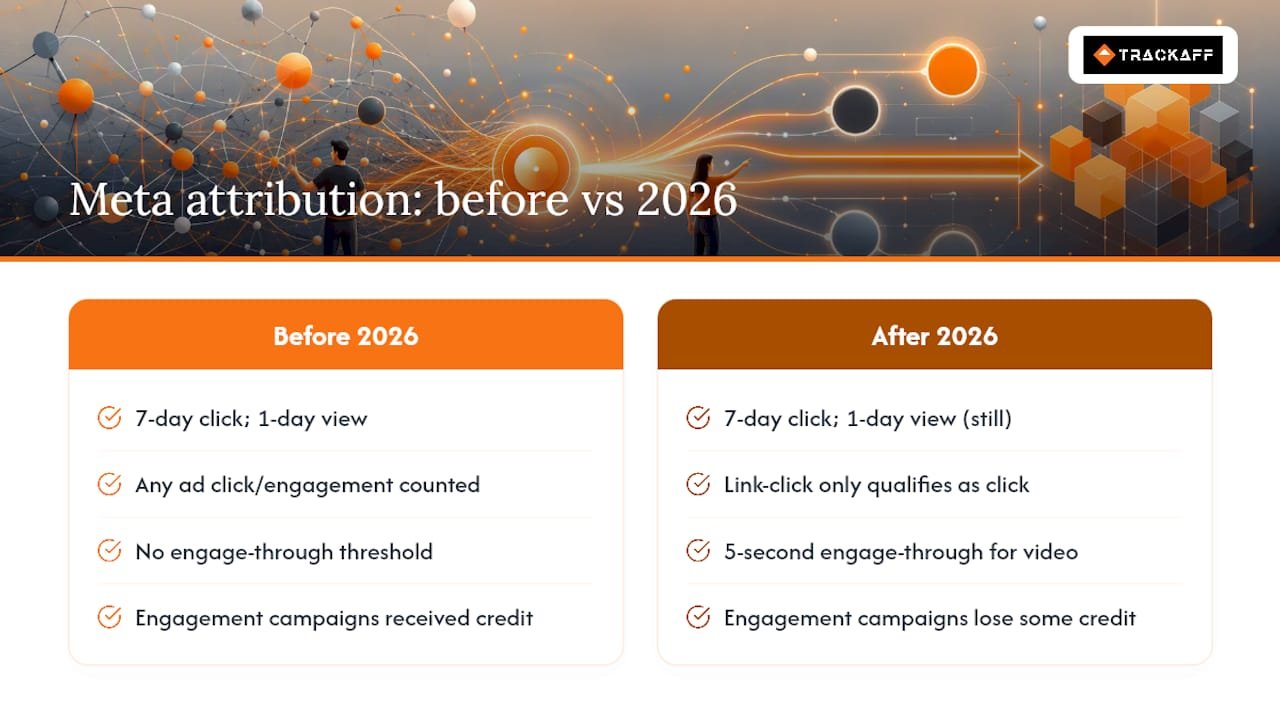
Pro Tip: Pull last month’s numbers under both the old and new definitions before you brief stakeholders. A campaign that “declined” might just be reporting differently, not performing worse.
Choose shorter windows (1-day click) for high-intent shopping campaigns where the path from ad to purchase is fast, and longer windows (7-day click, 1-day view) for consideration-heavy or video-driven campaigns where the customer needs time to come back.
Implementation Checklist: CAPI, Deduplication, EMQ, and Event Hygiene
Every model above is only as good as the events feeding it. Before you touch attribution settings, fix the pipeline.
- Implement server-side Conversions API and pair it with your Pixel. CAPI recovers conversions lost to ad blockers, browser restrictions, and iOS App Tracking Transparency, according to D2C Times’ 2026 attribution stack guide.
- Pass hashed identifiers (email, phone, and other PII, always SHA-256 hashed before transmission) to raise your EMQ score. Higher match rates mean Meta can tie more conversions back to the right ad.
- Use a consistent
event_idon every event sent through both Pixel and CAPI so Meta can deduplicate them instead of double-counting the same purchase. - Check your deduplication rate and EMQ score in Events Manager Diagnostics. Aim for above 80% deduplication on your primary conversion event.
- Keep UTM parameters disciplined and consistent across campaigns. Server-side tracking does not replace clean UTMs. Meta’s own attribution still relies partly on URL parameters to tie sessions together, and your GA4 or CRM cross-check depends entirely on them matching.
- Capture consent before storing or hashing any identifier, and store only what you need for matching. Don’t warehouse raw PII you don’t use.
The most common failures are boring, not exotic. A UTM parameter gets dropped after a redirect. Two systems generate different event_id values for the same purchase, so deduplication silently fails and Meta double-counts. EMQ quietly drops below 5 out of 10 because a checkout redesign stopped passing phone numbers. Check Diagnostics weekly, not quarterly.
When Is Multi-Touch Attribution Worth the Investment?
Buying or building a full MTA tool isn’t universally worth it. It depends on your volume and channel count, according to Soku.
- Under roughly a few hundred conversions a month: skip MTA entirely. Put the effort into CAPI, deduplication, and CRM matching instead. A model built on thin data will produce noise dressed up as insight.
- Between 300 and 500 conversions: a GA4-based data-driven model may be viable, especially if your channel mix is simple.
- a higher volume of stable monthly conversions across multiple channels: a dedicated MTA vendor becomes a genuinely useful diagnostic tool for spotting which touchpoints are underweighted by last-click reporting.
Even at scale, MTA has real limits under current privacy constraints. iOS ATT opt-outs and SKAdNetwork’s aggregated reporting mean a meaningful share of the customer journey is invisible to any attribution model, no matter how sophisticated. Treat MTA as a diagnostic that tells you where to look, not a causal proof that tells you what happened. The right move is to use MTA output to prioritize which channels or campaigns deserve an incrementality test, not to reallocate a big chunk of budget on modeled credit alone.
How Do You Validate Multi-Touch Attribution Outputs?
Modeled credit means nothing if it doesn’t hold up against real revenue. Run these checks on a regular cadence, not just when a report looks strange.
- Quarterly Meta-to-GA4 revenue ratio check. If Meta-reported revenue diverges sharply from GA4 or CRM-reported revenue, quarter over quarter, that’s usually a deduplication or CAPI failure, not an attribution model problem, per DigGrowth’s guidance on reconciling Meta and CRM revenue.
- Design incrementality tests using geo holdouts or ghost ads. Hold out a region or a matched audience segment, run the campaign everywhere else, and compare lift. This is the closest thing to causal proof you’ll get without a full experiment platform.
- Use marketing mix modeling (MMM) for channel-level budget decisions. MMM works at a level MTA can’t reach, aggregating spend and outcome data across channels to guide budget allocation without needing individual-level tracking.
- Pair SKAN data with a mobile measurement partner (MMP) when app-based conversions create gaps, then validate with aggregated MMM or geo incrementality.
Meta’s own attribution settings documentation confirms that different attribution settings can coexist at the ad-set and campaign level, which is exactly why a single dashboard number rarely tells the whole story. Trust MTA’s directional signal week to week. Pause and run an actual test before making a decision that moves real budget.
Which Ads Manager Columns Should You Track After the 2026 Changes?
Build a saved column view specifically for the post-2026 measurement environment. Trying to interpret one blended “results” column across engage-through and link-click definitions is how teams misread their own data.
- Link-click purchases — isolates conversions tied strictly to a link click, per Meta’s redefined click-through rule.
- Engage-through purchases — captures conversions following a qualifying video engagement (5 seconds or more), useful for video and Reels placements.
- Total attributed purchases — the blended number, useful for a quick health check but never for cross-campaign comparison.
- Incremental ROAS from your latest test — pulled from your incrementality testing, not from Ads Manager, but tracked alongside these columns for context.
Map these to objectives directly: Advantage+ prospecting and video-heavy campaigns should be judged primarily on engage-through purchases, while shopping and retargeting campaigns should be judged on link-click purchases. Save this column set as a shared view so your whole team, and your client if you’re an agency, is reading the same numbers the same way. Document which column set backs which type of budget decision, so nobody defends a spend change with the wrong report.
How TrackAff Closes the Post-Click Gap in Meta’s Attribution Stack
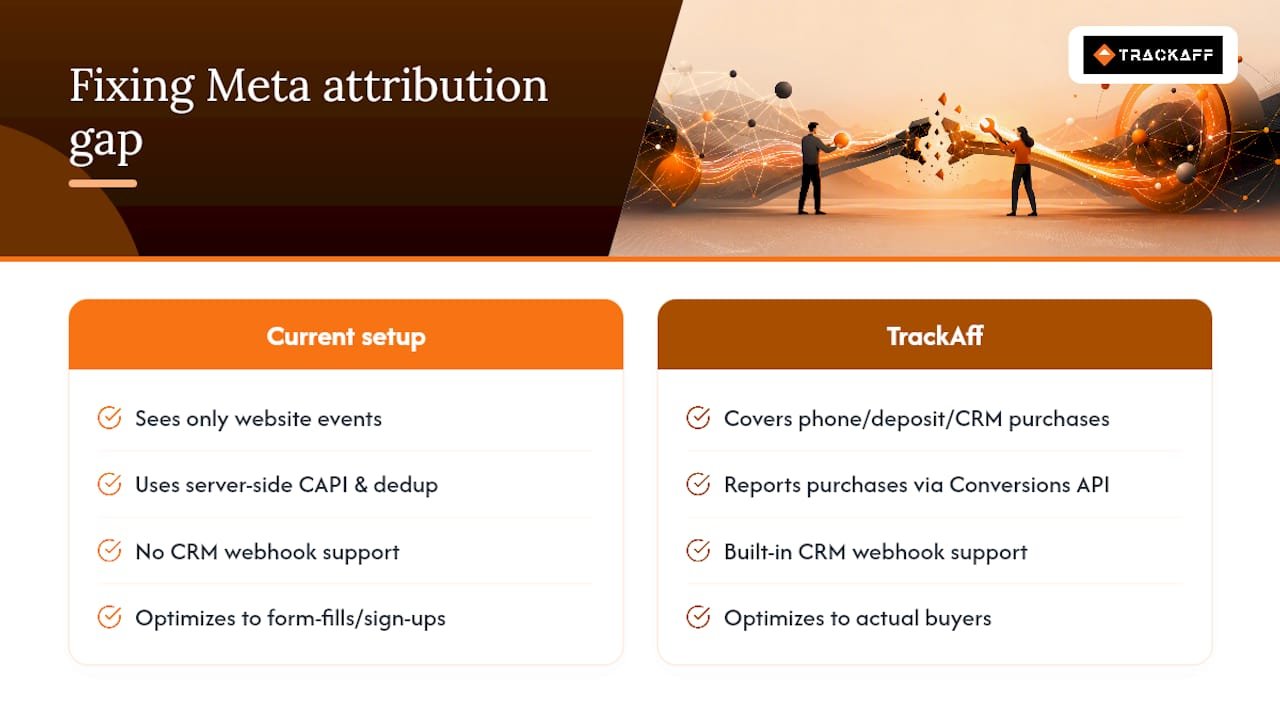
Even a clean CAPI and Pixel setup only tracks what happens on your website. If your sales close off-site, over the phone, through a CRM, in a deposit form, or via a manual sales process, Meta never sees the actual outcome. TrackAff addresses this directly with a branded, white-label post-click form embedded in your funnel that captures purchases, deposits, and registrations, then reports them back to Meta server-side via the Conversions API, complete with deduplication logic and CRM webhook integration.
The gap most attribution stacks miss isn’t a modeling problem. It’s that Meta is optimizing toward sign-ups and leads instead of actual closed revenue, because nobody told it what happened after the click.
A TrackAff pilot makes the most sense for accounts with off-site conversion events or a visible, persistent gap between what Meta reports and what the CRM shows as closed revenue.
Why Model Shopping Is the Wrong First Move on Meta
Most marketers ask “which attribution model should I use?” before asking “can Meta even see my conversions?” That’s backwards.
The conventional advice treats MTA like a shopping decision. Pick a model, buy a tool, done. It should be treated like a diagnosis. Fix CAPI, fix deduplication, get EMQ into a healthy range, then look at what the models say. Meta’s 2026 engage-through and link-click changes make this more urgent, not less. Two campaigns with identical spend can now report wildly different results depending purely on measurement definitions, not performance.
The gap most teams underestimate is the post-click one. You can have flawless on-site tracking and still be blind to every sale that closes off the web checkout. That’s where the real ROAS distortion lives, and it’s a signal problem before it’s a modeling problem.
Fix the signal. Then trust the model.
— Terry
Fix Your Meta Attribution Gap with TrackAff
Most of the checklist above gets you halfway there. Server-side CAPI, deduplication, and clean EMQ scores fix what happens on your website, but they can’t see a sale that closes over the phone, through a deposit form, or inside a CRM your Pixel never touches. That’s the gap TrackAff is built to close.
TrackAff drops a branded, white-label post-click form into your existing funnel, then reports every real purchase, deposit, or registration back to Meta through the Conversions API, with built-in deduplication and CRM webhook support. Instead of optimizing toward form-fills and sign-ups, Meta’s algorithm starts optimizing toward the people who actually buy.
If your CRM revenue and your Meta-reported revenue have never matched, that mismatch is worth investigating now, not after next quarter’s budget review. Start a free trial or run a single-funnel pilot to see the gap for yourself.
Where to Go Deeper on Meta Attribution
For the platform’s own rules, start with Meta’s attribution settings documentation, which covers windows and how they interact with the 2026 changes. For the conceptual trade-offs between models, the AMA’s breakdown of MTA approaches and Adobe’s explainer are worth the ten minutes. For the practical build, D2C Times’ 2026 stack guide walks through CAPI, EMQ, and where MMM and incrementality testing fit around MTA.
Sources
- Multitouch Attribution in the Customer Purchase Journey — AMA
- Multi-touch attribution — Adobe
- About multiple attribution settings | Meta Business Help
- How to Build a Meta Ads Attribution Stack That Actually Works in 2026 – D2C Times
Recommended
Your deals close off the pixel. Meta never finds out.
TrackAff reports your real conversions back to Meta the moment they happen, tied to the exact ad that produced them. 10-minute setup, no code.
Start free 14-day trial → Card required · No charge until day 14 · Cancel in one click