
- trackaffadmin
- 0 Comments
- 76 Views
Use both. The Conversions API (CAPI) is the durable, server-side backbone for your conversion data, while the Meta Pixel supplies real-time browser context CAPI can’t see on its own. Run them together with matching event IDs so Meta deduplicates properly, and if your team has to prioritize one step this week, install the Pixel today and treat CAPI as the infrastructure project you schedule next.
TL;DR:
- Installing the Pixel is quick and cost-free, but its signals degrade with ad blockers, cookie restrictions, and privacy changes, limiting long-term accuracy.
- Conversions API provides more resilient, server-to-server tracking that captures offline, downstream, and delayed conversions beyond the Pixel’s browser-based scope.
- Proper deduplication using shared event IDs is essential for combining Pixel and CAPI data without inflating conversion counts, requiring careful setup and validation.
- Start with Pixel for rapid deployment and add CAPI gradually as ad spend increases or privacy restrictions impact tracking quality.
- Regular reconciliation of server and browser event volumes, along with monitoring Event Match Quality, helps ensure accurate data and campaign effectiveness.
Table of Contents
- Pixel Vs Conversions API: A Side-By-Side Snapshot
- How The Meta Pixel Works And Where It Breaks Down
- What The Conversions API Adds: Server-Side Events And Better Matching
- Pixel Or CAPI: Weighing The Trade-Offs
- Running Pixel And CAPI Together Without Double-Counting
- How Teams Actually Implement This: Connectors, sGTM, Or Direct Build
- What To Watch After You Launch CAPI
- Where Pixel And CAPI Implementations Usually Break
- How Trackaff Applies These Patterns In Practice
- What I’d Prioritize First If I Were Rebuilding This In 2026
- Fix The Gap Between Ad Clicks And Real Sales
- Where To Read More On Pixel And CAPI Setup
- Sources
Pixel Vs Conversions API: A Side-By-Side Snapshot
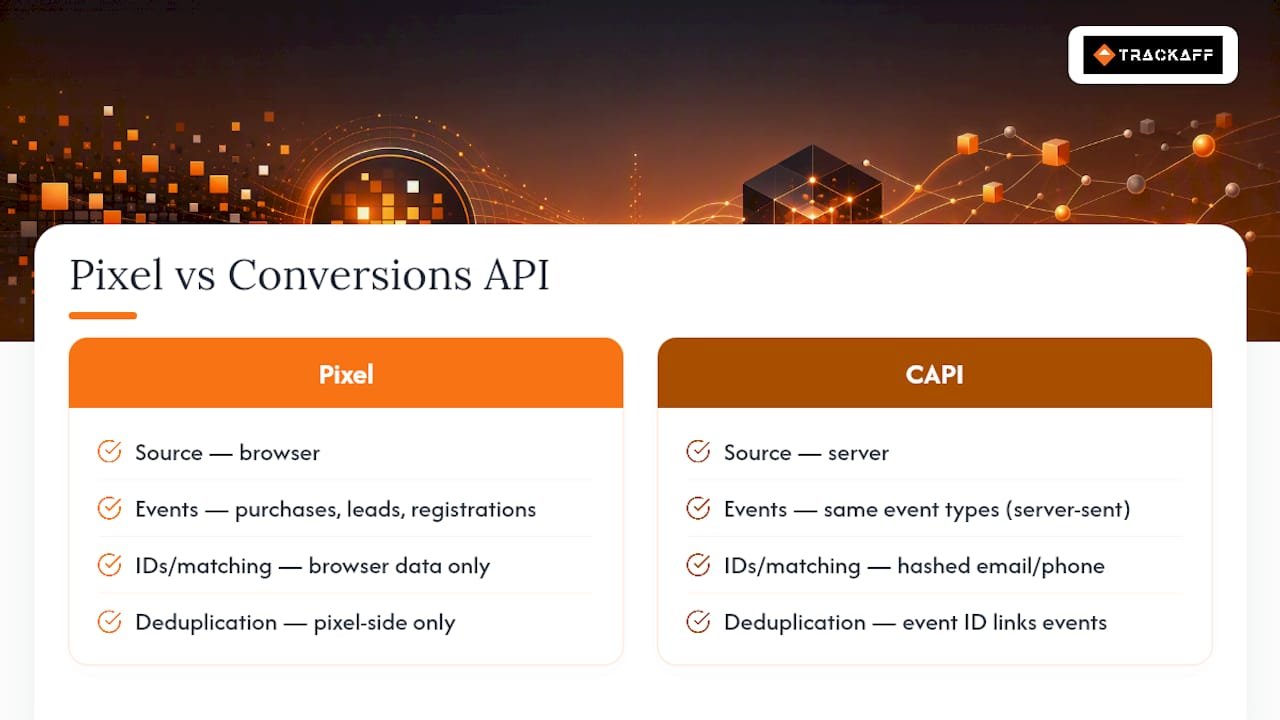
The Pixel is a JavaScript tag that fires from the browser when someone views a page, adds to cart, or completes a purchase. CAPI is a server-to-server connection that sends those same events directly from your backend, CRM, or point-of-sale system, skipping the browser entirely.
That distinction changes what each method is good at. The Pixel installs in minutes and captures rich browser signals like device type and referrer path. CAPI takes more setup work, whether that means server-side Google Tag Manager (sGTM), a direct API integration, or a partner tool, but it survives ad blockers, cookie restrictions, and Safari’s tracking limits because it never depends on a script running in someone’s browser.
Here’s how the two compare on the factors that actually affect campaign performance:
- Data path: Pixel fires client-side from the user’s browser; CAPI fires server-side from your infrastructure.
- Resilience: Pixel signal can degrade due to ad blockers and browser privacy settings; CAPI is more resilient to these issues.
- Setup effort: Pixel is a copy-paste script; CAPI requires backend work or a server-side connector.
- Cost: Pixel is free to deploy; CAPI implementation cost scales with engineering time or platform fees.
- Unique strength: Pixel captures on-page browser behavior; CAPI captures offline and downstream events like CRM conversions and renewals.
The short version: Pixel gives you speed and behavioral detail, CAPI gives you durability and reach into events that never touch a browser. Most accounts spending meaningfully on Meta ads need both.
How The Meta Pixel Works And Where It Breaks Down
The Pixel is a snippet of JavaScript installed on your website that fires standard events, view content, add to cart, initiate checkout, purchase, whenever a visitor takes an action. It reports those events to Meta in real time, tagging each one with browser-level context: device type, user agent, referring URL, and a first-party cookie ID that helps Meta connect the click to the eventual conversion.
That browser vantage point is also its weakness. The Pixel only sees what the browser is willing to let it see, and browsers have gotten far less cooperative. Ad blockers strip the script before it loads for a meaningful slice of visitors. Safari’s Intelligent Tracking Prevention limits how long first-party cookies persist, sometimes to as little as a day, which breaks the multi-day attribution windows advertisers rely on. Cookie consent banners add another layer: if a visitor declines tracking, the Pixel may never fire at all.
The result is a signal that erodes as it travels. A purchase that happens three days after the ad click might never get attributed if the cookie expired, the browser blocked the script, or the visitor switched devices between the click and the sale. None of this means the Pixel is obsolete. Setup takes minutes through Meta’s own tag manager or a platform integration like Shopify’s native connector, and for early-stage campaigns or small budgets, that speed matters more than the signal loss. The issue is that Pixel alone gives you a shrinking, browser-dependent view of what happened after the click, and that gap grows as privacy restrictions tighten.
What The Conversions API Adds: Server-Side Events And Better Matching
CAPI sends the same kinds of events as the Pixel, purchases, leads, registrations, but from your server instead of the visitor’s browser. A typical payload includes the event name, a timestamp, hashed customer identifiers like email or phone number, and an event ID that ties the server event to its browser-side counterpart for deduplication.
The hashed identifiers are what make CAPI valuable beyond just working around ad blockers. When you pass a hashed email or phone number with each event, Meta can match that conversion to a real person even if the browser session data is incomplete or missing entirely. Meta’s own documentation on the Conversions API frames this hashing and matching process as central to what makes server-side events reliable, and it’s the mechanism behind higher Event Match Quality (EMQ) scores when implemented correctly.
CAPI’s second advantage is reach. Because it isn’t tied to a browser session, it can report events the Pixel structurally cannot see: a lead that converts to a sale three weeks later in your CRM, a subscription renewal processed by your billing system, an offline sale confirmed by a sales rep over the phone. Practitioner guides on CAPI implementation document this pattern repeatedly, using CAPI as the pipe that connects backend systems to Meta’s optimization engine.
Integration patterns vary by team size. Some connect through server-side Google Tag Manager, others build a direct API integration, and many use a partner tool that handles the hashing and event formatting automatically. All three routes end at the same place: a stream of durable, first-party-matched conversion events that doesn’t depend on what a visitor’s browser allows.
Pixel Or CAPI: Weighing The Trade-Offs
Neither method wins across every use case, and the right call usually comes down to budget, privacy sensitivity, and how much engineering time you have available.
Pixel strengths:
- Deploys in minutes with no backend work
- Captures rich on-page browser behavior
- Free and supported by nearly every ad platform integration
Pixel weaknesses:
- Signal loss from ad blockers, ITP, and consent declines
- No visibility into offline or downstream conversions
- Attribution window shrinks as browsers restrict cookie life
CAPI strengths:
- Bypasses browser-level blocking entirely
- Improves EMQ through hashed first-party identifiers
- Reports offline, CRM, and delayed conversions
CAPI weaknesses:
- Requires backend or server-side setup work
- Needs disciplined deduplication to avoid double-counting
- Slower to launch than a copy-paste Pixel script
Pixel-first is suitable for new accounts needing quick deployment, whereas CAPI becomes important as ad spend grows or privacy restrictions heavily impact tracking.
Pro Tip: If engineering resources are tight, start by sending just your purchase event through CAPI rather than your full event set. That single event usually drives the optimization decisions Meta’s algorithm cares about most, and it gets you EMQ gains without a full rebuild.
Running Pixel And CAPI Together Without Double-Counting
Meta’s own guidance recommends running the Pixel and Conversions API together rather than choosing one, and deduplication is what makes that combination safe instead of chaotic. Without it, a single purchase gets counted twice, once from the browser Pixel and once from the server CAPI call, which inflates your reported conversions and quietly corrupts optimization data.
The fix is a shared event ID passed identically to both channels:
- Generate a unique ID on the client, often a hash of the order number and timestamp, when the conversion happens.
- Pass that same ID unchanged to both the Pixel’s browser event and the server-side CAPI call.
- Let Meta’s deduplication logic match events sharing an event ID within its matching window and count them once.
- Confirm the setup in Events Manager by sampling a purchase and checking that only one event was counted, then reviewing the EMQ and dedup diagnostics.
Common misconfigurations include generating a new ID on each side instead of sharing one, formatting the ID differently between Pixel and CAPI calls, or skipping validation entirely and assuming it works. A quick sample check after launch catches all three.
How Teams Actually Implement This: Connectors, sGTM, Or Direct Build
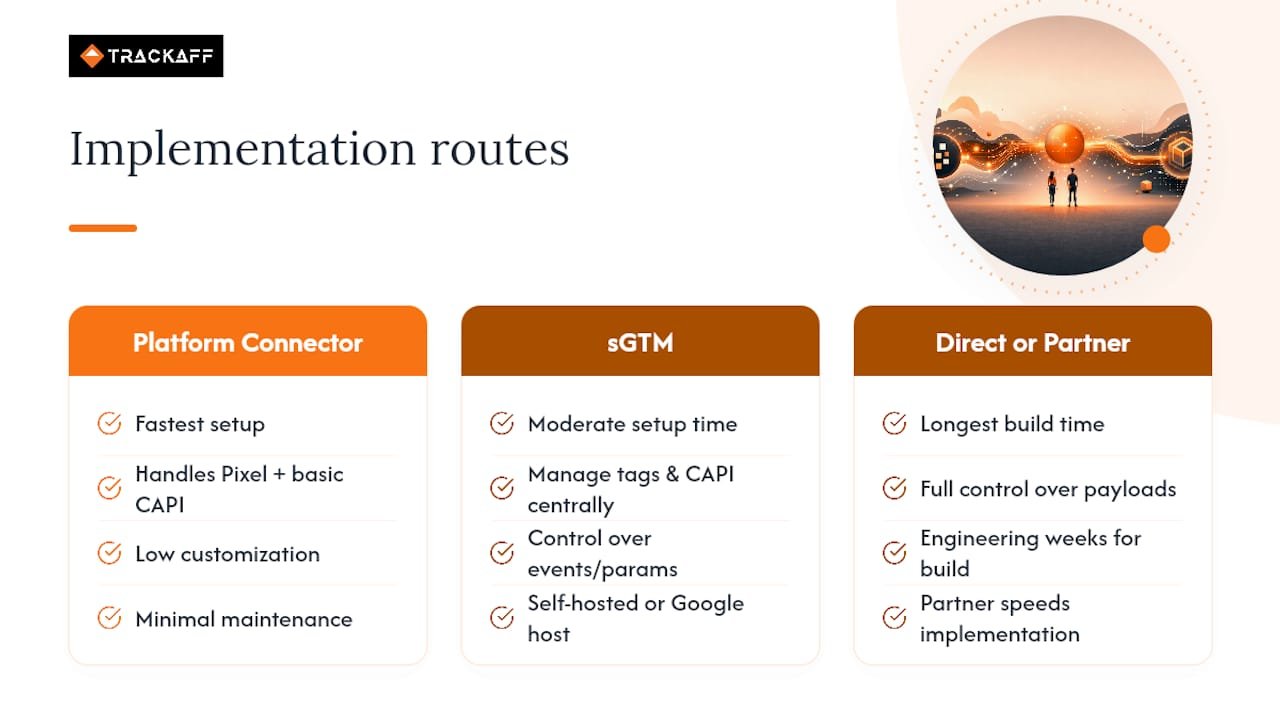
Most teams pick from three implementation routes, and the right one depends on engineering bandwidth more than budget alone.
Platform-native connectors, like Shopify’s Meta integration, are the fastest path. They handle Pixel and basic CAPI events with minimal setup, which makes them a strong default for ecommerce brands on established platforms. The trade-off is limited flexibility: you can’t easily customize which events fire or add custom parameters beyond what the connector supports.
Server-side Google Tag Manager gives you more control. A self-hosted sGTM container lets you manage tags, triggers, and CAPI payloads in one place, though someone has to maintain the server. Google-hosted containers reduce that maintenance burden at a modest monthly cost, which is a common middle path for teams that want control without owning infrastructure outright.
Direct server implementation or a partner-managed solution sits at the other end. Building your own API integration gives full control over what data gets sent and how, but it demands real engineering time, often several weeks for a first working version. Partner tools compress that timeline by handling the hashing, event formatting, and deduplication logic for you, trading some customization for speed.
Budget-conscious teams typically start with a native connector, move to sGTM as spend grows, and consider a partner-managed build once conversion volume justifies dedicated tracking infrastructure.
What To Watch After You Launch CAPI
Three numbers tell you whether the implementation is actually working. Event Match Quality, visible per event in Events Manager, should trend upward after adding hashed identifiers; a flat or declining EMQ score signals a hashing or data-quality problem worth investigating immediately.
Compare server-side event volume against browser Pixel volume and reconcile both against your actual backend order count. A wide gap in either direction usually points to a missing integration or a firing issue. Watch deduplication rates closely too. A sudden spike often means event IDs stopped matching between Pixel and CAPI calls, while a sharp drop can mean one channel stopped firing altogether. Reconciling against backend truth, not just Meta’s own reporting, is the check that practitioner guides consistently recommend as the real test of whether the setup is paying off. A weekly dashboard review catches most of these issues before they affect a full reporting cycle.
Where Pixel And CAPI Implementations Usually Break
Most tracking problems trace back to a handful of repeat offenders, and nearly all of them are preventable with a checklist before launch.
- Missing shared event_id: Without matching IDs, Meta counts the same purchase twice, inflating conversion numbers and confusing optimization.
- Incorrect hashing: Sending unhashed personal data, or hashing it with the wrong algorithm, creates both a matching failure and a privacy compliance risk under regulations like GDPR and CCPA.
- Duplicate integrations: Running a platform connector and a manual CAPI build simultaneously often means the same event fires from two sources with different event IDs, defeating deduplication entirely.
- Consent handling gaps: Server-side events still need to respect a visitor’s consent choice; sending CAPI events for users who declined tracking creates real regulatory exposure, not just a data quality issue.
A short pre-launch audit, checking hashing method, event ID logic, and consent gating, catches the majority of these before they reach production.
How Trackaff Applies These Patterns In Practice
Trackaff was built around the exact gap this comparison exposes: Pixel and standard CAPI setups both stop tracking at the click or, at best, the on-site conversion. They rarely see what happens after someone leaves your funnel, closes a deal with a sales rep, or completes a deposit days later.
Trackaff’s branded post-click forms capture those downstream events, purchases, deposits, registrations, and report them back to Meta through the Conversions API with proper hashing already handled. The platform layers in Pixel and CAPI deduplication automatically, supports a manual approval mode for teams that want a human check before an event counts as a conversion, and connects to CRM systems through webhooks so offline sales flow into Meta without manual entry. For teams tired of guessing whether a “conversion” was actually a sale, that closes the loop between ad spend and revenue.
What I’d Prioritize First If I Were Rebuilding This In 2026
If I were setting tracking priorities from scratch, I’d install the Pixel on day one, no debate there, then start budgeting engineering time for CAPI the moment monthly spend makes a few points of signal loss expensive. Waiting until CAPI is “necessary” usually means waiting until you’ve already burned budget on bad optimization data.
For build-versus-buy, internal builds make sense only if you have a developer who can own deduplication and hashing long-term. Otherwise, a partner-managed integration gets you there faster with less risk of the misconfigurations that quietly inflate reported conversions.
Measure success with one number: EMQ trending up alongside a stable, explainable dedup rate. If both are moving in the right direction after 30 days, the investment is paying off.
— Terry
Fix The Gap Between Ad Clicks And Real Sales
Pixel and CAPI solve tracking up to the point of conversion, but neither one was built to follow a lead after it leaves your funnel. That’s the exact gap Trackaff closes. Its branded post-click forms capture what happens after the click, purchases, deposits, signed contracts, and report those real outcomes back to Meta through the Conversions API, so your campaigns optimize toward actual buyers instead of form-fills that never turn into revenue.
Trackaff layers Pixel and CAPI deduplication, hashed identifier matching, and CRM webhook syncing on top of the setup you already have, and businesses using it report meaningfully improved return on ad spend once campaigns start optimizing around confirmed sales instead of raw leads. If your team runs Meta ads and closes deals off-platform, whether that’s a sales call, a deposit, or a signed application, see how it fits your funnel on the Trackaff platform page or check current implementation options in the portfolio of live setups.
Where To Read More On Pixel And CAPI Setup
For the official word on deduplication and setup requirements, start with Meta’s own Conversions API documentation. For implementation comparisons and EMQ benchmarks, the 2026 CAPI vs Pixel guide and Beacon’s reporting guide for ad campaigns both cover practical setup details worth reviewing before you build.
Recommended
Your deals close off the pixel. Meta never finds out.
TrackAff reports your real conversions back to Meta the moment they happen, tied to the exact ad that produced them. 10-minute setup, no code.
Start free 14-day trial → Card required · No charge until day 14 · Cancel in one click